

Delay is more than an echo — it’s a rhythmic, tonal, and spatial tool for enhancing vocal performances. The art of using delay involves knowing when to let the repeats be felt and when to let them be heard:
- When used subtly, delay textures add intimacy to vocals, especially when combined with reverb.
- When more up front, delay can make a vocal feel larger than life.
- Misused, delay can clutter a mix — especially if the delay time doesn’t match the song’s rhythm.
Delay is often used as a channel insert effect. When used as a bus effect, it applies the same delay to multiple tracks (e.g., background vocals). Modern musical genres usually synchronize echoes with the tempo. So, the delay becomes an effect that also tightens the music rhythmically.
Delay Types
Some devices or plug-ins specialize in a particular type of delay. Others offer some, or even all, of the options below.
Slapback Delay
- Adds a single, short repeat (usually 60ms–140ms). Syncing to tempo adds a sense of rhythm.
- Creates a vintage rockabilly vocal sound, especially when combined with tape emulation and set to a 135ms delay.
- When mixed well below the vocal, adds fullness without obvious echoes.
Doubling Delay
- Very short delay (20ms–40ms), often with slight modulation to add a chorusing effect.
- Often provides the basis of artificially double-tracked vocals.
- Thickens the vocal without sounding like a discrete echo.
Ping-pong Delay
- Alternates repeats between left and right channels or left, right, and center.
- Adds stereo width and creates rhythmic movement when synched to tempo.
- Works well in sparse arrangements to highlight the vocal but can clutter dense arrangements.
Tape Delay (Emulated)
- Models tape-based echo signal processors (fig. 1).
- Creates warm, slightly degraded repeats (e.g., flutter, frequency response variations, or slight distortion). May have subtle modulation.
- Adds character and vintage vibe.

Digital Delay
- Clean, precise repeats.
- Useful for modern pop, EDM, and genres where clarity is key.
- Almost always offers sync to tempo.
Multi-tap Delay
- Multiple repeats (typically four or eight) occur at different times.
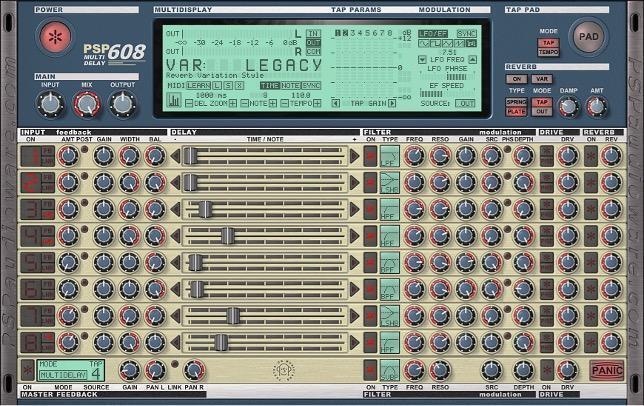
- Can create rhythmic patterns by syncing the repeats to different rhythms (fig. 2).
- Panning the delays produces complex, animated textures.
- Often used creatively rather than subtly, especially for groove-oriented music.
Main Parameters
Delay time sets the interval between the original sound and the first repeat. The calibration may be in milliseconds or a rhythmic value (e.g., dotted eighth note) when synced to the host.
Feedback creates multiple echoes by feeding the output back into the input. The higher the amount of feedback, the greater the number of successive echoes before they fade out.
Mix (wet/dry balance) sets the proportion of the delayed signal in the overall output. Subtle mixes keep the vocal up front. Increasing the balance for more wet sound changes the delay’s role to being more of an effect.
Filtering/EQ (highpass and/or lowpass filters) in the feedback path changes the echoes’ timbre when they repeat. Lowpass filters create progressively “darker” echoes that blend into the background. Highpass filters give brighter repeats that cut through a mix. Restricting both high and low frequencies narrows the bandwidth of successive echoes.
Modulation uses a low-frequency oscillator (LFO) or amplitude envelope to modulate the delay time. The effect is like adding chorusing to the echoes.
Stereo panning places repeats across the stereo field when in ping-pong mode or with multitap delays. This widens vocals without crowding the center.
How to Set Delay
- Sync the BPM parameter to the host DAW’s tempo: Dotted eighths or quarter notes often complement vocals without clashing. Shorter 16th and 32nd notes are good for slapback effects. Meanwhile eighth notes split the difference between longer and shorter delays.
- Set an initial wet/dry balance: Temporarily tilt the balance toward wet to judge how parameters affect the sound. Revisit any settings in context with the song’s full mix.
- Turn up feedback for the desired number of repeats: No feedback gives a single repeat, as used for slapback echo effects. More feedback builds a delay “tail.”
- Shape the tone of repeats: Roll off highs and/or lows so echoes don’t compete with the lead vocal. Readjust the balance as needed.
- Consider using automation: Repeats can spill over into sections where you don’t want echo. Use automation to bring down the delay level or to increase feedback in selected places to add drama. To have echo tails continue without adding new echoes, mute the input going into the delay.
Delay Applications
- Enhance the groove: Add drive and energy with rhythmic delays that lock vocals to the beat.
- Create space without reverb: With dense mixes, delay can add depth without the wash or clutter of reverb. A short delay can often substitute for reverb.
- Call-and-response effects: Delays with long feedback create the illusion of a second voice echoing the lead.
- Alter the stereo image: Ping-pong or tapped delays spread vocals across the stereo field to widen the vocal image.
- Highlight specific sections: Emphasize key lyrics by automating a long, dramatic delay on a phrase’s last word.
- Complement reverb: Echoes before reverb diffuses the reverb effect, which gives a more complex sound. Following reverb with echo blends echoes more naturally into the mix.
- Looping: Use feedback to loop a vocal phrase for a hypnotic effect or to sing harmonies over it.
The Famous Sun Studio Slapback Echo Sound
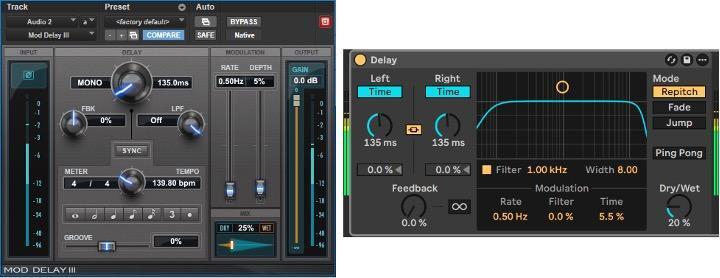
The delay settings in fig. 3 produce the slapback echo used in Sun Studio by artists such as Elvis Presley and Carl Perkins. Despite being one of the earliest uses of delay, this effect has stood the test of time. The key settings are 135ms delay time, no feedback, and a tiny bit of modulation to emulate the variability of tape machines.
(This excerpt was adapted from the Sweetwater Publishing E-book The Ultimate Guide to Vocal Production and is reprinted with permission from the author.)


