Q: After reading your Guitars & Gear article, I’m interested in the Roland eBand JS-8. But what happens if the song you’re playing requires more than one sound? Does the eBand have a way to automate the effects through the song? Or do you need an external pedal to change the presets?
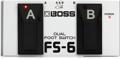
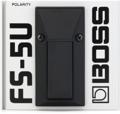
A: There is no way to automate patch changes with the JS-8, but you can use a Roland FS-5U or FS-6 pedal (or a third-party, compatible pedal) to step through patches (up/down) or to control a variety of other parameters and functions:
- PATCH +1 — Select the next effect patch number (+1).
- PATCH -1 — Select the previous effect patch number (-1).
- PLAY/STOP — Operate the player ( Play/Stop).
- REC/STOP — Operate the recorder (Rec/Stop).
- SOLO — Switch SOLO on and off.
- PH.LOOP REC/PLAY — Control REC/PLAY in PHRASE LOOP ( DELAY).
- PH.LOOP STOP — Stop PHRASE LOOP ( DELAY). The recorded content will be erased at the same time.
- ROTARY SPEED SEL — Switch the speaker’s rotation speed (SLOW/FAST).
- TUNER — Switch the Tuner screen on/off.