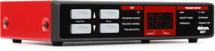
DDrum has been in the electronic drum and trigger business since 1983, so they know a thing or two about the subject. They’re always on the cutting edge, making new products to help today’s drummer stay in line with our modern world. If you want to set yourself apart from the pack, you really need to know about the whole electronic drum world and how it works. Of course you don’t need electronics to play drums, but it is always a good thing to have in your bag of tricks and the DDrum DDTi is an inexpensive and easy-to-use interface for triggering your favorite drum machines, samplers, or computer plug-ins from your acoustic drums or electronic drum pads.
I had a chance to sit down and put the DDTi through it’s paces using a variety of trigggers and triggering several sound sources.
Easy to set up
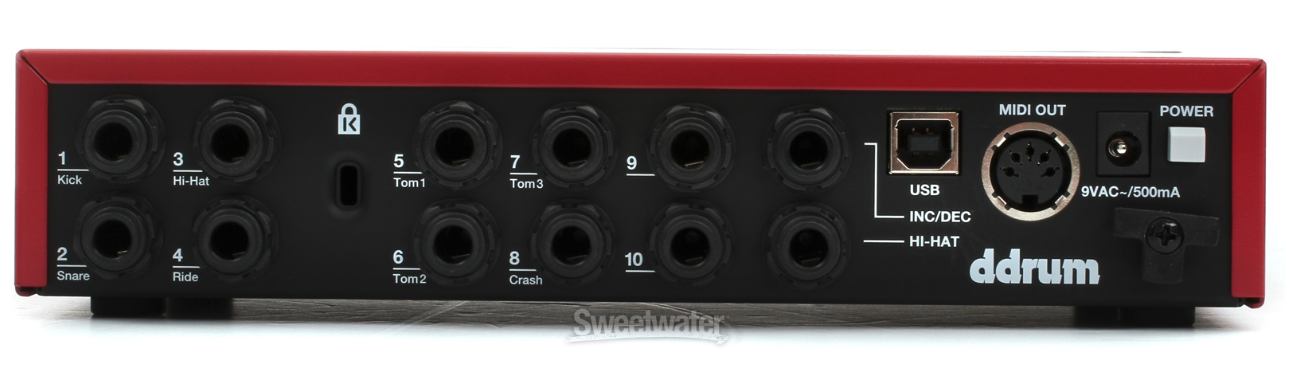
Right out of the box, you will notice that the unit is small and compact. There are only four buttons on the front panel. The Function buttons scroll through the different parameters, while the Value buttons turn those parameters up or down. The back of the unit is pretty simple, too. There are inputs for up to 10 triggers, a hi-hat pedal input, a footswitch input to make it easy to scroll through your different kits, a USB port to connect to your computer, a MIDI port to connect to a drum machine or module, a power adapter input, and the power button. That’s it!
Another nice feature to note is that the DDTi can be bus powered so you don’t need to plug it into the wall, though that is an option, too. The DDTi is also a plug-and-play device, which means there’s no need for installing special drivers or software on your computer.
Electronic Pads
Setting up the DDTi with electronic drums pads was quick and easy. The unit tells you which drum goes into which input for a normal drum set up, but you can plug the pads in any order you want. You tell the pad which note number to play (which we will get into below) but for the basics, just follow the numbers. For an electronic hi-hat there are two inputs. One for the pads and one to control the pedal, so you can use it like a normal hi-hat for open,closed, or in-between sounds.
Acoustic Triggers
Setting up the DDTi with acoustic triggers was easy as well. With my acoustic kit I used only needed five of the trigger inputs for the kick drum, snare drum, and three toms. What is great about this is that you can use triggers on your acoustic kit and still have inputs for electronic pads on your kit for other sounds; turning your kit into a true hybrid acoustic/electronic kit.
Get Right into Playing
I used Roland pads from a TD-30 kit with the DDTi and found that I didn’t have to tweak the controls on the DDTi much at all. I was able to launch Toontrack EZDrummer and play right away. Changing the feel or the sound on a particular pad was quite easy, too. Every sound available in the plug-in has a number associated with it, so all I needed to do to change a sound was to press the Function button three times to turn on the Trigger MIDI number light and then press up or down on the Value button to change sounds. Pressing the function button again took me to the Trigger Setup where I easily manipulated the way the pads responded to my playing.
If you have never used triggers or electronic drums before, you may have to tweak the parameters to get them to respond to your playing with a natural response. Everyone hits a drum with different force and uses different technique. The default parameter settings work well, but with some tweaking you can really dial things in perfectly. And once they are set, you are good to go — you shouldn’t have to mess with them much after that point.
As you’d expect, I had to work with the triggers on the acoustic kit to get them responding just right, but the DDTi really did make it easy to do. Initially, there was crosstalk between the triggers and double triggers but changing the Threshold and X-talk values really helped. There are also 15 different velocity settings in the DDTi that helped with playing rolls and faster rhyhthms on the drums.
The DDTi comes with 21 available kits where you can store different parameters for different set ups. I found this really helpful when changing the kinds of sounds I was using from EZDrummer. For instance, when playing a drum kit with a lot of gated reverb on it, a la Phil Collins, you don’t hit the drums the same way. A fast press roll sounds wrong, but big single hits and slower more defined grooves sound great. To take advantage of this, I changed the trigger to make it less sensitive and was more deliberate in how I hit the drum. Using another kit, with a more basic sound, I was able to make the triggers more sensitive so I could play ghost notes and other more intricate rhythms. This flexibility in how the triggers respond, and being able to store those setups into 21 kits, makes the DDTi much more versatile.
Wrap up
Playing electronic drums or using triggers on an acoustic kit makes playing the drums a different animal then just sitting down behind a kit and going for it. But if you take the time to wrap your head around all that you can do with electronics, you’ll find that there is an endless amount of creative content there. The DDRum DDTi made it very easy to get going with the electronics. It was easy to understand, and flexible enough for a variety of kits, situations, and musical styles. Plus, it’s affordable, so you can easily add one to your kit and start incorporating electronics right away!