

Our lives and social interactions have changed a lot in the past few months during quarantine. Those people who had never “teleconferenced” before are now in dozens of Zoom meetings a week. Zoom, FaceTime, GoToMeeting, Google Meet, whichever. If you didn’t know how to use these apps at the beginning of 2020, you are very familiar with them now. Our jobs, schools, family interactions, birthday parties — it seems everything has become virtual via videoconferencing. But just because everybody’s doing it doesn’t mean they know how to do it well.
Have you ever been in a Zoom meeting where one person has no idea how disruptive they are being? Whether it’s dragging papers across the microphone, blowing their nose, eating or drinking loudly, or maybe setting the timer while putting food in the microwave — I’ve heard all these in the past few weeks. Or the worst – eating potato chips!! It doesn’t have to be that way. Here are ways to be a good Zoomer and be respectful of the people on your teleconference. It’s actually really easy.
Making sure that everyone in your Zoom meeting can hear well is critical. So, here’s a list of Dos and Don’ts — things that will help you be a good teleconferencer. It’s just six simple steps.
(NOTE: It’s also completely acceptable to forward this list to anyone that doesn’t do these things. You know you want to!)
- Find a quiet space
- Put your device on a solid surface
- Figure out where the mic is
- Find the Mute button — and Use it!
- Stay close to the mic
- Be aware of what others are hearing (and seeing!)
Find a Quiet Space
Don’t try to do teleconferencing from a busy restaurant, a noisy diner, or a hectic airport. For everybody’s sake, find a small room or, at least, a quiet room with some privacy, preferably without lots of foot traffic (human or otherwise). Try to avoid using your kitchen table where the kids are constantly coming and going to the fridge. Try to sit angled so that anyone who wanders through will be off camera.
If you have a space with soft furniture (couches or chairs), then that’s even better. A room without hard walls or reflective surfaces (such as glass) is better still. All of these will help your voice sound clear and non-reverberant.
Put Your Computer on a Solid Surface
Have you been on a video chat with someone whose phone/computer was on their lap while they were sitting on a couch? Their fidgeting and constant movement can make you feel seasick, not to mention hearing the rustling sounds of them moving around. Find a good, solid place for your phone (using a phone stand or tripod works well) or a table for your computer. Your call mates will thank you.
Figure Out Where Your Mic Is
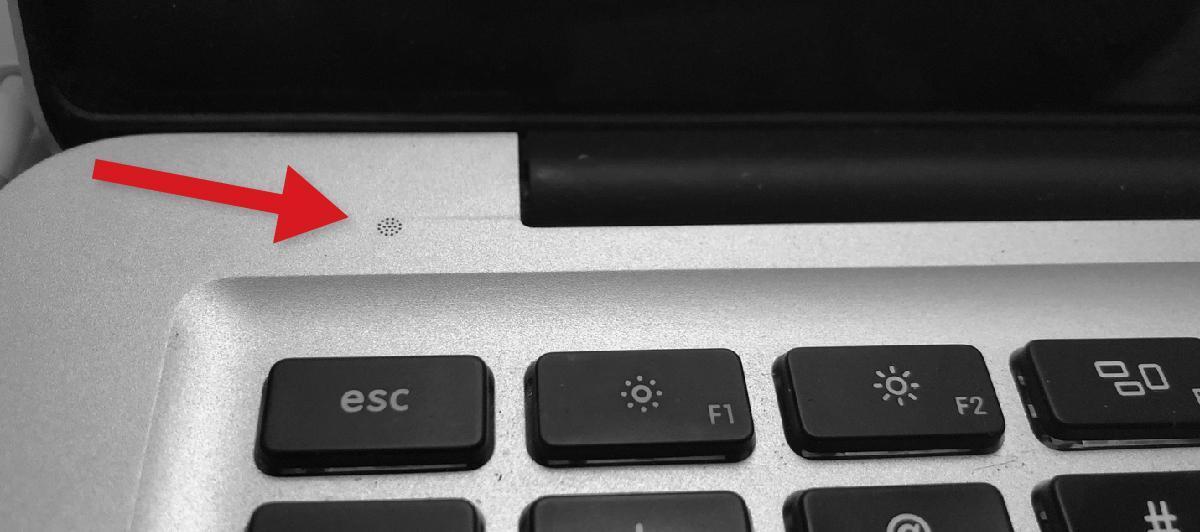
Most people know where the microphone is on their phone, but they may not know where it is on their computer. Find it. Avoid covering it up, setting papers on top of it, or brushing your hand over it. If it’s on your computer keyboard (see the photo above), then know that any typing you do will likely be louder than your speaking voice. Mics are designed to pick up sound from a distance, and sounds closer to them will be louder.
Find the Mute Button — and Use It!

Nobody wants to hear you drinking, eating, typing, rearranging your desk, or — especially — flushing the toilet. Yes, it happens (see video clip below). If you are not actively speaking and contributing to the conversation, then please mute your mic. Everyone will thank you.
And please silence your computer and the notifications on your devices. Nobody wants to hear a notification (ding, crickets, alarms) every time you get an email.
Stay Close to the Mic
Have you been on a phone call when someone got up and walked across the room? It can make it hard to understand what they’re saying. Just like you wouldn’t walk away in the middle of an in-person conversation, be considerate of others and stay close to the mic when you’re speaking.
Be Aware of What Others Are Hearing (and Seeing!)
When you have 5–10 people on a Zoom call, there can be lots of distracting sounds. Do your best to keep distracting noises out of your audio feed. If you can hear chirping birds, passing cars, screaming children, wind chimes, beeping electronics, or other people’s conversations, then they will be even more obvious to those on your video chat. Find a quiet setting and minimize those distractions. If you’re using Zoom and you notice that your video screen keeps popping up when you’re not talking, that means it’s hearing something in your audio, which makes it switch the camera to you. So, either mute your mic or figure out what’s making noise so that it won’t keep interrupting the video feed from others.
IMPORTANT NOTE: If you are involved in a video conference, be aware that others can see you. Sounds obvious, right? But people seem to forget this all the time. Believe me, you don’t want to end up like “Poor Jennifer,” the YouTube sensation, for doing something totally embarrassing on camera.
Six simple steps. It really is that easy.
Here are a few other tips for being a better Zoomer:
- Have a good internet connection. If you’re connecting wirelessly, then make sure you have a strong Wi-Fi signal before you join the call.
- If you start a call and your connection is problematic, don’t be afraid to pull the plug and reconnect. That may resolve the situation and result in less frustration for everyone.
- Stay focused. There may be lots of topics being discussed that don’t concern you, but eventually something will, or else you wouldn’t be on the call.
- If you have to step away from the call, announce that you are leaving. Is this a short diversion to deal with an emergency, or are you leaving the call for good? Let people know so they don’t start a conversation to tell you something only to find out that you aren’t even there.
- Don’t talk over other people. Zoom will prioritize one person (and you can tell who it is because it will give them the video screen), so let the person who is speaking finish before you start talking.
- Don’t be preening for the camera. It’s always so obvious when people are staring at their own screen in video chats. It’s like they’re staring into a mirror and fixing their hair or their clothes. Try to engage and pay attention to the other people.
- If someone comes into the room where you are and you’re discussing private or sensitive information, then make sure the remote participants on the call are aware that someone else is overhearing what they say.
- Don’t put your computer or smartphone down low, facing up at you. It’s very unflattering to have a camera looking up your nose. I know — I see it on videoconferences all the time.