

A transient shaper separates audio into attack and sustain components. Shaping the attack can make it more prominent or subdued. For example, shaping the attack can emphasize sounds, like sticks hitting drums or picks hitting strings, or place those sounds more in the background. Most transient shapers can also shape a sound’s sustain by extending or shortening it.
Although Pro Tools doesn’t have a transient shaper plug-in, combining an expander and compressor in parallel with a dry signal (and adjusting their parameters appropriately) creates a do-it-yourself transient shaper. The expander shapes the attack while the compressor shapes the decay. You can mix these with the original track or drop out the original track to emphasize the attack and sustain independently.
To hear what transient shaping can do with drums, check out this clip from the Sweetwater YouTube video, “Innovative Techniques for Pro Tools Audio Examples.” The first four measures are the original drum loop. The next four measures emphasize only the attack. The next four measures emphasize only the sustain. The final four measures are a blend of the shape attack and shape sustain tracks.
Creating the Transient Shaper
It’s easy: download Transient Shaper.ptxp, a track preset that’s set up for transient shaping. Figure 1 shows the transient shaper’s routing.
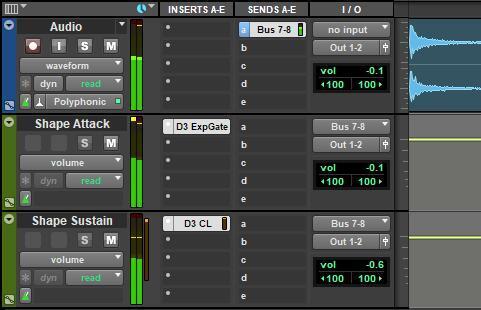
Here’s how to start exploring transient shaping:
- Import some stereo audio with percussive characteristics (e.g., drums, guitar, piano, bass, program material, etc.) into the audio track and start the playback.
- Solo the shape attack channel. The bus fader level (Bus 7-8 fader in this example) affects both the expander and compressor because it determines how often the audio crosses over the level where expansion or compression takes place. Leave the bus fader at 0dB for now. However, if the audio level isn’t high enough to trigger the dynamics processors, then raise the audio or bus level.
- Become familiar with how the expander settings shape the attack (see Figure 2). Range specifies the level above which the audio becomes expanded. Ratio sets the expansion’s steepness. Adjust these two controls and note how they interact.
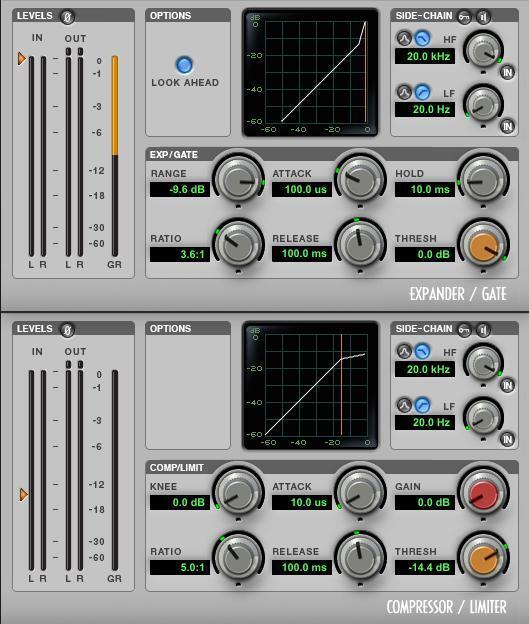
- Next, solo the shape sustain channel and become familiar with how the compressor settings shape the sustain. The compressor’s attack is as short as possible so that it can clamp down on the attack. This allows the expander to control the attack characteristic.
- Threshold sets how much of the audio’s sustain will be subject to compression. Ratio determines the compression’s effect. Higher ratios give more sustain. Release decreases the amount of compression over the specified time after the audio falls below the compressor’s threshold.
- Now, let’s play with combining these possibilities. Set the shape attack and shape sustain faders all the way down. Bring up the audio fader for a comfortable listening level.
- Bring up the shape attack level. It should emphasize the audio material’s percussive qualities.
- Bring up the shape sustain level. The audio should have more “weight” as well as sustain.
- With all these options, it can take a little tweaking to optimize the dynamics processor parameters. In general, once you’re happy with the attack and sustain settings, experiment with the balance of all three channels to find the optimum level for each component.
Transient shaping has all kinds of applications, like bringing out the snap of percussion, the strum of acoustic guitars, the transients from slap-bass techniques, and more. Also, don’t forget that you can de-emphasize attacks to place sounds farther back in a mix by using only the shape sustain path. Then, set the compressor to a fast attack, a high threshold to catch only the peaks, and a high ratio. As experienced engineers know, transient shaping can be a great addition to your arsenal of mixing tools and techniques.
Excerpted fromInnovative Techniques for Pro Tools by Craig Anderton, Chapter 2, “Signal Processing.” To purchase the entire e-book (which includes 24 session files and 84 preset files), please visitSweetwater Publishing.
