Ever wish you could record acoustic guitar with a realistic stereo image, but without phase cancellations — and have a faster setup time, too? Well you can, and here’s how.
I started using this technique on some nylon-string guitar albums with the late classical guitarist Linda Cohen. She played quite softly, with very detailed articulation, so it was difficult to set up stereo miking and not have some issues with phase differences weakening the sound. With rhythm guitar for rock songs where the guitar sits mostly in the background, sometimes I record in mono to avoid phase issues, and add ambience with signal processing to obtain a somewhat bigger sound. However, with a solo classical guitar project, the guitar needed to be up front, and the lack of a stereo image due to using a single mic was not acceptable.
Rather than experiment with multiple mics and deal with phase issues, I decided to go for the most accurate sound possible from a single, high-quality condenser mic and figured I could add some light reverb to provide ambience. This was successful, in the sense that moving from the control room to the studio sounded virtually identical. Upon starting the mix, though, the sound lacked realism. Thinking about what I hear when sitting close to a classical guitar provided clues on how to obtain the desired sound.
Getting EQ into the Act
If you’re facing a guitarist, your right ear picks up on some of the finger squeaks and string noise from the guitarist’s fretting hand. Meanwhile, your left ear picks up some of the body’s bass boom. Although not as directional as the high-frequency finger noise, it still shifts the lower part of the frequency spectrum somewhat to the left. The main guitar sound fills the room, providing the acoustic equivalent of a center channel.
Of course, there’s a huge amount of crosstalk, but you still hear somewhat of a stereo image. In Studio One, sending the guitar track into two additional buses solved the imaging problem (fig. 1).

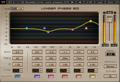
One send goes into what I call the Lows bus. A Waves Linear Phase EQ plug-in provides a lowpass cutoff around 600Hz (fig. 2), which focuses on the guitar body’s boom. The other send goes to the Highs bus, which emphasizes finger noises and high frequencies. Its Linear Phase EQ has a highpass filter response with a cutoff frequency around 500Hz. I turned the levels up quite a bit on these channels because the filtering reduces amplitude so much.

Pan Lows toward the left and Highs toward the right, because if you’re facing a guitarist, the body boom will be toward the listener’s left, and the finger and neck noises will be toward the listener’s right.
Listen to the first two buses, and set a good balance of the low- and high-frequency buses. Then bring up the main guitar track, with its pan centered. The result should be a big guitar sound with a stereo image, but we’re not done quite yet.
The balance of the three tracks is crucial to obtaining the most realistic sound, as are the EQ frequencies. Experiment with the EQ settings; also consider adding a third send to replace the main guitar track, with its highs and lows diminished in order to emphasize the highs and lows that are panned to the right and left, respectively. If the image is too wide, pan the low- and high-frequency buses more to center. It helps to double-check the output in mono as well as stereo for a reality check. Note the Phase Meter in the Main output (seen lower right in figure 1), which shows that the correlation is no longer the straight vertical line associated with mono, but has more of a stereo image.
Once you nail the right settings, you may be taken aback to hear the sound of a stereo acoustic guitar with no phase issues.
The audio example plays a phrase of nylon-string guitar recorded live in mono, and then with the processing described in this article.
The sound is stronger and more consistent, and there’s a sense of a stereo image (exaggerated slightly to make the point). As to what gear to use, this technique works with just about any DAW. I’m hesitant to recommend any particular mic, but your Sweetwater Sales Engineer can recommend mics for use with nylon-string and other acoustic guitars. Give us a call at (800) 222-4700.