

How do I update the firmware on my Moog Minitaur on a Mac?
***Please back up your presets before updating the firmware on your Moog Minitaur. The firmware update process will delete all data on your Minitaur.
First, click here to download the latest firmware for the Minitaur. Be sure to choose the download that matches your operating system.
Before you begin the update, you’ll need to install SysEx Librarian. The installer for this is included in the Minitaur firmware update download.
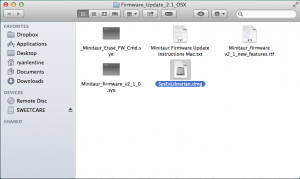
Once the SysEx Librarian is installed, follow the instructions below to update the firmware on your Minitaur:
- With the Minitaur powered OFF, connect it to your computer with USB cable.
- Power up the Minitaur while holding down the VCO 1 and 2 waveform switches. Do not release the switches.
- While still holding the VCO 1 and 2 waveform switches, press the Release switch. Now you can release all three switches. The Glide switch should be blinking slowly.
- Open the SysEx Librarian application that you installed earlier.
- Click the Destination pull-down menu and select Moog Minitaur.
- Drag and drop the two .syx files into the SysEx Librarian window. The files will be added to the SysEx Librarian playlist.
- In the SysEx Librarian window, select “Minitaur_Erase_FW_Cmd.syx” and press the Play button at the top left. You should see the Glide switch turn off, the MIDI light flash, and the VCO 1 switch LED blink several times while the system file is erased. When the erasing is complete, the Glide switch will blink again.
- Next, go back to the SysEx Librarian window and select “Minitaur_firmware_v2_1_0.syx and press the Play button at the top left. The VCO 2 waveform switch LED will blink as the unit receives the new firmware.
- When the process is complete, the Minitaur will reboot with update functionality.
When you need help, Sweetwater has the answers!
Our knowledge base contains over 28,000 expertly written tech articles that will give you answers and help you get the most out of your gear. Our pro musicians and gear experts update content daily to keep you informed and on your way. Best of all, it’s totally FREE, and it’s just another reason that you get more at Sweetwater.com.

