Streaming has become a bona fide form of content creation, but, more importantly, it’s uniquely equipped to help build and solidify a fan base around your work and establish a sense of community. This can be especially valuable in arenas including gaming and musical performance, where chats and interactivity are as much a part of the streaming experience as the content itself. The ability to balance personality with active content creation is a key facet of developing a presence in the streaming world, and having the right gear to support you can make all the difference.
Because there are so many ways to stream, finding the right camera for the job can be tricky. Not only are there more options than ever across numerous price points, but different cameras are designed with different needs in mind. This might sound obvious, but think about it like buying a car: the more money you spend, the more features you get. However, the most expensive sports car is a poor fit for off-road travel, and a superior option might be less than a third of the price. Whether you’re gaming at competition levels, showing off your musical chops, or engaging in casual content creation, we’ve got the webcams for the job!
NOTE: At Sweetwater, we know there’s no such thing as “best” when it comes to music gear. Every player and artist has unique tastes, which is what makes selecting gear so fun! The items on this list feature some of our favorite products from top manufacturers to help you start your buying journey! Explore these recommendations and dive into Sweetwater’s massive collection of gear on our online store. For personalized picks and expert advice, please contact our knowledgeable Sweetwater Sales Engineers at (800) 222-4700!
- Logitech C922 Pro Stream 1080p Webcam
- Logitech C920S Pro HD 1080p Webcam
- GoPro HERO12 Black & GoPro HERO13 5.3K60 Waterproof Action Cameras
- Insta360 Link AI-powered Ultra HD 4K Webcam
- Elgato Facecam MK2 1080p60 Webcam & Elgato Facecam Pro 4K60 Webcam
- Insta360 Link 2 Webcam
- Logitech StreamCam Plus Content Creator Webcam
- Logitech C270 USB 2.0 720p Webcam
- Logitech Brio 100 Full HD Webcam
- PTZOptics Webcam-80
- Light Up Your Livestream!
- Cameras Frequently Asked Questions
Logitech C922 Pro Stream 1080p Webcam
Determined to pack in an all-encompassing webcam solution at a wonderfully affordable price point, the USB-powered Logitech C922 Pro Stream 1080p webcam incorporates features to fit a variety of needs. First of all, shooting at 1080p/30 fps enables high-definition visuals that will satisfy most streamers, with the option for 60 fps when recording in 720p. To sharpen your image quality, the C922 utilizes auto-focusing, automatic light correction, and integrated 1.2x digital zoom to help frame the perfect shot every time.
For audio, the C922’s onboard stereo microphone setup enables clear and accurate sound translation aided by the protection of an included windscreen. Clip it to your computer monitor or simply set it where it’s most convenient, courtesy of its tripod mount. The C922 also allows you to personalize your background when using Windows 7+ devices for a custom look. Hands-free streaming that looks great, sounds great, and intuitively integrates with your setup? That’s the Logitech C922.
Logitech C920S Pro HD 1080p Webcam
We’ve all seen some impressive streaming setups from complex, multicamera arrangements to full-blown video studios. As fun as these things are, none of them really matter if your content isn’t good. Put another way: you need to have a solid foundation, and every streamer has to start somewhere. Fortunately, this doesn’t mean sacrificing quality visuals! Logitech’s C920S Pro HD 1080p webcam is a beginner-friendly camera that doesn’t skimp on value. With an encompassing yet focused 78-degree field of view, the C920S delivers 1080p Full HD video at 30 fps. Its five-element glass lens keeps images sharp — an especially useful feature when used with the camera’s auto-focus to avoid distortion experienced with digital zoom.
Rest assured that your recordings will be clear and balanced, thanks to the onboard RightLight 2 system, which automatically corrects and adjusts for changes in brightness and lighting without sacrificing HD visuals. A versatile and removable mounting clip ensures accommodating placement of the camera in countless arrangements, and its dual onboard microphones make audio capture a breeze. For newer streamers looking for a high-quality, flexible camera, the C920S is loaded with everything you need for a reliable, HD stream.
GoPro HERO12 Black & GoPro HERO13 Black 5.3K60 Waterproof Action Cameras
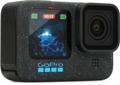
The best part about streaming is that, with the right camera, you can move from your studio to the field with no hassle at all. Sweetwater’s top pick for the job? GoPro’s HERO series of action cameras. While not technically webcams, the GoPro HERO12 Black and GoPro HERO 13 Black 5.3K60 waterproof action cameras can effortlessly capture your post-journey breakdowns back at HQ and livestream your daring activities while they happen on location. Their shared 5.3K60 recording quality is superb and will stream anywhere you want to go in fabulous 1080p.
The HERO12 Black uses a powerful 1/1.9-inch CMOS sensor with High Dynamic Range (HDR) and HyperSmooth 6.0 stabilization to provide some of the most impressive professional filming quality on our list. It also offers two screens, including a 2.27-inch rear touchscreen for seamless navigation. For just a bit more, the HERO13 Black offers all this while really skyrocketing your creative potential. This latest HERO model includes a series of improvements, most notably its compatibility with HB-Series lenses for more immersive footage in POV, close-focusing, motion-blur, and cinematic capture styles. And that only scratches the surface!
Insta360 Link AI-powered Ultra HD 4K Webcam
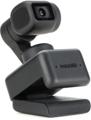
The power of onboard AI assistance is what makes the Insta360 Link such a standout among webcam models. Packed with a state-of-the-art 1/2-inch sensor, the Link can provide consistent high-definition visuals up to 4K UHD in combination with HDR modes and auto-exposure technology to ensure you’re always in focus while providing the best possible output to your audience. Similarly, dual noise-canceling microphones work to dramatically reduce background noise, serving as a wonderful audio-capture point without the use of an external microphone.
The real power behind the Link, however, is its aforementioned AI-assisted functionality. The camera’s motorized 3-axis gimbal and AI tracking algorithms allow you to move freely around the room while staying center stage. PDAF, HDR, and framing are also automatically taken care of as it keeps a constant eye on your environment for optimal video quality. While you’re up, feel free to take advantage of the Link’s built-in hand gestures, which allow you to command AI tracking and zooming and enable various video modes hands-free. Take it from us: If you’re looking for a webcam that’s designed to do all the hard work for you, then the Insta360 Link is sure to fit the bill.
Elgato Facecam MK2 1080p60 Webcam & Elgato Facecam Pro 4K60 Webcam
If you’re the type that likes to get hands-on with their video output, then Sweetwater highly recommends you take a look at Elgato’s Facecam series. For starters, the Elgato Facecam MK2 1080p60 webcam serves up beautiful HDR video from a Sony Starvis CMOS sensor across a wide 84-degree field of view, promising a super-sharp image that keeps you entirely in frame. The Facecam Pro supplies even beefier resolutions, up to 4K60, along with PTZ controls, variable focusing, and enhancement controls for dialed-in visuals.
Both cameras are compatible with Elgato’s Camera Hub software, giving you immediate control over fine-tuning such as shutter speed, color temperature, saturation, and much more. As a result, these webcams are a cinch to operate and make a great filming option for those who are looking to dial a specific hue or tone into their visuals. Likewise, the Facecam MK2 and Facecam Pro are finalized with the company’s ultra-low-latency USB interfacing system to ensure efficient video transfer and timely communication. Gaming, business, or film — no matter your content of choice, you’ll be able to find your visual profile within the Facecam family’s deep internal controls.
Insta360 Link 2 Webcam
At an amazing price point, the Insta360 Link 2 webcam’s stunning 4K/30 fps performance is quite impressive! Not only does that help make crisp video the standard, but it unearths the potential for greater expression, such as natural bokeh effects, without having to drop a fortune. Stability is part of that equation, as well, and the Link 2 has a dual-axis gimbal (with privacy mode option) for steady delivery. Factor in the convenience of hands-free gesture control and software settings to cater the webcam to your streaming space, and the Link 2 stays ready for any stream, any time.
Sweetwater’s A/V experts love seeing AI put to good use, and the Link 2 webcam is a prime example of effective AI assistance at work. Onboard tracking and True Focus technology keep tight focus and a well-framed appearance throughout your entire stream, wherever you are in the room. AI noise cancellation in the Link 2’s microphone system automatically eliminates background noise and audible hindrances from your live audio, leaving you with a crystal-clear result to reach everyone watching the stream.
Logitech StreamCam Plus Content Creator Webcam
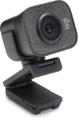
Upgraded content-creation potential from a simple webcam setup is now easier with the Logitech StreamCam Plus content creator webcam that is tailor-made for the job. This USB-C webcam shoots crystalline 1080p/60 fps streams through a premium glass lens enhanced by auto-focus, an auto-framing mode, and remarkable intelligent exposure capabilities that work with virtually any lighting from sunset shade and lava lamp glow to the brilliance of LED lighting. This webcam is also optimized for seamless use with Streamlabs Desktop and Open Broadcaster Software (OBS) for incomparable streaming support while offering additional control of the camera itself through Logitech’s included Capture software.
Need to stream your content in vertical video format? The StreamCam Plus is ready! With Full HD vertical video support for popular platforms including TikTok, Facebook Live, YouTube, and more, smartphone audiences on the world’s most popular social platforms will get to view your creative content in the cleanest, most easily interactive format possible. Get set up in an instant with its universal mount, monitor mount, or the included tripod stand.
Logitech C270 USB 2.0 720p Webcam
For tight budgets or applications that don’t require stunning imagery, the Logitech C270 USB 2.0 720p webcam is a great fit. Powered by a simple USB-A connection and offering a basic 720p/30 fps resolution, the C270 makes a great camera for users that need a multifunctional solution — one that can stream when needed but that is also utilitarian enough to handle your video calls on Skype, Windows Live Messenger, Yahoo Messenger, and like platforms.
With integrated Fluid Crystal technology and automatic light correction, the C270 can accommodate a variety of different environments with aplomb. Its audio system is similarly impressive, including not only an onboard microphone but built-in noise cancellation, too, to supply your viewers or calls with excellent audio quality. The C270 is the definition of straightforwardness — and, in many cases, that’s all your application requires!
Logitech Brio 100 Full HD Webcam
The Logitech Brio 100 Full HD webcam delivers 1080p/30 fps performance in a ridiculously accessible package that any streamer can get their hands on. Infused with RightLight operation, the Brio 100 actively works to minimize the effects of shadows on your video by boosting your signal’s brightness by up to 50% when needed. Its privacy shutter makes it easy to take a moment to yourself, too. Just plug into your computer with a basic USB-A connection, and the Brio 100 will get right to work.
But it’s not just great for streaming! The Brio 100 is an excellent match for video recording and generic webcam use that will rise to any occasion — especially video calls. With support for Google Meet, Zoom, Microsoft Teams, and other top platforms, the Brio 100 ensures you’re always ready to look your best, no matter the stakes. Its onboard omnidirectional microphone offers outstanding signal clarity so that you can stream and call with audio quality on par with your video’s exceptional resolution.
PTZOptics Webcam-80
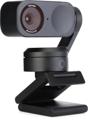
For streamers looking for a first webcam that punches well above its weight, few models can compare to the astoundingly keen PTZOptics Webcam-80. This USB-A webcam boasts a phenomenal 80-degree horizontal field of view supported by a whopping 8x digital zoom, blending the very best of wide-angle streaming and highly capable capture for large streaming spaces and occasions that bring together a few collaborators. Group meetings, interviews, livestream concerts — the PTZOptics Webcam-80 will accommodate all the above for a fraction of the cost of flagship models.
But don’t be fooled by the price tag! This powerful webcam packs a 1/2.7-inch CMOS sensor with 2.07-megapixel photo resolution while also offering switchable resolutions of 1080p/30 fps and 720p/30 fps to best suit the needs of your production. Plus, the Webcam-80 boasts convenient universal compatibility with a huge assortment of hardware and software, ensuring that it will effortlessly elevate your workflow.
Light Up Your Livestream!
Once you’ve upgraded your camera, lighting is a fun and easy way to add sizzle to your stream. From single- to multicamera setups, purely decorative and set design–centered, Sweetwater offers a range of lighting options to illuminate your virtual presence. For a detailed rundown on choosing the right lights for you, take a look at our guide!
Depending on the scope and ambition of your planned streaming setup, green screens and backdrops are a fantastic way to get creative with your visuals. Moreover, they help to establish a visual consistency for new and returning viewers.
Cameras Frequently Asked Questions
What Is the Best Budget Webcam for Streaming?
If you’re just starting out or looking to keep costs low, then the Logitech C920S consistently ranks as the best budget webcam for streaming. It delivers crisp 1080p video, captures clear audio, and works seamlessly with platforms including OBS, Zoom, and Twitch while providing a sleek look at a very reasonable price. For even tighter budgets, the PTZOptics Webcam-80 supplies powerful performance for under $40.
Do I Need a DSLR or Webcam for Streaming?
You don’t need a DSLR to stream professionally since modern webcams are highly capable. A high-quality webcam, such as the Logitech StreamCam or Elgato Facecam MK2, delivers excellent resolution, smooth frame rates, and easy setup. DSLRs offer more control over depth of field and image quality, but they require capture cards and power solutions and have a steeper learning curve. For most streamers on platforms such as Twitch and YouTube, a solid webcam is more than enough to create polished, professional-looking content.
Is 60 fps Important for Webcam Streaming?
Yes, but it depends on the content you’re producing. Streaming at 60 fps (frames per second) creates a smoother and more natural video, especially for gaming, sports, or action-heavy streams. It helps your camera feed match the fluidity of gameplay or fast motion. However, for podcasts, interviews, or discussion-based content, 30 fps is usually sufficient. Many streamers use webcams that support 60 fps at 1080p and deliver high-quality video for dynamic content, which is quality enough to get virtually any streaming setup off the ground.
Can You Stream with a Laptop Webcam?
Yes, you can stream using a laptop webcam, but there are limitations. Built-in webcams usually offer lower resolution, weaker performance in low light, and fewer customization options. If you’re streaming casually or just starting out, then a laptop webcam can get the job done. For better image quality and a more professional appearance, upgrading to an external webcam is a smart move. Even budget-friendly options can make a noticeable difference in how your stream looks.
What Webcam Quality Do Twitch Streamers Use?
Most Twitch streamers use webcams that support 1080p resolution at 30 fps or 60 fps, depending on their streaming needs. Popular models include the Logitech Brio 100 and Elgato Facecam MK2. These webcams offer sharp video, good low-light performance, and reliable software controls. Streamers who want the highest quality may use DSLR or mirrorless cameras with capture cards, but for most creators, a premium webcam provides the right balance of quality and convenience. Good lighting and camera settings are just as important as resolution!
Ready to Go Live? Give Sweetwater a Call!
No matter how you approach your content, streaming is a fun, accessible way to connect to fans and friends while building a community around the shared experience of gaming. With plenty of platforms to broadcast your brand, it’s important to set reasonable goals for yourself and choose the camera that’s best for your needs. From lifestyle streams to competition-level gaming, or just simply hanging out with friends, these cameras have what it takes to kick-start your livestreaming journey! If gaming is your calling and you’ve got some concerns regarding other gaming-oriented equipment, then check out our “Gaming Streamer’s Guide to Gear”! Otherwise, our Sweetwater Sales Engineers are available at (800) 222-4700 to answer any questions you might have on these products and more. Give us a call to find the right camera for you!