

Keyboard Month: Expert Picks & Hot Deals
Similar Best Sellers

Behringer X-LIVE X32 Expansion Card for 32-channel SD/SDHC card and USB Recording

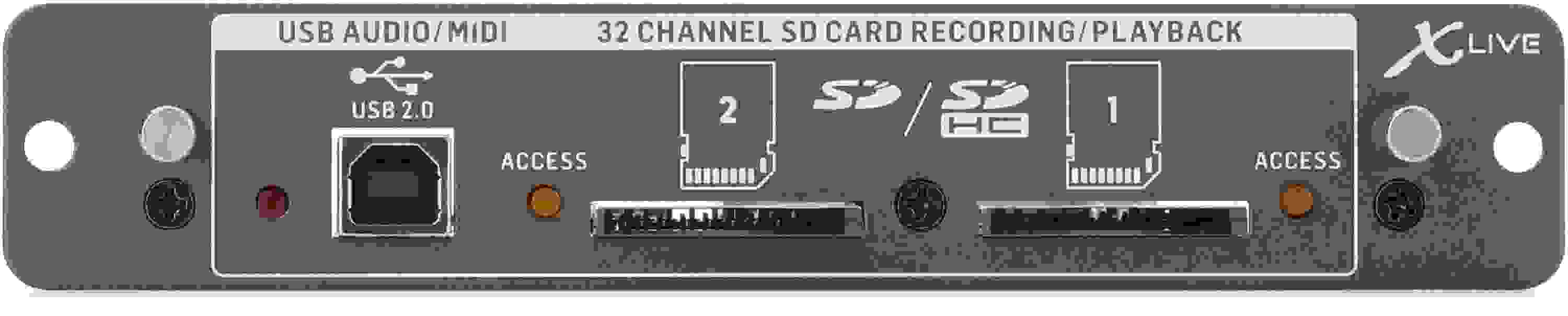
Expansion Card for 32-channel Live Recording/Playback on SD/SDHC Cards and USB Audio/MIDI Interfaces
Share
Item ID: XLIVE
Behringer X-LIVE X32 Expansion Card for 32-channel SD/SDHC card and USB Recording
Price:$155 and 00 cents
$26.00 suggested monthly payments with 6 month financing‡

Backordered - More On The Way!

This item requires extra delivery time from Behringer. Order today to reserve yours now, risk-free, or contact us for more information. Estimated August 2026.

Notify me when in stock
Add to Cart
Sales engineer photo
Ask An Expert

Our expertly trained Sales Engineers are ready to help!

What is a Sales Engineer?
Sweetwater Gear Exchange

Have one to sell?
Check out Sweetwater's Gear Exchange!
Learn More

Behringer X-LIVE X32 Expansion Card for 32-channel SD/SDHC card and USB Recording
Backordered - More On The Way! Notify me
Price:$155 and 00 cents
Add to Cart
Add to list
Skip to Description
Most Popular Accessories & Related Items
Back to navigation

This article was Written By

Our Product Research Team

Get to know them!

Expand Your X32's Recording Capabilities

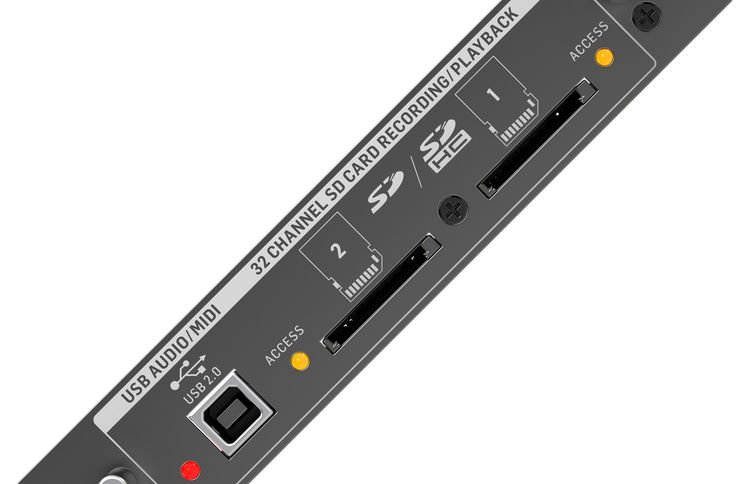
Increase your X32's capabilities with the Behringer X-Live expansion card. The X-Live augments your X32 with 32 channels of recording and playback via USB 2.0, as well as remote operation of your DAW. On top of that, you get dual SD/SDHC slots that allow recording of up to 32 channels of uncompressed WAV files. Best of all, you can use the USB and SD functions simultaneously and independently. Create multichannel recordings without a computer, conduct virtual soundchecks, deploy backing tracks, and more. You also benefit from remote operation via your PC, Android, iPad, or X-Touch control surface. Drop an X-Live into your X32, and transform it into a powerful multitrack studio!

Easy multitrack recording with your X32

Whether you use it live or in the studio, the X-Live grants your X32 robust multitrack recording capabilities. You can capture live performances directly to your Mac, PC, or flash media. No matter what, the X-Live makes it easy. Dual SD/SDHC slots equip you with uncompressed recording and playback of up to 64GB of memory, sufficient for a 3-hour 32-bit/48kHz 32-track session. You can also extend a session across both SD cards, giving you more than 12 hours of 8-track recording time. Best of all, you can accomplish everything without leaving the X32 environment.
Simultaneous and independent USB and SD operation

The Behringer X-Live's USB and SD interfaces feature simultaneous and independent operation. This means that you can play back a session from an SD card and record the tracks into your DAW via USB for further processing. Prepare live backing tracks in your DAW, transfer them to an SD card, and set performance markers on the fly. You can also record using USB and SD simultaneously — great for making a backup copy of your performance. And you can do all this without routing tracks through the X32's mixer channels, leaving it free for your FOH mix.

Remote operation via PC, Android, iPad, and X-Touch

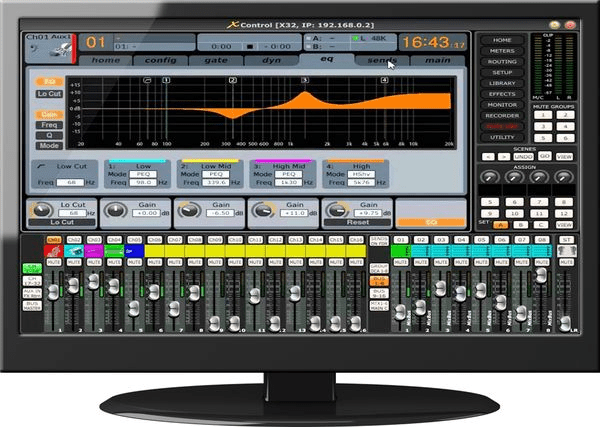
You can take command of X-Live's functions and transport controls remotely via your PC, Android, or iPad, as well as Behringer's X-Touch control surface. Cue up and initiate backing tracks. Start or stop recording and playback. Perform virtual soundchecks from anywhere in the venue. At Sweetwater, we've found the feature-packed X-Live X Control app to be a powerful tool.
Computer sold separately.

Behringer X-Live Expansion Card Features:

  • 32 channels of recording and playback via USB 2.0
  • HUI/Mackie Control emulation for remote operation of your DAW
  • Dual SD/SDHC slots allow uncompressed recording and playback of a 3-hour 32-bit/48kHz 32-track session
  • Extend a session across both SD cards for more than 12 hours of 8-track recording time
  • Create multichannel recordings without a computer, conduct virtual soundchecks, deploy backing tracks, and more
  • Simultaneous and independent USB and SD operation
  • Remote operation via your PC, Android, iPad, and X-Touch control surface
  • Virtual soundcheck and live performance files are stored separately for extended recording time
  • Instant live playback with preload and markers in the console user interface and remote apps
  • Markers can be set on the fly for identifying song positions during recording or playback
  • Conveniently edit markers directly within the console's user interface
  • Use your computer's plug-ins for outboard effects via USB
  • Store and automate channel routing for recording and playback
  • CoreAudio compatible on macOS with low-latency ASIO drivers available for PC

Warranty Info

Sweetwater's FREE 2-Year Total Confidence Coverage Warranty

Extra peace of mind at no extra cost.

  • Save money with FREE parts and labor
  • Get back to making music with the industry's fastest turnaround time
  • Fix it the first time with our award-winning, factory-certified Service Department
Learn More about Total Confidence Coverage
Back to navigation

Tech Specs

  • Type: Recording Expansion Card
  • Compatibility: Behringer X32 Expansion Card
  • Channels: 32
  • USB: 1 x Type B
  • Data I/O: 2 x SD/SDHC card slot
  • Manufacturer Part Number: 0606-ABU86-001

What Makes Our Sales Engineers Great?

Sweetwater Sales Engineers are a world-class team of experts dedicated to you. Hand selected from across the globe, each brings a wealth of experience and expertise in the world of music gear to provide you with unparalleled service completely free of charge. Friendly relationships, real trust, and the right gear are only a call or a click away!

Back to navigation

Reviews

x-live card
This card works great. I ordered two of them. If you have a Midas, they make a dn32 live card for that console as well. You can use a larger memory stick as long as you format from a different device. I am using 256gb microSD cards with the adapters. I initialized the sticks with my security cameras. Once their initialized, you can format them, and use them through the mixer normally. You can order rechargeable batteries to prevent corrosion from regular batteries leaking. Make sure you get the correct ones, 3 volt.
I love my x-live expansion card
I am very new to working with a digital sound system. I found this very easy to install and thanks to the many video tutorials I am enjoying recording my work on my new x-32 rack.
Music background: Organist, Keyboard, Drummer
Great for recording a band live
This card adds the ability to record a band live using 32 separate tracks at one time. I installed it in my X32 producer mixer. It is easy to install. After you install it you will need to go to Behringer's website and do a firmware update on the card. While you are there get the latest firmware update for the X32. The new update adds features to the DCA and some cool routing functions.

The reason why I only gave it 4 and a half stars is because you can not overdub using the card. You can only record one session at a time with no overdubbing. This card is only meant to record bands when they play live. It does a good job with that and everyone has their own track. you will still need a DAW to transfer your audio to and you must use your DAW to overdub. It is a great way to record a live album for a band.
Music background: Pro Musician
X-Live Issue With User Defined Inputs
My 1st card had a defective SD slot, but the Sweetwater guys quickly shipped another one to me... thanks!!! I had another problem that may be an issue for other users who purchase the X-Live. I have been using the user defined input feature on the X32, so that was the state of my routing configuration when I installed the card. The card was clearly trying to record when I tested it, BUT either nothing was going in or nothing was coming out: I had no play-back. I started trouble-shooting and found that when I changed to block routing the card functioned normally. I then switched back to my user defined inputs and it worked fine. It appears the X-Live card does not "see" the user defined inputs unless they are chosen with the card already installed. Weird, but if anyone else has this issue that maneuver will get you up and running.
Everything it is cracked up to be!
Just purchased to add to our main mixer at church. It was super easy to install however I ran into an issue with the firmware on the install. Turns out that since the since the main firmware update version 4.09, this card no longer requires its own separate firmware. Everything is baked into the boards main firmware. Nothing was stated about this on Behringer's website when I downloaded the the X-LIVE firmware update. When I tried to load the firmware, it kept giving me "wrong card" error.

So I called Sweetwater tech support. Kyle in tech support was very helpful today!! He was able to see that there was a notice from Behringer that the firmware updated was no longer needed and that if you have version 4.09 of the board firmware that it should just see the card. Everything works!!

This is why Sweetwater gets 99% of our business
Music background: worship ministry