


$6K PRS Line 6 Giveaway

Elgato Stream Deck + Customizable Desktop Interface

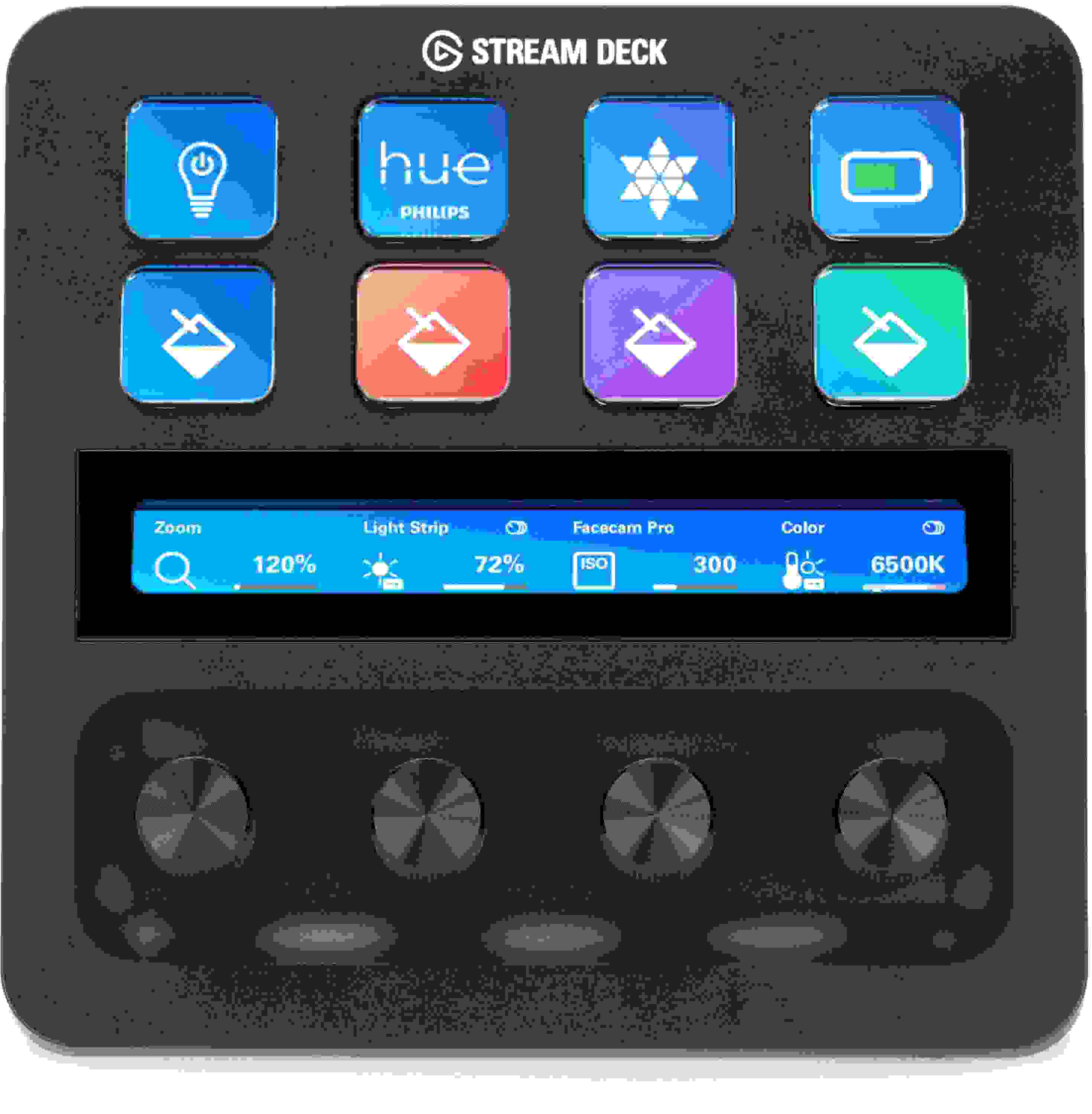
Customizable Desktop Interface with 8 LCD Keys, USB 2.0 Connectivity, LCD, and 4 Multifunction Dials
Share
Item ID: StreamDeckPl
Elgato Stream Deck + Customizable Desktop Interface
Price:$199 and 99 cents
$34.00 suggested monthly payments with 6 month financing‡

In Stock!

Add to Cart
Sales engineer photo
Ask An Expert

Our expertly trained Sales Engineers are ready to help!

What is a Sales Engineer?
Sweetwater Gear Exchange

Have one to sell?
Check out Sweetwater's Gear Exchange!
Learn More

Complete Your Order
Product Image - This Item - Elgato Stream Deck + Customizable Desktop Interface
Elgato Stream Deck + Customizable Desktop Interface
$199.99
+
=
Buy all:
Elgato Stream Deck + Customizable Desktop Interface
In Stock!
Price:$199 and 99 cents
Add to Cart
Add to list
Skip to Description
Most Popular Accessories & Related Items
Back to navigation

This article was Written By

Our Product Research Team

Get to know them!

Complete Content Control, One Streamlined Interface

As the lines between online and offline activities blur in an age of endless interconnectivity, a reasonable question arises: “Why does everything have to be so complicated?” Elgato was wondering the same thing, so when they set off to create an upgrade of their ever-popular Stream Deck, Sweetwater content creators were instantly intrigued. Enter Stream Deck +, a customizable desktop interface that streamlines everything from office workflow and DAWs to fully-loaded streaming arrangements and even smart devices in your house! Its endlessly reconfigurable interface features an improved user system with touch control and a quartet of adjustable knobs, allowing to you open apps, run macros, manage streams, cue tracks, and more. Sweetwater Sales Engineers love the convenience of Stream Deck +, many of whom use one as the central nervous system of their office setups.

Deep integration with 1-touch simplicity

As you might guess, the Stream Deck + is just as simple as its predecessor. Each button can be assigned to any app, function, or folder, all simultaneously; this functionality includes Multi Actions, which allows you to easily chain together any number of actions or trigger them all at once or one at a time. New features on the Stream Deck + include 4 additional multifunction dials, allowing 360-degree control over a wealth of various parameters like volume, panning, mixing, and more! Moreover, the onboard LCD displays can be customized to accommodate your workflow, and features touch compatibility for easy page changes and instant information. Stream Deck + can save presets to call up quickly — it can even be used to auto-detect application changes to set up the necessary preset!

What can I do with Stream Deck +?

The better question might be, “What can’t you do with Stream Deck +?” DAW-centered musicians can dedicate keys to simple functions like opening the application, toggling track volumes, mute/record, and cueing up new tracks. Complex chains can be as specific as managing or adjusting frequency bands within an equalizer or dropping in a sequence of plug-ins specific to a type of instrument. Streamers of any kind will quickly find a home with Stream Deck +, from volume management and pre-written chat texts to deploying entire intro/outro videos and bringing content from other applications into your stream. Virtually any process can be automated and streamlined with Stream Deck +, creative or otherwise. Its compatibility even extends to ring, home, and scene lighting with Philips Hue, LIFX, IFTTT, and more.

Elgato Stream Deck + Features:

  • LCD buttons can be endlessly customized for display and function to meet your content, streaming, and office workflow needs
  • 1-button design means everything simple toggling to complex, app-specific macros are always available
  • Multi Actions let you create a custom chain of commands that you can trigger all at once or intermittently
  • Presets can be easily saved and recalled, including via auto-detection as you change apps
  • Improved LCD system — view information and command pages with a single swipe
  • 4 integrated 360° dials for easy parameter adjustments on the fly

Warranty Info

Sweetwater's FREE 2-Year Total Confidence Coverage Warranty

Extra peace of mind at no extra cost.

  • Save money with FREE parts and labor
  • Get back to making music with the industry's fastest turnaround time
  • Fix it the first time with our award-winning, factory-certified Service Department
Learn More about Total Confidence Coverage
Back to navigation

Tech Specs

  • Type: Stream Deck+, Black
  • Keys / Buttons: 8 x Customizable LCD Keys
  • Control Knobs / Dials: 4 x 360° Encoders
  • Display: LCD Touchscreen, 4.2" x 0.5"
  • USB: 1 x USB-C 2.0
  • Compatibility: OBS, Twitch, XSplit, YouTube, Spotify, iCue, Philips Hue, LIFX, IFTTT, Zoom, PowerPoint, Keynote, Apple Mail
  • OS Requirements - Mac: macOS 10.15 Catalina or later
  • OS Requirements - PC: Windows 10 (64-bit) or later
  • Power Source: USB Powered
  • Height: 4.33"
  • Width: 5.51"
  • Depth: 5.43"
  • Weight: 1.02 lbs
  • Manufacturer Part Number: 10GBD9901

What Makes Our Sales Engineers Great?

Sweetwater Sales Engineers are a world-class team of experts dedicated to you. Hand selected from across the globe, each brings a wealth of experience and expertise in the world of music gear to provide you with unparalleled service completely free of charge. Friendly relationships, real trust, and the right gear are only a call or a click away!

Back to navigation

Reviews

Wow. Just wow.
Was really unsure about this purchase. Had extra cash and decided to find out what it's all about. Found a third party setup for the stream deck that opened up some amazing quick functions for my DAW. Things that take a lot of mouse clicks are now just a quick tap and knob twist away.

It's so worth it. I added custom colored knobs and a USB hub designed for the space in the back. Perfect does not come close enough. Its fantastic.
Music background: Passionate about music.
Works great, but needs more plugin support
The Stream Deck + works great in all areas except for one - the plugins on Elgato's website have not been updated to take advantage of the 4 rotary encoders. There are very few plugins that have support for these encoders yet, and some that do only map them to a limited set of controls.

Case in point is the Apple Music app on macos - the only way to control its volume is by mapping two buttons (one for volume up, one for volume down). You can't map the encoder to control the volume of this common macos app.

This would be an easy five stars if I could make better use of the encoders - the very feature that made me purchase this over the original Stream Deck in the first place!