



SpectraLayers Pro 12: The Next Evolution in Spectral Repair
Steinberg has outfitted SpectraLayers Pro 12 with an impressive amount of spectral repair upgrades and continues to grow the software's leading influence within the fields of stem separation and sound design. New Soundtrack and Instrument Unmix modules join the bolstered lineup of beloved AI-powered algorithms skilled in separating voices, noise, drums, entire songs, and more. There are also the brand-new DePlosive and Voice Enhance modules and the improved Voice DeNoise and Unmix Transcription modules that work to set a new standard for voice processing capabilities. You'll also benefit from batch processing and customizable process chaining, as well as a Loop Preview that lets you audition your chains before saving. A wealth of editing and workflow additions, including "sound-painting" tools for transient shaping, History and Filtering panels, and a slew of visualization options, make SpectraLayers easier and more enjoyable to use than ever before. Finally, advanced technologies that support multi-layer editing, track-based ARA clip grouping, and the rendering of volume envelops in place further solidify SpectraLayers Pro 12 as a serious sonic powerhouse.
What's new in SpectraLayers Pro 12
Unmixing modules
- New Soundtrack and Instrument modules
- Improved Drums and Noisy Speech modules
- Improved Song AI
Voice processing modules
- New Voice Enhance and DePlosive modules
- Improved Voice DeNoise and UnMix Transcript modules
Workflow enhancements
- Selection editing
- Layer envelope rendering
- Grouping ARA clips by track
- Simultaneous VST3 effects display
- Multi-layer editing
- Improved Cut/Copy actions
Related Videos: SpectraLayers Pro 12 Audio Restoration Software
You gotta keep 'em separated
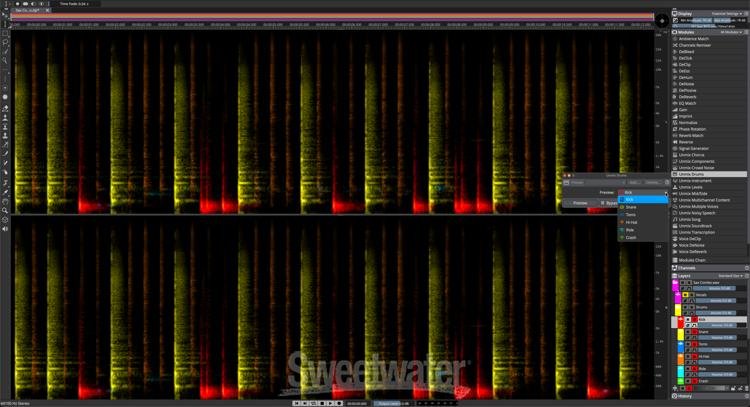
SpectraLayers Pro 12 houses its extremely powerful stem separation capabilities in what it calls "Unmix" modules. These include user favorites from SpectraLayers Pro 11, such as modules for Multiple Voices, Chorus, Song, and Crowd Noise, as well as enhanced modules for Drums and Noisy Speech, each with upgraded algorithms bolstering their respective performances. An all-new Soundtrack module separates audio into dialogue, effects, and layers, and a new Instrument module isolates and extracts audio based on user identification. Whether revisiting a familiar favorite or giving a new feature a test drive, each module is supported by Unmix Song AI for peak performance.

Make sure your vox rocks
SpectraLayers Pro 12 makes cleaning up any ADR, audiobook, or other such vocal track a complete and total cinch. Both DeNoise and Unmix Transcription modules have been upgraded from the previous version to produce even cleaner results, while new AI-powered Voice Enhance and DePlosive modules join the ranks, reconstructing poor-quality voice recordings and eradicating plosives in speech recordings, respectively. Used in tandem with SpectaLayers Pro 12’s other features, such as Modules Chains and the ability to save your own presets, you'll discover the voice processing suite in this latest version sets a new bar for excellence.
Batch Processing and automation
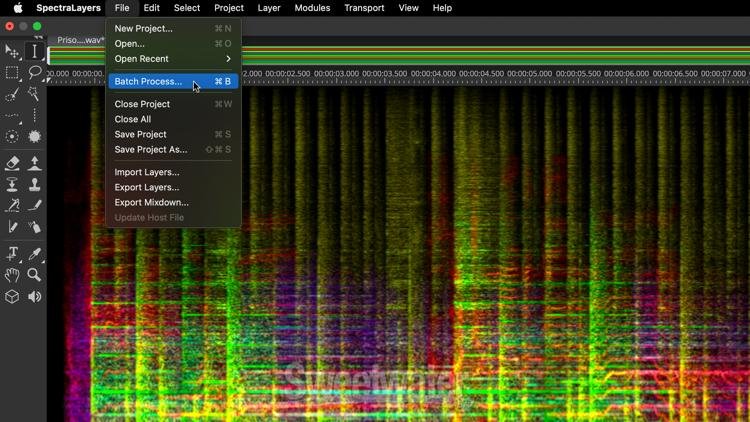
Longtime users of SpectraLayers here at Sweetwater — of which there are many — are thrilled to see the attention paid to advanced automation directly inside SpectraLayers Pro 12. Volume envelopes can now be rendered in place, while Selection Editing allows for resizing directly on the spectrograph. Likewise, you can now edit multiple layers in one fell swoop, freely define folder and file names during batch processing, and group ARA clips by track for even faster navigation and editing.
Time for sound design
Steinberg really upped the ante for SpectraLayers Pro by including some excellent sound design tools. Engineers of Pro 12 ensured each process and feature housed in the software worked in harmony to create unique sounds within the SpectraLayers platform. With lightning-fast unmixing processes supported by SpectraLayers AI-powered algorithms, visual "sound-painting" tools to bolster artistic expression, and granular-level precision editing, sonic surprises wait around every corner.
Overflowing with workflow enhancements
An enlightened interface, improved panels for History and Filtering, transferable tools and module presets, an intuitive time estimation feature, and more. SpectraLayers Pro 12’s new workflow enhancements ensure that your projects will not only sound better but that you’ll also achieve your end results faster than ever before.
Steinberg SpectraLayers Pro 12 Features:
- Advanced algorithms and fierce technical prowess enhance Steinberg's long-renowned flagship spectral repair software
- "Unmix" modules deliver clearer, more isolated, and phase-coherent stems for entire Songs, Soundtracks, Instruments, Multiple Voices, Crowd Noise, Transcripts, Drums, and more
- Addition of AI-driven Voice Enhance and DePlosive to the voice processing suite marks the largest collection of voice and speech modules to date
- Modules Chain can be programmed to process entire layers' specific selections, divert processes to other layers (even future layers that previously assigned processes generate), change process controls, realign components in the process chain, and save your custom chain presets for future use on similar audio files.
- Selective editing and improved Frequency, Harmonics, and Transient selection boost precision and accuracy in your automated workflow
- View multiple plug-in interfaces simultaneously with the enhanced VST3 FX module
- Correct asymmetrical waveforms for maxed-out gain and achieve more balanced audio with the Phase Rotation Module
- Batch Processing window lets you process multiple files simultaneously and render them into entire mixdowns or individual elements, complete with corresponding sorted folders
- Use Volume Envelope Automation to apply volume envelopes to Layers and Channels, view their graphs in the waveform display, and render Volume Envelopes in place
- Channels Panel displays mute and solo functions, and the Downmix Channels View displays a single-channel spectrogram view of all active channels
- Improved selection editing allows for resizing directly on the spectrograph
- Group ARA clips by track and drag multiple layers directly into the Cubase and Nuendo Arrange windows (in ARA mode)
- Drag layers directly to your computer's desktop for conveniently deriving transcoded audio files
- Further enhance your workflow with improved Cut/Copy to, filtering, History navigation, and a host of both new and enhanced tools
- Time-Reverse Module reverses the audio in any selection!
- Signal Generator Module merges the legacy Tone, Noise, Silence, and Transients generators to deliver even more sound design potential!
- Loop Preview lets you audition your processing before changing or saving