$6K PRS Line 6 Giveaway

Acoustica Mixcraft 10.5 Pro Studio

DAW Software with Unlimited Tracks, Integrated Online Store, Natively Integrated Melodyne, Audio to MIDI Conversion, and VST Plug-in Compatibility - Windows
Share
Item ID: MixcraftPS10
Acoustica Mixcraft 10.5 Pro Studio
Price:$149 and 00 cents
$25.00 suggested monthly payments with 6 month financing‡ 36 month financing available* with $399.00 minimum purchase on one invoice.

Delivered In Minutes!

Delivered by download. Our unique partnership with Acoustica delivers your license code within minutes.

Software Is Not Returnable
Sorry, Software cannot be returned once it has been delivered. Contact your Sales Engineer or give us a call at (800) 222-4700 if you need any help with ensuring compatibility or finding the right version.
Add to Cart
Compatible with:
Windows
VST
Software Compatibility

Most software is compatible with both macOS and Windows, but check to make sure.

If you're using Pro Tools, AAX plug-ins are what you need. Most other DAWs on macOS support Audio Units (AU) plug-ins, while VST is compatible with many DAWs on oth macOS and Windows. Be sure you choose plug-ins that work with your DAW!

To learn more about software compatibility, check out our buying guide.

Sales engineer photo
Ask An Expert

Our expertly trained Sales Engineers are ready to help!

What is a Sales Engineer?
Acoustica Mixcraft 10.5 Pro Studio
Delivered In Minutes!
Price:$149 and 00 cents
Add to Cart
Add to list
Skip to Description
Most Popular Accessories & Related Items
Back to navigation

This article was Written By

Our Product Research Team

Get to know them!

The Famous Windows DAW Looks and Sounds Better Than Ever

Acoustica Mixcraft has been a favorite Windows-based DAW for many professionals ever since it was introduced in 2004, thanks to its loaded features and ease of use. Mixcraft 10.5 Pro Studio is the latest flagship, and it adds even more firepower by now featuring an AI-powered Stem Separation tool, track regions, advanced audio and MIDI routing and recording options (as well as audio to MIDI conversion), and natively integrated Melodyne. There’s also a newly integrated online Mixcraft Store where you can purchase —or, in many cases, download for free — additional loops, instruments, effects, and even entire projects. Mixcraft 10.5 also sees improvements to the project start window (including preset Project templates), piano roll, plug-in manager, libraries, and much more. Plus, users can assign their own custom hotkeys, project settings, and plug-in collections, and a wider range of control surfaces are now supported. New drag-and-drop automation supercharges Mixcraft’s already speedy workflow, and its video editing capabilities make it a comprehensive multimedia powerhouse under one roof. Finally, Sweetwater engineers have discovered the MIDI controller support has been greatly enhanced, with a new Quick Access panel where you can immediately add, delete, and rearrange your virtual tracks' effects and instruments.

New for Mixcraft 10.5

In addition to staples that have long driven Windows-based producers and musicians to Mixcraft — such as recording/mixing unlimited tracks and the Live Performance Panel — both the Recording Studio and Pro Studio versions of Mixcraft 10.5 have a wealth of brand-new additions, including:

  • An integrated Mixcraft Store that makes it effortless to find, purchase, or download free content, such as the brand-new Musician’s Toolbox suite
  • Quick Access panel lets you immediately add, edit, and remove instruments and effects on virtual tracks
  • A scalable interface with simplified menus and a more colorful, intuitive look
  • Drag-and-drop automation for an even more efficient workflow
  • Custom hotkey assignments to maximize your own personal workflow
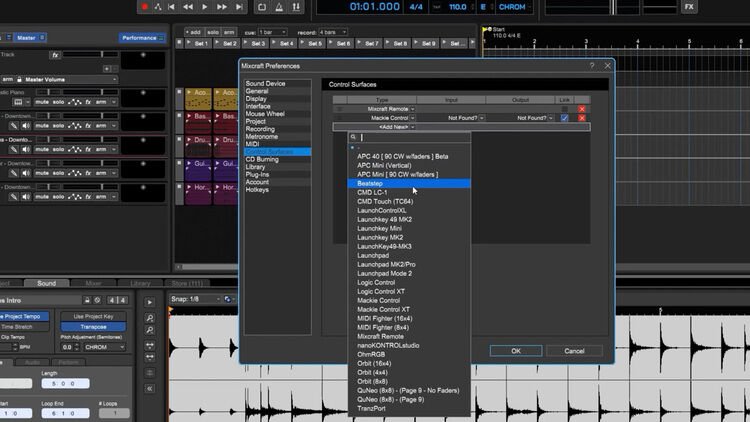
  • Expanded MIDI device and control surface support
  • An updated Plug-in Manager with better search, organization, and an optional SafeMode
  • An updated project start window complete with links to news, sales, and other videos
  • Task-specific Project Templates for mastering, video editing, podcasting, and more
  • Auto-save with user-defined intervals
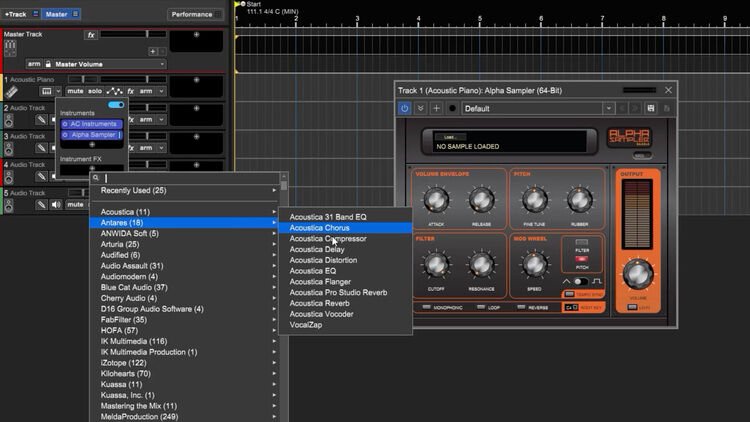
Up the ante with Mixcraft 10.5 Pro Studio Version

The Pro Studio version of Mixcraft 10.5 takes things even further, with some awesome exclusive features, instruments, and effects that combine to make Mixcraft 10.5 Pro Studio worthy of serious consideration from anyone either looking for a Windows-based DAW or looking to switch. These include:

  • An AI-powered Stem Separation tool
  • Track regions that allow you to select, copy, and drag-and-drop grouped clips and tracks, as well as their automations
  • Advanced audio and MIDI output recording and routing options
  • Audio to MIDI conversion that will enable you to augment your productions and arrangements with ease
  • Natively integrated Melodyne for perfectly-tuned vocals and other pitch corrective uses
  • The new Cherry Audio DCO-16 instrument
  • The new Cherry Audio Stardust 201 Tape Echo effect
  • The new Cherry Audio Galactic Reverb effect
  • A plethora of other instruments and effects (24 instruments and 50+ effects compared to Mixcraft 10 Recording Studio versions 16 and 36, respectively)

Back to navigation

Tech Specs

  • Software Type: DAW
  • Platform: PC
  • Upgrade/Full: Full
  • Download/Boxed: Download
  • Bit Depth: 64-bit
  • Plug-in Formats: VST3
  • Hardware Requirements - PC: Intel Core i5 / Quad-core or higher, 8GB RAM minimum
  • OS Requirements - PC: Windows 10 or later
  • Manufacturer Part Number: AC-10PRO-RE

What Makes Our Sales Engineers Great?

Sweetwater Sales Engineers are a world-class team of experts dedicated to you. Hand selected from across the globe, each brings a wealth of experience and expertise in the world of music gear to provide you with unparalleled service completely free of charge. Friendly relationships, real trust, and the right gear are only a call or a click away!

Back to navigation

Reviews

Awesome DAW
I use Mixcraft Pro Studio on my PC and Logic Pro X on my Mac. Mixcraft is absolutely amazing and intuitive for the price point. Workflow for recording or creating and editing MIDI is the best. I make all my MIDI tracks in Mixcraft and cannot make a stronger recommendation for anyone looking to start making music. More than worth the money you will pay, been using Mixcraft since version 2 back in 2008!
Music background: Music Major / Performer
Most underrated DAW ever!
It has all the bells and whistles for less money and is way easier to use. I have used Mixcraft since 2005 and it has kept pace with industry. I've recorded several bands, dozens of solo artists and countless other projects. This is my go to DAW and the one I always come back to.
MixCraft PRO 10.5 Fantabulous!!!
Couldn't be happier!!!
MixCraft PRO 10.5 Fantabulous!!!
MixCraft keeps getting better and better... The single most finest Daw I have used... For beginners and for Pro's
Perfect daw for the price
This is the most stable and plugin compatible version of Mixcraft to date. I cannot imagine trying to use other daws at this point. I came from Reaper, Sampltude and Cubase. I will never go back.
Music background: Professional studio engineer