
$6K PRS Line 6 Giveaway

Behringer X-Touch Mini Ultra-compact Universal USB Controller
Item ID: XTouchMini
Behringer X-Touch Mini Ultra-compact Universal USB Controller
Reviews for

Behringer X-Touch Mini Ultra-compact Universal USB Controller Reviews

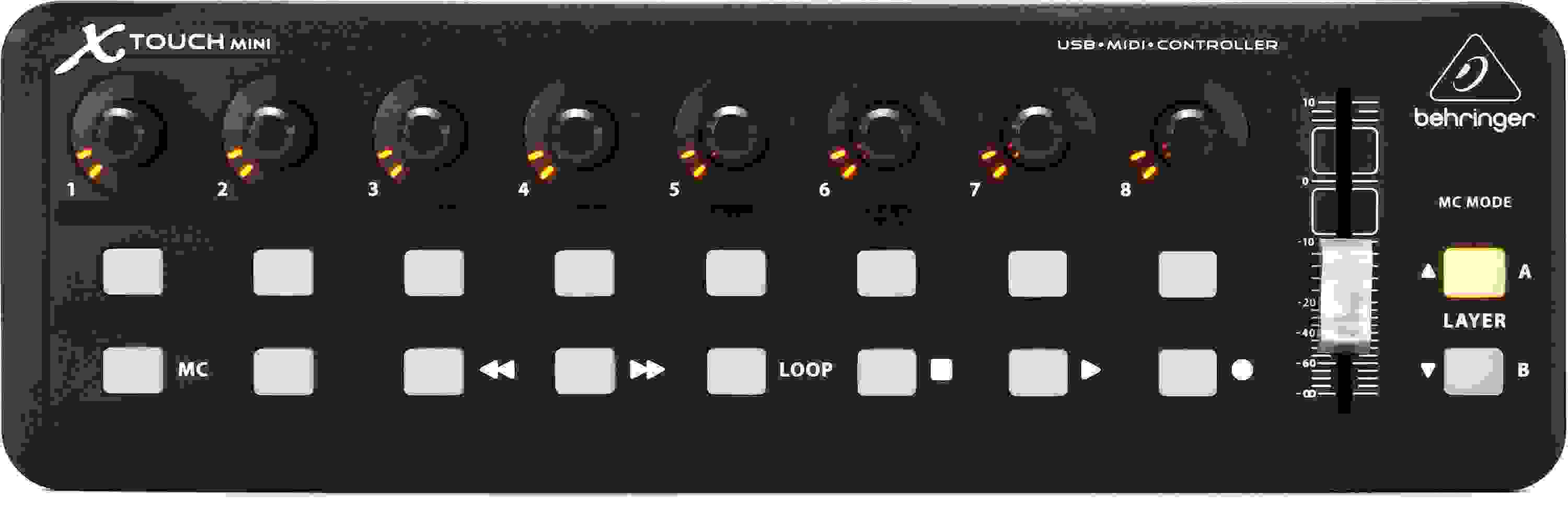
Compact USB Control Surface with 16 Illuminated Buttons, 8 Rotary Encoders with LED Collars, 1 x 60mm Slider, and 2 Control Layers

If you're looking for full-scale DAW and plug-in control, without the full-scale footprint, then the Behringer X-Touch Mini USB control surface was made for you. For many of us at Sweetwater, our studios are wherever we plant our laptops. The compact X-Touch Mini control surface is one of those wonderful tools that can make your mobile rig much more efficient. It may only be about the size of a laptop keyboard, but it delivers all of the hands on control you need to keep your fingers off the mouse and your head in the game. A set of eight rotary controls, 16 illuminated buttons, and a single quality 60mm slider let you control your mix, plug-ins, and virtual synths with ease. What's more, you get two program layers worth of control via MIDI or Mackie Control, so you can instantly switch setups on the fly.

More Details
Price:$70 and 90 cents
$12.00 suggested monthly payments with 6 month financing‡
Add to Cart
Backordered - More On The Way!

This item requires extra delivery time from Behringer. Order today to reserve yours now, risk-free, or contact us for more information. Estimated August 2026.

Notify me when in stock
Page 1 of 1
December 31, 2025

Great for flight simulators too!

By Sweetwater Customer
Music Background: None.... er, well very little.

Used in conjunction with Axis and Oh's or Spad.next this little controller can add a multitude of cockpit functions at your fingertips. I don't fly without it.

March 13, 2025

great for ableton macros / FX / instruments / etc

By pedro w. from brick HOUSE
Music Background: amateur fool too kool for skool

what i like most about this unit is that is has optional MACKIE CONTROL MODE which instantly / automatically maps to my 8 macro knobs on all racks / instruments / FX in ableton … the master fader is an awesome addition as well which although it was not my main concern to purchase, i found really RICO SUAVE…. there is really a lot it can do, but it's fine because it easily does some simple things i want

August 12, 2024

No Mac software

By Tom Z. from L.A. California
Music Background: Producer

Hard to believe, but after several years, there is no Mac driver or software for changing, updating or modifying the x-touch. I can't imagine that all of the glowing reviews are only PC users since the MAC is widely used in music. Total waste for a Mac user.

April 22, 2024

Great Little Controller

By Robert L. from WY
Music Background: Guitarist, Recording Eng, Guitar Builder RAL Custom Guitars

We have been learning to use Reaper and this little controler is great to program for all the controls we use all the time when Recording. So you don't have to keep looking at the computer and trying to find the pulldown menu to change something. Reaper alouse you to program all the controls of this unit for just about anything you want to have a control for. This unit is a great addition to your setup. Once I set it all up I made some overlays to show all the controls we use.

August 8, 2023

Great midi controller for VST/AU plug-ins

By Gabriel B.
Music Background: Trance

Great MIDI controller, bought it to control my VST synths but it works great as a Mackie Control unit, works great as well in all of my DAWs!

December 27, 2022

Fantastic piece of gear.

By Todd M. from Grayling, MI

I use this one piece of gear to give me fingertip control of Ableton, my digital mixing console, my lighting rig, a smoke machine, a Roland keyboard as well as effortless launching of programs from Windows.

If you can do something with MIDI through a computer, this controller can do it for just less than 100 dollars.

It's better than any other product trying to do this.

November 3, 2022

Somewhat expected disappointment, Behringer-flavored...

By Denis C. from Washington
Music Background: Composer

Let me preface this by saying that I have, historically, had mixed results with Behringer. Sure, their speakers are alright, but beyond that, it's always a gamble whenever I buy their products. Now onto the review.

This has been, by far, the least intuitive and least user-friendly MIDI controller I have ever had the displeasure of using.

First off, the faders and encoders are sort of... meh? I get the principle, "You get what you pay for", but come on, even Novation's controllers feel more measured and and comfortable. This fader just slides like metal against plastic, with none of the tactile "resistance" you would find on a proper mixer.

The buttons, on the other hand, do have a decent tactile resistance, so I suppose that's a plus, but that's present on every other controller I've used.

But by far, the worst thing about this controller is the software editor. Seriously? The editor looks like it was made for Windows Vista and hasn't been updated in any way since; I've encountered malware that is more pleasant to interact with.

But that's not even the worst of it. In the editor, whatever MIDI assignments I select for the encoders and fader do not stick. You want note C-2 on the first button? Get outta here. The fader assigned CC1 to control dynamics? Don't even think about it. Mackie Mode doesn't do anything for it either, though that was my experience using this nonsense controller in Cubase Pro 12.

Out of all the MIDI controllers I've used, this one is by far the worst. Cough up the extra money and get a Novation Launch Control XL or an Akai MIDImix. Or, at the very least, something with more buttons and faders that actually works and isn't built like it crawled straight out of 2007.

Read More
October 10, 2022

Does the job

By Level 4. from Michigan

I had a show where I was running sound from stage using an X18. One of my least favorite things to do. So I got the X-Touch mini so I would at least have some physical control along with using a tablet or phone. It's very hard to play and reach over to a touchscreen. It worked as intended and was very helpful. The biggest drawback is you have to have OSIMidi Stage to run a digital mixer. That costs $ extra, and thankfully I found a configuration I could download so I didn't have to build one from scratch, which seems very tedious and I'm a programmer. All in all the device worked for my needs and I will be using it every time I run into the "running from stage" situation. Also will be finding more uses for it. The 3 and half stars is only because you need extra software to use it. Oh, and Sweetwater Rocks!

Read More
September 21, 2022

Does NOT work with ProTools.

By Jeff from Boston

Disclaimer: Behringer's software to change the MIDI parameters is PC only. I only have a Mac handy right now.

Warning: This device does NOT work with ProTools, which requires Mackie's HUI protocol. The X Touch Mini only does Mackie MCU.

Note: I unboxed this last night Sept 16, 2022. First thing I noticed was the X-Touch Mini has a USB Mini connector like it's still 2005.

In MC mode, trying to use with MIO Console. I bought this because all the glowing reviews said it was "easy to use" "out of the box". "Scribble knobs can control both fader and pan." I wish.

The X-Touch Mini MC controls appear to only work with Panning and transport. Would rather the buttons on each channel control solo / mute.

When I can set this up on a PC I'll find out if I can get this device to do what I bought it for. Every other brand MIDI controller I've used, has always worked intuitively, with minimal fuss. I wanted this compact unit because I thought I could get the LEDs on the control knobs to substitute for flying faders - enabling Console control without it being onscreen.

I really hope I can come back later and change this review after I finally get this device to do what I bought it for. Mostly posting this review to counter all the other rosy reviews that made the X-Touch seem so simple and easy to use.

Read More
February 2, 2022

Fantastic as Generic Remote in Cubase

By Jewel D. from Wyoming
Music Background: composer

This is an easy controller to set up as a Cubase Generic Remote (Studio--Studio Setup--Remote Devices). I was able to quickly override the factory default cc's and enter my own in the Behringer editor, then assign those in Cubase. I configured several different presets for each of my plugins. Setting the knobs to "fan" with the global channel off, I get an immediate pickup and light-indicator reading (which is more helpful than I ever realized). Slider is smooth and fast.

January 14, 2022

Great Little Device

By Steven from Virginia

I use it for a flight sim and i will tell you it works great. Easy to set up and does everything I wanted it to do ! Highly Recommend. Oh and by the way, the people and service at Sweetwater are # 1.

November 15, 2021

Nice piece of equipment, does what I need

By Rod T. from California
Music Background: Music director at Sunrise Church Rialto.

This midi controller is sturdy, easy to use and not over complicated. It works well with Abelton and my others DAWs
I really like this unit and the price is affordable

October 22, 2021

A handy little Swiss-Army knife of a controller

By Bobbo from Iowa
Music Background: Musician/Broadcaster

This little guy is super-handy. I use it with Reaper, and it allows me to map functions that are usually a few mouse-clicks deep to the press of a single button, which seriously speeds up the workflow. Build quality is good for the money, the rotary encoders and fader action are smooth, and it does exactly what it's supposed to with rock-solid reliability. It might not look like a lot of controls, but it covers more ground than you'd think at first glance. It's compact size makes it a great choice if you're short on desk space, or portability is a priority. Well worth the $$$!

August 18, 2021

Between 20% and 75% of the perfect accessory for the XR18

By Sweetwater Customer

Like many users of the Behringer XR18 digital mixer, I want a few buttons and knobs or faders for those times when it is inconvenient to find the right button on the iPad. The X-Touch mini would seem to be the perfect box, however it only speaks MIDI over USB while the XAir wants OSC over ethernet/WiFi. According to Behringer marketing the solution is the full XTouch at several times the price and weight. Luckily there is another solution. Simply add a raspberry pi and some software (thus 75%), though I went all out and upgraded the Pi with a box, touch screen, and faster processor and an external USB-C SSD thus 20% but still less expensive and easier to carry than the full Xtouch. Note that this combo won't replace the iPad where the full X-Touch might, I never gig without the iPad so this is the winner for me.

Read More
June 7, 2020

Should be easily compatible with all DAW’s especially in MC mode

By Sweetwater Customer

Given that Mackie Control works with almost any DAW, the x-touch mini should have such compatibility as well. Overall for the price though it's a great device.

April 7, 2020

No Mac GUI

By Roger F. from North Carolina

I thought this product would be perfect for my set up. Unfortunately, it does not have a Mac program to set it up. C'mon Behringer, it ain't that hard.

April 21, 2019

Surprisingly useful

By Sweetwater Customer

I had originally bought this to use for transport controls in my DAW. I Work with Reason, Ableton Live and Studio One. Initially I was very disappointed. It really does not have any rhyme or reason to how it functions in Mackie Control mode, and cannot be customized in Mackie Control with the editor software. It took me a really long time to figure out that software. It was so frustrating I actually stopped using this controller altogether for a long time. Recently I started making videos for youtube with a software called vMix that allows you to set shortcuts, activators, effects and transport controls to a midi controller. It has become indispensably useful for that. In my opinion it's still total garbage for making music, but works great when I figured out how to use the editor software to update device firmware for use as customizable controller outside of Mackie Control mode. With vMix I have been been able to re-purpose this for video recording/streaming the same way I see so many people raving about their ability to use it for Adobe Lightroom with MIDI2LR

Read More
February 26, 2019

Time to get a 2nd, maybe a 3rd

By david n. from California

I'm giving this unit 5 stars, although it is a cheap unit and has some simple functionality, it is exactly what it claims to be, and there really isn't one thing wrong with it. I am using this with Reaper, and have several other controllers already so I honestly only purchased this for the buttons which can be assigned to anything in Reaper. I've had for about 6 months now... and am starting to use the rotaries for controlling sends of a selected track. Everything works as it should and I wouldn't change anything about it. Now that I have been using, I feel like I could easily use a 2nd or more together and put in some kind of enclosure to have 24 knobs and 48 buttons... I also just discovered (today!) that there is software that will allow some configuration of the buttons and rotaries. Would have been nice to have that info from the beginning. many have noticed that Behringer doesn't have much support or documentation, but at least with this unit it is not really needed. Just plug it in and start programming to your liking (if using Reaper).

Read More
September 29, 2018

Excellent controller

By GP from Texas
Music Background: Professional

First of all it works as DAW controller right out of the box, no drivers and no programming of any kind. I use it with Cubase PRO 9.5 and was up and running right after plugging it in and selecting it from within Cubase. The small size allows me to use it as an additional transport as needed.

No other controller I have ever owned ever worked so painlessly and flawlessly.

No only can you control transport but also panning, EQ, plugins filters and other parameters. Again, I can use Cubase EQ (all parameters) using the rotary knobs without any additional programming.

The added fader automatically works as your master fader for your DAW, useful as well.

Of course, using the FREE app you can program the unit to send any controller you want and use it in that mode as well, for ANY programs capable of accepting such commands, not just DAWs.

Read More
April 6, 2018

Great Product

By Sweetwater Customer

I bought my X-Touch Mini for use for MC control on Cubase 5, it works great. The transport controls streamline my recording and editing. Considering buying the regular X-ouch for the motorized faders, and scrub wheel. Over all I am satisfied and happy. The one downside I have seen is that I can't figure out how to change the what buttons do what, but that is probably just my software.

May 31, 2017

Behringer X-Touch Mini

By Tony C. from Boston MA
Music Background: Professional

It's very helpful in saying goodbye to 'mouse mixing' ... Once I figured out the MC functions, which is how I use it, it made my job much more efficient... I use it with Logic X.... It works better than the KORG nano, which I also have and no longer use....The Korg didn't play nice with Logic....

May 12, 2017

Works Great

By Antonio R. from New York

I use the Behringer X-Touch Mini with Lightroom CC to make adjustments to photos. I needed to load MIDI2LR software to make it work with the X-Touch Mine controller, a free software.I also downloaded the labels from Brian Lovelace and printed them on a label page. The X-Touch Mini works flawlessly on Lighroom CC and makes it easier to make adjustments to photograph then using the mouse and cursor to move sliders. I highly recommend this controller.

January 12, 2017

Good midi controller for Lightroom.

By Kevin T.

I bought this controller to use with Adobe lightroom through the midi2lr plugin. After some set up based on brian lovelace's youtube guide, I was able to use it as a physical editing solution for lightroom.

As a budget option, it works well for that task. The royary encoders detentes feel good but the push function on them feels a bit harsh. Other than that it's great for that task.

July 7, 2016

X Touch Mini Pass

By Ben from Columbus Ohio
Music Background: Sound Engineer

I bought the X Touch Mini to be a interface between me and the Behringer's X32-edit app. I have a X32 Rack and wanted to create some pre-show scenes and enter them into the Rack. So I found several video's of this unit interfacing for every app but Behringer's X32-edit. So I have to give Behringer a bad review. I would give this 5 stars if Behringer posted some support for this unit. I on the other hand give Sweetwater 5 stars for there excellent staff and service. They are my goto dealer !!! Bottom line ,,, don't just buy Behringer just for the $$$ remember the old saying. " You get what you pay for".

November 3, 2015

Great controller

By Aaron from Mississippi
Music Background: Audio Engineering, self-Taught keyboard/guitar.

This is a very great addition to a live performance MIDI key rig. I primarily use it with Apple's MainStage 3, but works well with other DAW's as well.
The XTouch software is a bit odd at first and is currently only on Windows, but it enables button/encoder behavior to be changed which is great.
Overall, i'm satisfied and I would definitely suggest it.

of

Have Questions About the X-Touch Mini Ultra-compact Universal USB Controller?

Or call us at (800) 222-4700

Questions about the Behringer X-Touch Mini Ultra-compact Universal USB...?

Sweetwater's Sales Engineers are regarded as the most experienced and knowledgeable professionals in the music industry, with extensive music backgrounds and intense training on the latest products and technologies. They are available to offer you personalized product advice any time you need it.

Type your question below or call us at (800) 222-4700
Thank You!