

Behringer X-Touch Universal Control Surface
Behringer X-Touch Universal Control Surface Reviews
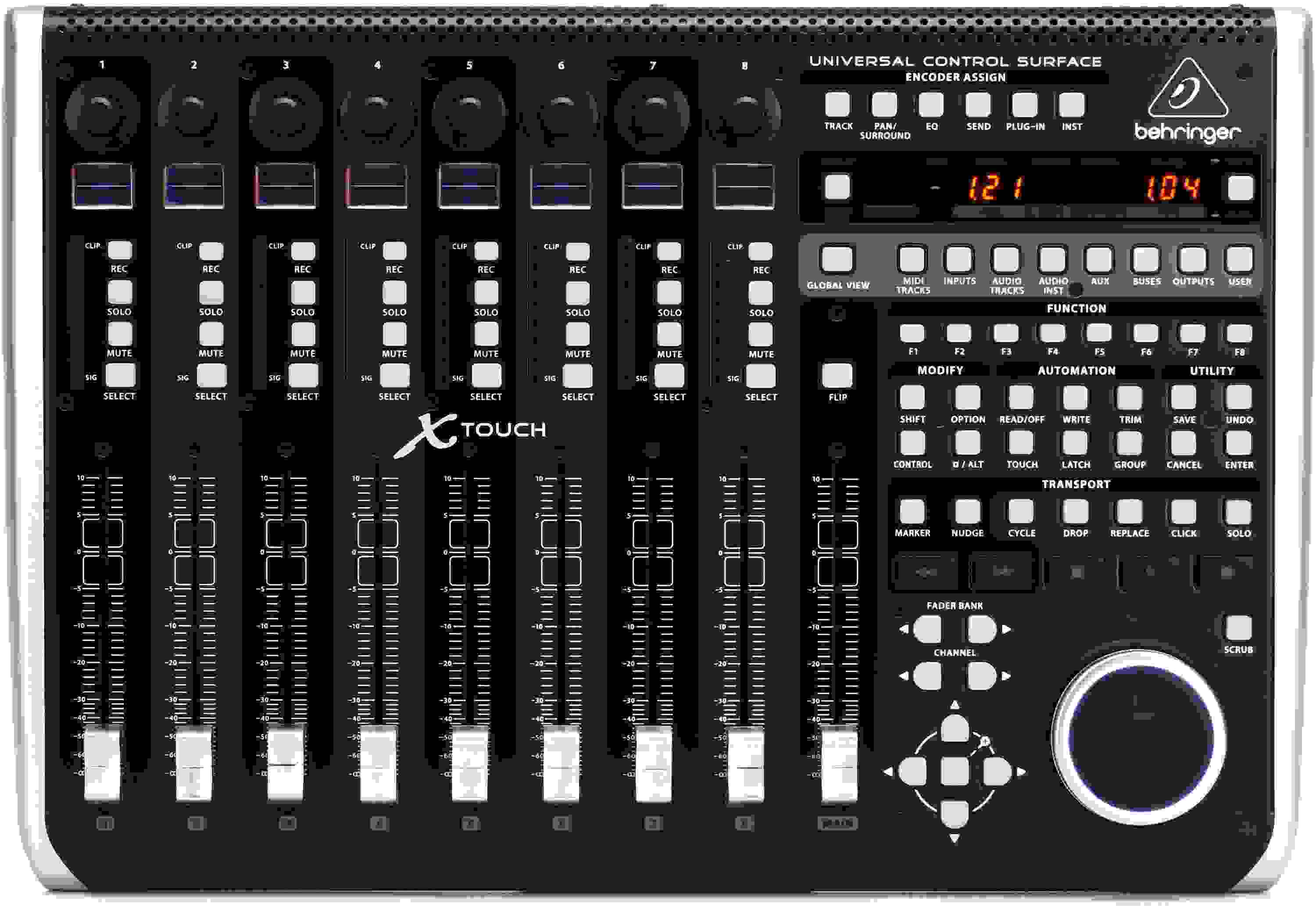
The Behringer X-Touch is the perfect way to control your DAW in your studio, and it's an amazing way to control your X32 digital mixer remotely, too. An integrated Ethernet interface lets you connect to and control any of Behringer's X32 series mixers. Engineers at Sweetwater know that nothing beats the fast workflow of a comprehensive control surface. With 100mm motorized faders, digital scribble strips, color-coded LEDs and displays, and much more, the Behringer X-Touch is simply an outstanding USB/MIDI control surface for practically any application.
Amazing
This thing is everything I could have hoped for. And I wouldn't normally give gear that high praise. I can see why it was out of stock for so long.
Great purchase
One gig down so far and it was just what I wanted.
Great control surface for the price
This has all the features I need and I'm constantly finding new ways to use it. The build quality is quite good, but the sliders tend to stick when nudging them unless you're pushing down directly on the face as you slide, rather than thumbing from the top or bottom. The sliders are a bit noisy too, but I don't need silent ones for my scenario. Works great with Adobe Premiere Pro as a Mackie controller but it steps it up a notch with the third-party PrControl plug-in. Also works great with FL Studio and gets better with custom device Python scripts. It takes custom code, but even the scribble strip can have RGB backlighting. This quickly became indispensable to my workflow and has thoroughly replaced my Contour Design Shuttle Pro V2 as my primary editing peripheral
GMECHANGING CONTROL
The X-Touch has seen a ton of use both in the studio and on stage. I originally bought it to help with mixing, as I prefer the tactile feel of a hardware controller and aim to minimize mouse use whenever possible. The X-Touch makes recording and playback in Reaper easy, but its best feature has been simplifying the creation of automations, especially with groups of similar instruments. Paired with the old Console 1, the X-Touch has given my "in the box" studio a much more tactile approach.
Beyond the studio, the X-Touch has revolutionized my XR18 workflow. It allows me to control live mixes in ways that are significantly easier for someone who has to both play and mix simultaneously. The X-Touch connects effortlessly to my small router, MacBook, iPad, and an inexpensive network switch. This versatility allows for numerous applications, and I particularly appreciate the option of a wired connection with the XR18. If I have an assistant, I can send a 50 or 100-foot Ethernet cable out to them and the X-Touch, or I can keep the X-Touch with me and let them mix on an iPad. If someone wants a quick change to their monitors, it makes it a simple task to hit the AUX button and then pull down or boost this or that in their mix. I bought an aftermarket overlay that shows all the XR18 commands over the buttons for about $. It was a good purchase.
The X-Touch's seamless integration with both Reaper and the XR18 has made it an invaluable tool. Its colored scribble strips and motorized faders pack a lot of value into a $ unit that is incredibly versatile.
Read MoreA Gift from Heaven
Before I got this thing, I was trying to mix film scores containing an insane number of tracks using only the DAW. This Behringer X-Touch Universal Control Surface has made my life SO MUCH EASIER! Setup was simple, operation is just as simple!
Home studio
Tremendo controlador me siento muy complacido
Solid integration with Logic Pro and a great value
No more updates???
The X-Touch is a pretty nifty controller for the most part, but I can't get past the fact that Behringer is no longer coding updates, and when the controller is reading automation, the faders jitter quite a bit. Behringer needs to develop a patch to fix this. Other controllers I've owed never had this problem. SMH.
X-Touch time saving
This is all I have to say I will be acquiring the X-Touch extended 2 of then soon
Wonderful
I got this to replace my X-Touch One controller, and my mixing workflow is now much better with more faders.
X-Touch & Extenders with Nuendo 8
Honest review
I purchased 2 years ago using with Cakewalk by bandlab. Bought a Sonar overlay and unit works good. The negative. If you write fader automation there is a loud annoying clicking/studder noise. I am in contact with behringer as this happens using other DAWS as well. I won't get extender if this issue can't be fixed. When you have clients over and they ask you whats that noise when the faders are automating is embarrassing.
Behringer X-Touch Universal Control Surface
I’m usable gear, simply don’t!!
2nd extender
Loved the x touch and extender i had and added an additional extender. Installed through a router with rtpmidi and all is working perfectly! 24 tracks + 1 master volume.
Updating my 3 stars review
The lights of my Xtouch are still not working with my X Touch (with Reaper+Monterey+ Macmini M1 silicon). I installed a new firmware dated Aug 22 wishing I could use my XTouch again. No way.
How long we Behringer customers will have to wait for a quite simple issue to solve? I tried to get in touch with them already but no answer at all.
Love it
Great addition to the x32 and daw. Ordered the extension and ordering 1 more. Found a way to connect the chassis permanently to make 1 solid unit, this should be an option for this line. Cut down my work time greatly and allowed more focus on my projects. Rock on Sweetwater!
Love it but at the time hate it
I just moved to a Mac M1 Silicon, and I own 2 sets of these X Touchs for my everyday use the studio. But Behringer still doesn't have a firmware upgrade for them (almost 2 years now!) . So, they are useless at the moment.
How long should I wait for it? Should I sell them?
That's my advice for those with new Apple Silicon - check first if Behringer woke up.
Works great
I use it for adding dexterity to a X32 rack , love it!
Useful
If you pair this with an X-Air mixer, it is invaluable. This mixer can obviously pair with a DAW, but lesser known is that it can pair with an X32 or XR-18 module. We throw this on top of our mixer when we perform, and bandmates or friends can go adjust the settings while we play. It's actually a very useful tool, especially if you can't just open a tablet or phone during a performance. It's vital that everyone in the band learn how to use it, but it's invaluable in the moment when you're trying to mix sound from on the stage.
X Touch
The X Touch is greater than expected,if you have talent Sweetwater has the tool for you. FedEx delivery was disapointing, but product is exelent.
Great choice to compliment X-Air (XR18) mixer + DAW
Works perfect with M1 macs
Even with m1 Macs this product is plug n play with Logic Pro!
Sucks on fl-studio and protools.
Buttons don't do what they say. Some do nothing. Only good for moving faders on a mixer really. Behringer blams all the DAWs and takes no responsibility for their product. Faders are loud when following automations. Trying to assign a fader to a parameter in fl can't be done without knowing how to write code. Behringer won't provide that. Not sure if it can be done in protools either but I cannot figure it out. I could write a whole bunch more but it is not worth my time.
X Touch is great
Sure going to make everything easier. Got some work to do in setting up, but is going to great..
Behringer X-Touch Works great With Sonar Platinum
Great fit and finish
Since it follows the Mackie control protocol, I pretty much knew what to expect when I bought this and it didn't disappoint. I was also pleasantly surprised by the solid feel of the buttons and jog wheel. It's got some substance to it, too. Nothing feels cheap about it. The YouTube Behringer channel has good how-to videos on the X-Touch. I think that's the best place to learn about it. I bought an inexpensive laptop stand to angle it towards me and a couple of USB gooseneck lamps so I can easily work it in an otherwise dark room. Once you get used to using a control surface, they really do speed up your workflow. Good job, Behringer!
My DAW: Logic Pro X.
How I use this: Tracking, dubbing, and mixing in a project studio.
Addition to earlier review
I said in an earlier review that I could not find a way to get to more XR18 parameters and adjustments. And that there is skimpy documentation. Well, I did a larger search on the music tribe (Behringer) and found the most complete documentation that is there: the Firmware 1.15 update document: basically what everything does, how to get to it, and how to set up the X-Touch with a variety of compatible devices, including the Xr18, X18, X16, and X12 devices.
Game changer
I have not spent a lot of time using this but, other than a few glitches upon first setting up (my oversights) it's been fantastic. So much easier to have transport controls and faders at your finger tips. The layout is intuitive and the workflow is so much smoother. No more hunt and click with the cursor. I can be on my instrument and quickly make adjustments and run the transport. IG highly recommend having a control surface and for a moderately priced unit the Behringer XTouch is top notch.
DP11 w Behringer X-Touch integration general review
NOT FOR PRO TOOLS!!
It would be unfair to give this less than 4 stars because it's not Behringer's fault. The model seems well built and a great deal, although the documentation is a joke.
However this is slightly better than using a paperweight as a control surface for Pro Tools. You can buy something small with just play controls and a scrub wheel because that's almost all you get. Although some claim to have made them work, the faders were a no go for me. Even knowing that can work, there are some functions that just don't work (master fader). Even if I could get more things to work it just doesn't make sense. If you're in my shoes you can follow me over to the PreSonus FaderPort 8 and see if that's a better fit.
Great Unit but poor documentation
I really like this controller. It has improved my workflow dramatically. But the documentation from Behringer is very poor. I would like to customize the buttons to work better with my DAW, but cannot find any details on how to make that happen on Behringers website. ALso, the template overlays which are available for the xtouch compact don't come with this unit. That is crazy stupid on Behringers part.
Greatest thing since popcorn and a movie
real talk it is Amazing and Awesome and cool and I really enjoy it can't live without it !! Thanks Sweetwater! And my kids are the candy in box lol and I branded my toy with the sticker!! Get it and Keep on trucking baaaaby!!
Poor documentation, Slightly false advertising, a few hiccups -- but it's a helpful device.
Useful gear.
Got this to use with a XR18 and X32 Rack. Works good so far. Sometimes I have to restart it when first turning it on to get it to connect to the X32R, but otherwise it does what I got it for. I have updated the firmware to 1.21. Added bonus that it also works with my DAWs too.
Great DAW Controller
We use this as a DAW controller for Ableton and it's a charm! It was very simple to connect after a video from Behringer on YouTube. It's snappy and the faders are smooth. I can't wait to get the x32 to connect to for remote control link.
Simple Communication Programming Bricked my X-Touch - So Why am I buying another One?
LOUD faders. Really annoying
Super loud clicking/rattling when the faders move.
I've attached a video of this issue - aside from this, the console works great - but if you're mixing with studio monitors or speakers, this rattling is pretty intrusive and makes it hard to focus on the mix.
Tried it with Nuendo, Pro Tools, and Ableton, and all of them reproduce this issue - it's the control surface's fault. You can even feel how wobbly/loose each fader is. Pretty frustrating.
Awesome gear
Wonderful equipment.
So disappointed
I was so excited to get this thing. Long story short, Behringer is a name I trust, but they really need to provide better documentation for their products, just upgrading the firmware was a chore. This thing integrated with Ableton Live so clumsily that I foresaw this drastically slowing down my workflow. So much so that I emailed my Sweetwater Guru Mark saying that I wanted to return this immediately, then boxed it up. I guess I am too used to using a keyboard and mouse to justify this expense. It is solidly built and really neat, but it's just not for me. I am not saying that this is a bad product, but the documentation is seriously lacking and, like I said, the integration with Ableton was very "meh".
Perfect for X-Air, room to improve elsewhere
For my main use with an MR18, it works great. Channel colors carry over, and with the motorized faders it will always match and allow parallel use with the app. Documentation is lacking, so you might need to learn the advanced capabilities from YouTube.
The unit is tall and works best angled up. A laptop stand from Ikea works great.
In Studio One, the Mackie Control protocol doesn't allow channel colors to update. And I haven't yet found a way to store the two configurations to automatically change between controlling the mixer and my DAW, which would be quite convenient.
A few other features like raw MIDI CC (for stuff like organ draw bars) would improve the rating as well. But beside those limitations it's a very functional control surface.
Not quite 5-star, but almost . . . so far
Using the X-Touch with Cubase Pro 10. Have only been able to spend a few hours with it so far, but as far as I can tell, works as expected. Minus 1 star for minimal documentation (as in NONE!). Not a terrible problem, there's plenty of info on the web. Faders are responsive and quiet. Not quite sure about ALL of the buttons and setup, but, again, ok so far.
Garbage
1. Worst manual ever
2. No editor software for a controller???????????????? They do have editors for all the other cheaper controllers. sigh......for this product they want you to make setting within DAW, well the hell do I do that with hardware?
X touch or the mouse? You decide!
Very useful and fun. Integrates seamlessly with Logic. Beats using a mouse to adjust everything.
Improved workflow!
This review is coming from a performing musician that just recently got into recording. I see many experienced engineer friends use only a mouse to navigate their DAW, but for inexperienced users like myself it helps to have something physical that I can touch to adjust volume, settings, etc. This workstation has given me a lot of great tools to expand my editing skills. I used to get frustrated trying to do all my editing with just a mouse and realized I needed more tools to speed up my editing process. Now I can quickly get good mixes and move onto the next song.
Amazing!
The Behringer X-Touch is exactly what I was looking for. Its size, LEDs, motorized faders and other controls are simply awesome. I use Cubase 9.5 and together they work very well. It didn't take much time to configure it.
In the other hand, Nick Huskins was a great advisor and the customer service was really good.
Thanks Sweetwater!
Versatile controller especially within Behringer ecosystem
Logic Pro X Paradise
This is the device that I"ve waited for my whole Logic career-and that"s a career that goes back to eMagic, Notator, and 1991. I"m not a full-time for work user anymore-but I keep my skills sharp. This device is completely plug and play in Logic. I updated the firmware, set it for MTU and USB, and that was it. Everything works. I mean everything… You can adjust plug-ins, flying fade or mixers… The scrub wheel… Half a dozen other handy features you"ve not thought of before. It has the transport LED bar right on it! It"s literally a part of the computer-it feels that integrated. Completely amazing!
Almost happy
X touch is Not working for Pro tool
I should read all comments before I buy it. This X-touch is not work for Pro tool. It work only stop and start, mix faders. Other that, not working.
Perfect addition to my Studio
This controller is so much more then I could have ever hoped for! It works extremely well with both Reaper and Studio One version 3, and works perfectly and effortlessly with my Behringer XR18 Air... a word to the wise: if you are not familiar with this type of gear, as I was not when I first purchased it, you will have to seek out instruction and advice, on how to do things like updating the firmware, and getting all of the devices and software talking to each other. I spoke with Behringer customer service, and they were fantastic as they walked me through that initial process. Once I was over that hump at the beginning, I was amazed at how easy it was to use this device! I definitely highly recommend the X Touch!
Awesome
It's really good product,it make my mixing become easy and good for live band too.
10.0 star
Best Choice
At first I was disappointed the scribble strips did not function in color as indicated by the X-Touch ads. However, the X-Touch, coulped with Mackie Control, interfaced extremely well with logic Pro X Version 3.1. The features and ease of operation streamlined the editing process for me, and the affordable price is a huge plus.
Once again thanks to the great sales staff at Sweetwater, you're the best.
Happy recording,
Ray
Best bargain full-featured control surface
As far as I can tell, this X-Touch control surface is button for button, fader for fader a ½ price Behringer version of Mackie Control. The buttons are laid out a little different than the MC but they're all there and they light up. The motorized faders are a little noisy but not a problem with my applications. The large alpha dial feels a little cheap, but it does what it's supposed to do just fine.
I use this with Logic Pro X and Reason. With Logic everything lines right up, no problem. With Reason the buttons behave in strange ways. But apparently they are mapped the same way on MC and so it's just a matter of getting used to the different labels.
The more I use the X-Touch, the less I use my track-pad. I highly rate this very nice piece of gear.
Right product at the right time
Excellent tool for working with Logic. Instant access to so many shortcuts, automation, and general mix down tools, all at the touch of buttons and motorized faders makes editing a project more of a joy rather than a task.
Fantastic
Pulled this unit from the box, plugged everything in and checked the setting. My MAC and Logic Pro recognized it right away, and it's been a ton of fun and extremely useful for me thus far. Just about all of the important functions in Logic are accessible with this controller. Really satisfied with it
So easy!
Using this with the XAir XR18. With a cheap external router I was up and running is seconds!
Great Hardware Value: Functionality Depends on DAW
Great value
Like always I needed some gear ASAP. Called my rep Devin and he had this out to me in a jiffy. Great value, bought this to use with my xr18 and it works flawlessly! Brought it home and it integrates right into my workflow. 1/2 a star off because the setup between Ethernet and usb is a little clunky but functional.
Works great with REAPER on MacOS
Works great with Sonar X3 Producer
Once you get the settings done properly this controller works great. I have so much more and better control now while editing. The only thing that would make it better would be a Sonar specific overlay to correctly show the button mapping.
Excellent
I am a long time Behringer skeptic, but this one is good. Motorized faders feel good, nothing laggy, and selecting tiny gradients is accurate. Only reason it's not a 5/5 is because I would have appreciated a bank of customizable buttons instead of dedicated buttons for each universal encoder setting. Dedicated pans would have been sufficient, if I want more encoders I'll buy another device for that.
BIG BANG FOR THE BUCK
It seems most of the positive praise is from Logic users and yes I am one of them. It does what it claims as the videos feature Logic instances. My only complaint so far is the position of the scribble screens. They are flat and difficult to read unless you are elevated considerably when using the X-Touch.
Built like a tank and priced competitively. I highly recommend this product for Logic users.
X-touch is a great piece of gear.
I was bit skeptical because Behringer has let me down in the past. However the Xtouch is just what I needed and I'm 100% satisfied. If you use Logic Pro X this is a great purchase.
Solid Device
A must for your studio
Prior to purchasing the Behringer X-Touch I controlled my DAW software with only a mouse. The X-Touch has increased my productivity ten fold! I use this controller in conjunction with a Mackie ProFX22 mixer and a Tascam 16 x 08 audio interface. The control surface was plug & play right out of the box.Well built, solid construction and give complete control over every parameter of the software at half the cost of other equivalent controllers. I highly recommend the X-Touch, a must for your studio!
Nice Addition
Love having the ability to be hands on with the controls rather than using a mouse, especially when attempting micro adjustments such as panning and slight bumps to the volume slider. Motorized faders instantly jump to the positions of the sliders on the console view so that you can pick up where you left off last. I am using this on Sonar X3 Producer, and my only issue is that there aren't DAW specific overlays available for the buttons. Hopefully Behringer will release them sometime in the near future. DAW overlays are included with the Mackie Control Universal, however the Mackie is much more pricey. Overall a great addition to my studio. No regrets.
I LOVE IT!!!!
I love it!!! I'm not a true "mixer" as to say, but this thing is simple to use. Still trying to figure out everything on it, but I love it so far. Thumbs up!!!!
BerrÃ
X touch quick guide is not real manual for best operation.
I want to know if it is posible to find a complete Operation Manual. In this moment i'm not happy with some functions . X touch cannot controls pro tools ver y well. So sad.
The best price with quality
Very nice and controller set up integrated especially for Logic Pro X. Love it !
Really nice DAW controller
Really nice DAW controller, easy to use with light and beautiful design.
Loving it
Works great for what I need. Motorized Faders, rotary encoders, MSR buttons for each track, and a jog/scrub wheel are what I really wanted. I'm using it in Reaper as a Mackie Control unit, and it does all of that and more. I've even mapped a few custom actions to other buttons / etc.
Only slight con...documentation. It wasn't great, and it took me some digging online to realize that I had to boot it in "USB" mode to get it to work that way. That's not the default...and it's not intuitive to know that you have to do it. Overall, great build quality, warranty, and functionality for what I need.
X-touch It's Excellent for Logic Pro
X-Touch Control Surface
"New improved" control surface from Behringer. The motorized faders are silent. Has better Mackie implementation than the BCF2000 in Cakewalk Sonar. The only negative is the sketchy documentation. The small pamphlet that was included is the only documentation. If it wasn't for Sweetwater I wouldn't have figured out how to set this for Mackie Mode. Thus the reason for a 4 rather than 5 rating.
Behringer X-Touch
I'm impressed with this unit which replaced a Behringer BCF2000. I only rated this 4 stars due to the almost non existent documentation. If it wasn't for Sweetwater and a user on the Cakewalk Sonar forum I would have never got this setup for Mackie mode or enabled in Sonar. The "instruction manual" (pamphlet) and exactly same thing on the Behringer web site were useless. The motorized faders are quiet which is another improvement over the BCF2000. 3 days after I got the X-Touch setup, the BCF2000 was sold.
behringer x touch
I give this controller 5 stars because it seems to do what Mackie control is supposed to do ! it did take some days of experimenting to figure out the layout for sonar platinum key functions & seeing every daw has it's own language it would take awhile for behringer to have a complete of cammands & even in the same daw it changes from time to time ! so late makes it hard to list all the daw protocals & I find everyday it is getting easier to find & remember functions but I'm getting fast & moreaccurate mixing likei di on anolog consoles ! oi see know problem with this controller & it's well built ! users need to realize there is learning curve & I know longer seem to be getting mouse fatigue ! I kmow I havemore to learn!
don't get for protools!
with protools you get to use 8 out of 9 faders
start and stop
solo mute arm
thats it
NO PLUGIN CONTROL
this is Avids fault not behringer`s
x touch
I have received a few pieces of gear from sweetwater,and they are the best at getting me what I need!!!
The x-touch is a cool piece of gear. Everything works well if you are on the Logic DAW platform, but,I would rate it higher, if Behringer took more time and worked with other developers.
I have other DAWs that I utilize,so it has its limitations for now.... Behringer, I hope you consider this...If you use logic regularly, don't hesitate...... Thank you sweetwater, for making affordable gear, as well as high end gear available to everyone!!!!!!
Also about install...
I forgot to mention the important install of the firmware upgrade from Behringer, to 1.14... it's easy using the recommended Bome SxSend free software. All is good!
Easy install, good to go!
I just upgraded to cubase 8.5, followed the cubase "Remote Devises" manual for the Mackie Control install, and the X-touch installed without a hitch! On the behringer forum, I was able to download the overlay template for the Mackie Control for cubase, created the overlay, and I'm all set up. The time code display is working, faders and encoders are all flying around, so I'm a happy camper. I think those who are having problems with the x-touch are probably using older software that is not current.... could be wrong, but my install could not have been easier!
Producer
I bought this item about a week ago and have been loving every single moment of it. It literally automatically routes itself to all of my projects on LOGIC PRO X. Makes my workflow a lot smoother and more enjoyable. The only minor flaw is that it sometimes causes some overloads depending on how much i have going on. I run a home studio and usually around around 24-48 tracks having the ability to tab of 8 channels at a time is really great. Would recommend for logic users!
great
It is a control surface, not a general midi controller. This gear work like a Mackie Surface control. You don't' need any doc because the surface control works differently with each software. Look in our DAW documentation for MCU. If you have problem with a specific software, you will have the same problem with a MCU. My only complain is that with the Mackie, you can buy template overlay for your favorite software (Cubase, sonar, pro-tool, Live...) but with this one (for now) you have to label your button. (Search Google for Mackie control overlay for the mapping). I have post my own overlay for Sonar on cakewalk forum and the overlay for cubase are already on x-touch forum.
Great Hardware Crippled by Missing Documentation
$600 DUD
I requested a recommendation for a control surface to be used with Studio One. I like the DAW so far, and wanted a little more traditional interaction for mix and transport. This was the recommendation. NOTHING works. Firmware has been updated. NO interaction with the DAW. Documentation with a piece of gear like this is deplorable. I can't give review on any of the specific functions or interface because none of it works.
$600 disapointement, which has never been my experience from Sweetwater before. Their recommends have always been spot on and trustworthy. Caution in the future.
First Impressions with the X-Touch v 1.14
Strictly ProTools User
X-Touch OOBE - Primarily An MCU Compatible
Have Questions About the X-Touch Universal Control Surface?
Or call us at (800) 222-4700
Sweetwater's Sales Engineers are regarded as the most experienced and knowledgeable professionals in the music industry, with extensive music backgrounds and intense training on the latest products and technologies. They are available to offer you personalized product advice any time you need it.
