
New Akai Pro MPC Sample

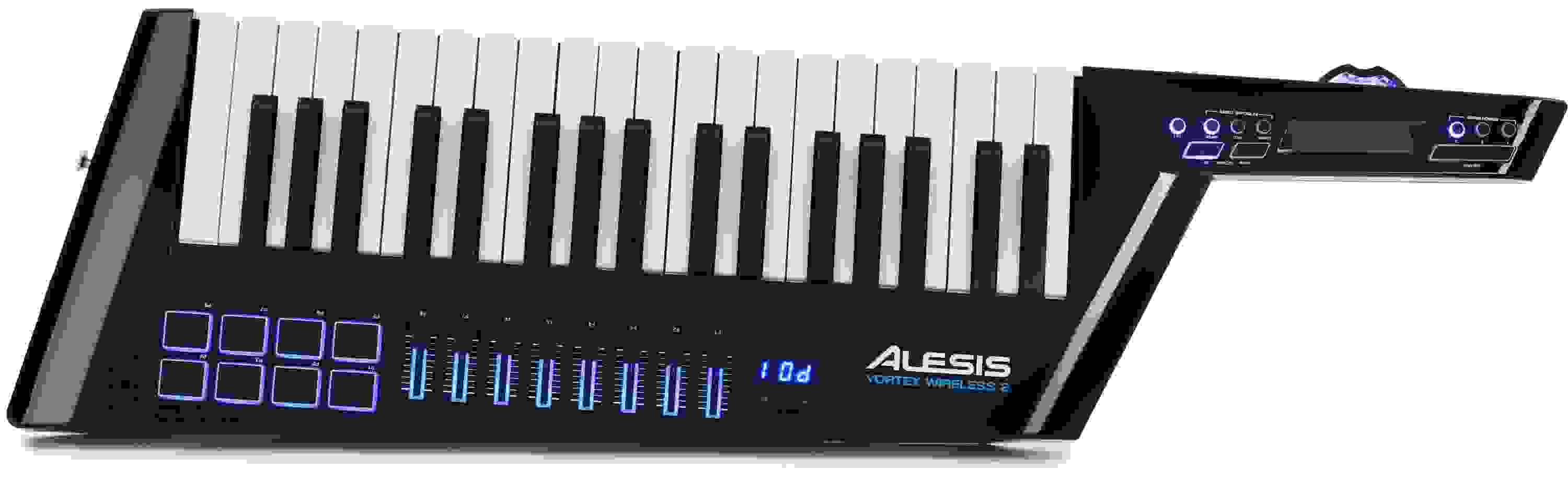
Alesis Vortex Wireless 2 Keyboard Controller
Item ID: VortexKBW2d2
Alesis Vortex Wireless 2 Keyboard Controller
Reviews for

Alesis Vortex Wireless 2 Keyboard Controller Reviews

37-key Wireless USB Keytar Controller with Assignable Touch Strip, RGB Trigger Pads, Back-lit Faders, Volume Slider, Pitch Wheel, USB and MIDI Connectivity, and USB Bus Power

You'll be hooked on the freedom of performing live with the next-generation Alesis Vortex Wireless 2 keytar MIDI controller. With updated ergonomics for improved playability, a more robust housing, and a streamlined control layout, you'll have powerful control over your software instruments and sound modules, while the included USB dongle lets you connect to any computer wirelessly. You can load up your favorite software instruments, then rock out on stage with your band. Even the most traditional keyboardists at Sweetwater can't deny how much fun it is to strap on a keytar and let loose. Whether you want more freedom onstage, or just want to cut down on cables in your studio, you'll love the Alesis Vortex Wireless 2 controller. And that gloss-black finish looks totally stunning under the stage lights!

More Details
Price:$350 and 10 cents
Savings: $38.90

New for $389.00

$59.00 suggested monthly payments with 6 month financing‡ 36 month financing available* with $399.00 minimum purchase on one invoice.
Add to Cart
Page 1 of 1
October 7, 2025

A Downgrade from the previous Vortex Keytars

By Sam R.
Music Background: Composer

If you have never owned a keytar before, this is not really a terrible choice, but I would probably recommend the original Vortex keytar over this one for build quality and durability.


I have two main issues with this keytar, the first of which is that the general quality of the plastic, controls, keys, and knobs is not incredibly high. I originally used the USB-out as the power source when composing in FL studio, but it quickly stopped working. It is fairly common for the USB-out to get fried or damaged on midi controllers, but you can usually use an AC adapter along with a midi-to-USB converter cable. For some reason, they decided to remove the AC adapter option from the first model Vortex keytar, so you have to use batteries or the USB-out for power on this model. Eventually, the batteries stopped working for me as well, seemingly because the connectors no longer recognized when batteries were placed in the keytar.


The second issue with this keytar is definitely the largest problem. This is a midi controller, so its primary function is to be customized while running through another system, whether that be a midi-module, workstation, or even a DAW. The only possible way to edit the presets and get the functionality that you're looking for out of this keytar (unless you're assigning things in the DAW) is to use the software that Alesis provides on their website, while running the USB-out into the computer. It is very handy that they have so many different banks for presets on the keytar, (20+ separate customizable banks, many more than the first Vortex model) which essentially allows you to store your entire setlist. The problem is that if the USB-out ever fails, or if your operating system is out of date, or even is too modern, support for the editor/software may no longer be offered. It almost completely defeats the point of having a midi controller, especially since the eight sliders on the face of the keytar are seemingly only able to be used with assigned functionality from the software. The first Vortex model allowed you to edit the presets by using the buttons on the front of the keytar. It was extremely convoluted to navigate the menus on a tiny keytar screen that basically only showed a couple numbers, but with enough time and patience it could be done. This was incredibly handy, especially if there was any last minute change that needed to be improvised for your set/sound settings when you have no access to a computer.


The last point I should probably address is simply the wireless functionality of the keytar. It comes with a USB dongle they can be plugged into your computer and used with VSTs and DAWs. Once again, I have read that it is not very reliable for live shows. It is however, very handy when composing in a DAW, especially if your setup already has a bunch of cables. You will have to rely on AA batteries, but you no longer have to use the USB-out or the midi-out. The only problem is that the dongles are extremely hard to replace. Additionally, if you do get a replacement dongle, I believe the USB-out is still required in order to pair the keytar with the dongle. If the USB-out stops working, (which again, is fairly common with midi controllers) you will not be able to use the wireless function either after the dongle is replaced.


Overall, if you are looking for a good starting point/midi controller for a keytar, I would highly recommend getting the first Vortex model instead. You will need to take some extra time to learn the manual if you are editing the presets on the fly, but it is more durable, cheaper, more reliable, and even provides an output for a sustain pedal! Just be conscious of whether or not you are buying the "wireless" version of the first model.


The Vortex Wireless 2 is unfortunately not a keytar that people will remember because of its poor functionality, and can't really be used without the online software.

Read More
January 25, 2025

Well designed and works very well.

By Tracy C. from Belleview, FL
Music Background: Musician, Composer, sample library developer

I bought this over a month ago but waited till I actually used it in a concert to write a review. Despite what I'd read in other reviews, the build quality seems very good, and the action is fine - better that several other lower cost keyboards I've bought in the last few years.
The wireless works well as long as the USB dongle is in clear sight while you are playing. If you plug the USB dongle into your the side of your laptop, you will get (or I got) a range of maybe 10 or 15 feet. However, when I used a USB extension cable and attached the dongle to a mic stand I had no problems going anywhere in the church sanctuary, probably over 50 feet. I could certainly play without glitches anywhere on a large stage as long as the receiver dongle was elevated somewhere on or near the stage.
My only complaints are that I had to use a PC rather than a Mac in order to use the editing app (the Mac one didn't seem to work well), and that you can't set the thing down anywhere on end due to it's shape, so I just laid it down flat until I needed it.
The Vortex did not disappoint, and did a great job live.

Read More
August 10, 2023

Love it, but...

By Thomas G. from Chicago, IL

I like much about it, and it works great. But the editor software has not been updated and therefore runs only on old Macs (intel 32 bit) with an old OS (older than 2019). Anything newer rejects the software installer. That's a huge problem because you can only program the buttons, sliders and pads on this keytar with the software editor. I have an old computer that can run the editor, but if you don't have that, you will be disappointed. Alesis has no intention to update the editor, nor will it make one for iPhone or iPad. No idea if it runs on new PCs though. Not cool, Alesis!

October 18, 2022

alesis is crap company with no support

By kangaroo from TX

the software is not updated to work on current apple computers, the customer support is non existant, i'm sure this cheap feeling plastic keyboard could be great if there was a company that actually backed the product.
and on top of that, half of the vst's are not even valid
save your money and get something from a company that isn't dead

March 25, 2022

Wow

By Daniel A. from FORT BRAGG, CA

Nothing like it on the market. Fantastic.

September 30, 2021

What I always wanted!

By Emmanuel L. from El Paso, Texas
Music Background: Enthousiast

My Vortex II is a really fun instrument! This is THE keytar that will be a show-stopper for live events!

February 19, 2020

Very poor for any live performance

By Sweetwater Customer from New South Wales
Music Background: teacher and musician

Can't send program change messages via wireless connection and often crashes software or has an issue endlessly sustaining notes. I don't get through a 45 min set without having notes randomly sustaining.

August 31, 2018

A decent toy, but not for stage use

By Matthew E. from Edmonds, WA
Music Background: Full-time performing artist (rock, pop, EDM) since 2007.

I bought the Vortex Wireless II so I could use it behind the decks as a DJ/performer. It's a fun toy in the studio, but it has failed me at every single live performance thus far.

The biggest failing is its most attractive feature: wireless. In the studio where I've got only a single mic and monitor competing for radio bandwidth, the Vortex works just fine. I can jam all the way to the front couches before it starts losing signal.

At EVERY SINGLE performance on a real stage, however, I can only stray a few feet from the receiver before glitches occur. At that range I might as well just use a cable, but I bought this thing so I could jump on the dance floor.

The glitches are infuriating when you're trying to play a solo at the foot of the stage: Notes will randomly sustain with no means of stopping them besides a MIDI Panic message. Some notes will lag by as much as half a second before sounding, making it sound like my rhythm is godawful. CC messages are the same– laggy and inconsistent.

Even while standing right next to the receiver, glissandos are impossible. Almost every time I try one, a note will become "stuck" on (presumably because the receiver missed its note-off message for that note). The only way to "un-stick" the note is to play it again. By itself.

Sometimes a note will similarly stick when switching zones/layers. If that happens, you have to go BACK to the original zone, hit the offending note (if you can find it), and try again. So much for being able to quickly switch from one instrument to another for a solo section.

The available velocity maps are all somewhat terrible. No matter what map I've selected, they all feel like a lightswitch. I'm either playing in mud or banging the keys with an iron fist.

I have high hopes that these problems can be overcome with better error correction and changes via firmware, but until then this toy is pretty much useless on stage. If I can't move more than a few feet, I may as well just use a real keyboard.

Can't wait to see what OTHER keytars come out now that everyone's nuts about the 80's again.

Read More
August 22, 2018

Alesis Vortex 2 Wireless

By Clint M. from Morriston , Fl.
Music Background: Professional Musician and Producer

the Alesis Vortex 2 Wireless is something I have been looking for . This gives keyboard players the freedom to get from behind your banks of keyboards and join in on all the fun out front of the stage and as a sound man it allows me to get out front and check the mix to make sure everything sounds great in our band .

July 22, 2018

AMAZING WIRELESS KEYTAR

By William C. from New Orleans
Music Background: Piano

This is my favorite thing in the world! I bought a USB MIDI-DIN converter box and plugged the wireless dongle into that, and then the 5 pin MIDI DIN out cable into the MIDI IN in the back of my vintage Korg Poly-800II and BOOM! I have wireless control of my vintage synth!!! I don't hear any latency AT ALL!

I didn't map anything, yet the pitch bend wheel works immediately, the ribbon bar controls the DCO vibrato, and the +/- (up, down) button changes the patch (though doesn't cycle through all for some reason, stops in the 40's, so if you want to use live, keep all your necessary patches within 11-41)!

I really want to get into mapping more MIDI control, but I have a bit more to learn about that first. Right out of the box, it works perfectly for what I want it to do, and that is control and perform 80's synth sounds with a KEYTAR! No more standing at a keyboard, but playing expressively standing up and jamming with the guitarist!!! So much fun. Highly recommended. My only gripe is that you cannot change the LED colors of the faders, just the pads. I want to paint this thing metallic gold but I want the faders to be GREEN. If Alesis can make an update to the firmware to change these (if possible) too, that would be EPIC!!!

Read More
July 6, 2018

Refund Please

By Dwayne from Louisiana
Music Background: 40 years plying live and hopefully more ahead

Not sure how this is still for sale?
There is a terrible hung note bug on this unit and after waiting and working with Alesis support for 2 months and patches it still can't be relied upon to play out live.

Very nice otherwise and was very happy to get my hands on it, but the company is not doing anything to help us. Still have the box. Can I just return it for a refund or store credit? The bad rating is because the problem is still not fixed.

May 29, 2018

Stuck notes

By CND from VA

Loving everything about this portable keyboard, except the stuck notes (in wireless mode). They happen a lot even when I am a few feet away from the USB receiver. I consider this issue to be a fatal flaw which defeats the main purpose of this keytar: to perform live in front of an audience. Hopefully it can be fixed with a firmware update.

The included software synths/VSTs sound great.

May 28, 2018

Good Product, but One Major Gripe!

By Andrew P. from Cedar Park, TX
Music Background: Live keys, Composition

Being the only keytar controller on the market, you don't have many options.

Whether Alesis is taking advantage of this, I can't be sure. They've made a good product, but the construction is all plastic, even the wireless dongle, and my confidence in the durability was immediately shaken. The dongle is massive and split along the seam when I set my laptop down at an angle with it docked. Luckily, it's still functional, but I can be thankful there's also a Midi-through-USB cable included.

I understand the desire to create a light instrument easy to hold for hours of playing, but this thing is lighter than an electric guitar and definitely could benefit from some aluminum in the chassis. Feels cheaply made. You're really paying for the software bundle. Ehhh... Wouldn't recommend, at least until Alesis puts out a better-feeling instrument.

Read More
April 9, 2018

One of the best things I've ever purchased

By Jpoole
Music Background: Youth Worship Leader

I knew from the start that I had to purchase this product from Sweetwater, not only for the warranty, but also for the service and customer support. I intend to use this instrument in a worship setting, for weeks when my church's worship team doesn't have a bass or electric guitarist. I gotta say, you won't see many high-schoolers with a keytar, because it's very unique. Overall, this is an awesome product! It's much improved from the original vortex, and even the vortex wireless. One thing I wish they could include is more information on the softwares included. Me having a musical and technology background, it was pretty straightforward to figure out. But I can see some people having a difficult time with this. For me, it was literally plug-in and play! It was so awesome to not have to mess around with any drivers! And let me just say...the accelerometer, (tilt-sensor) is AMAZING! It is so much fun to just hit a note and fling the thing up in the air...makes me feel like a guitar-hero! I would definitely recommend this product to anyone looking for a fun midi-controller, and I will definitely be buying from Sweetwater in the future!

Read More
April 8, 2018

Innovation with Typical Alesis Bang for the Buck

By Rod from Hollywood, FL
Music Background: lifelong musician/technogeek

Not only does the Vortex have virtually no competition, it is very affordable while offering a ton of great features. The wireless MIDI works flawlessly and requires virtually no setup. The pitch wheel has a nice feel, and the colored lighting looks cool. I don't intend to use the pads or the sliders much because I'm mainly a traditional player, not a programmer, but I'm sure they will come in handy from time to time. EDM-oriented producers will definitely use it. I haven't tried the tilt control yet so I can't comment on how well that works in a performance. There's tons of great software included; I haven't even begun to scratch the surface of all the new synth sounds. 37 full-sized keys is the perfect size for a keytar in my opinion.
What could be better: The odd body shape means you will need a special guitar stand like the one Fender makes for the flying V rock guitar designs. They could have made the body slimmer and lighter. The keyboard feel is not my favorite; the keys are too stiff compared to Roland and Yamaha keyboards that I own. The position of the ribbon controller could be better; it's too easy to touch unintentionally. The included strap is short and cheap looking, and the paper-thin cover is almost worthless. Alesis should offer a decent case at least as an accessory option.

Read More
February 24, 2018

New Keytar

By Sweetwater Customer

Still working out how to get it going with my other gear, but this is a winner from my prescriptive. The options are endless with is, so I look forward to getting this gig ready.

February 17, 2018

The Good, The Bad and the Less Ugly

By Shane K. from New York City

I got my Vortex the other day and can give my first impressions thoughts on these keyboards in general.

The Good: This unit is a definite improvement over the original. Alesis claim a better built quality and I can agree with that. The keybed definitely feels better. The original had some of the crappiest feeling keys, spongy, no feel. This one, while not as good as my Casio AZ-1, is much improved. Aftertouch is ESSENTIAL on this style of keyboard and works well on this unit. I like that the tilt sensor is now defeatable with a button, I ended up never using it on the original. I have tried calibrating this one according to the manual but can"t really get it where I want it but being able to toggle means it could be useful. The pads are WAY better. The original pads were basically useless. I am very happy that the colors can be changed or turned off completely. And that the pads can be momentary or toggled is important for how I play live. I wish they transmitted poly aftertouch some other continuous controller when pressed on but I can live with it.
The ribbon control both feels better and is placed better. On my original I couldn"t use it for pitch bend because when I got to the max it would snap back to zero. I still don"t like the pitch wheel being where it is, that is not a natural place and it makes it hard to use pitch bend and the ribbon at the same time, which I do a lot. The wheel is a bit bigger, I"m not sure how I feel about that, and rubberized, so it is easier to grab. Practice will help but that isn"t ideal. I would greatly prefer wheels like the AZ-1, which is my benchmark for this style of keyboard. Speaking of which, I so wish this had 41 keys. C to C just is too small, getting up to E is better.
I like that the volume slider is assignable. I think I"m more likely to use it for a different controller. I wish that the sustain button were also assignable. I think that the faders will be useful. They don"t feel amazing but I wasn"t expecting amazing. I won"t miss the lack of onboard programability, it was very unintuitive and the new version of the editor software is pretty good. I won"t miss the annoying LEDs that the original had, those were very cheesy.
I haven"t had a lot of time to play with it so I can"t give much of a review of how good the wireless is. I did have a stuck note playing with it, that is never good. I don"t know if I"ll end up using it"s built in wireless anyway, I have the Panda-Audio MidiBeam and that thing is rock solid, never had a stuck note and have never exceeded it"s range. If you want wireless MIDI, buy one.

The Bad: Take a look at the shape. Take a look at where the ports are. Now tell me how I am supposed to set this down on stage when I"m not using it. I don"t want to have to bring a guitar stand. I get to most of my gigs on the subway and can"t carry extra stuff. The ports should not be on the bottom, they should be NEAR the bottom on the side of the thing. I really wish that the manufacturers would talk to actual users when designing these things.
A real pitch wheel would be so much better.
There is no ability to edit how the aftertouch responds but it seemed just about right to me.
The included strap is too short. One typically wears these a bit low and the included strap wants it up high in a very uncomfortable position for the wrists. I installed a DiMarzio Cliplock strap to mine, having the strap come off mid performance sucks and a great way to break the unit.
The demo where the Alesis guy is playing guitar sounds? Yeah, don"t do that. Cheesy. CHEESY!!! It isn"t a guitar.

Of this style of keyboard the Alesis is easily the best of the recent crop. The AX-Synth was too big, too expensive and has an unnecessary sound engine. (these keyboards should only ever be controllers) The AX-9 less offensive but still just not designed by someone who would ever actually use it. The Korg is an absolute joke. There isn"t one single thing they got right with that keyboard. That leaves the Vortex. Alesis have done a good job updating it, I just wish they would consult with the people who actually use them.

Read More
February 14, 2018

Beautiful

By Jonathan C. from Orlando, FL
Music Background: Singer/Songwriter

It runs like a dream and i appreciated on buying one, thanks Sweetwater.

of

Have Questions About the Vortex Wireless 2 Keyboard Controller?

Or call us at (800) 222-4700

Questions about the Alesis Vortex Wireless 2 Keyboard Controller?

Sweetwater's Sales Engineers are regarded as the most experienced and knowledgeable professionals in the music industry, with extensive music backgrounds and intense training on the latest products and technologies. They are available to offer you personalized product advice any time you need it.

Type your question below or call us at (800) 222-4700
Thank You!