
Edit Like a Pro
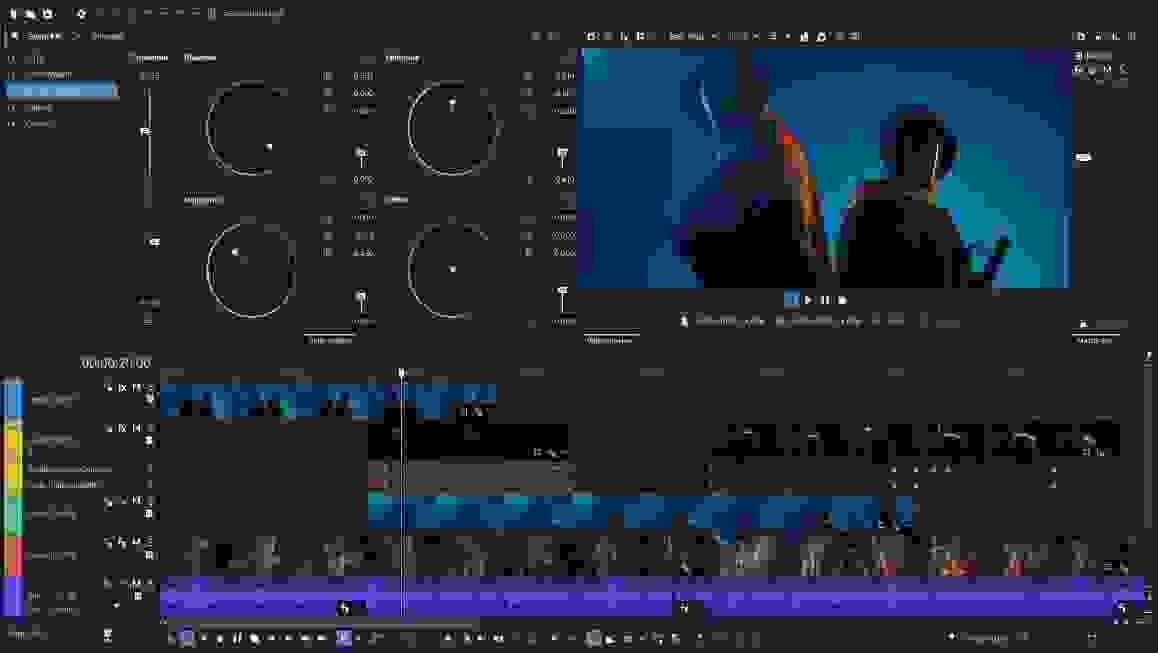
In today’s high-energy and ever-evolving content creation landscape, having the right video editing software in your corner to help polish your projects is an absolute game changer. Enter Vegas Pro 23 from MAGIX. This workhorse video editor for Windows systems packs a staggering number of helpful tools and features to give your videos the clean-cut glow they deserve. Backed by the overhauled Vegas Core Engine, Vegas Pro 23 delivers advanced color-grading, streamlined rendering, and smoother preview playback — all within a thoroughly modern user interface. It's also a next-gen cloud-integrated creation platform, empowering you to edit, manage, and deliver your content faster than ever before. Moreover, an expansive and powerful library of effects and seamless footage blending with 3D generations helps expand the horizons of your creativity. With Vegas Pro 23 from MAGIX and Sweetwater at your side, leveling up the quality of your creative content has never been easier!
Related Videos: Vegas Pro 23 Video Editing Software
Powerful new features
While Vegas Pro 23 offers a handful of new improvements, you’ll find its upgraded Vegas Core Engine among the most impressive; it leverages DirectX-based GPU acceleration to deliver advanced color-grading, streamlined rendering, and timeline-integrated VFX animation tools. Additionally, KeyFrame Animation on the timeline yields extremely efficient compositing. You'll find that Vegas Pro 23's enhanced user interface adapts flawlessly to your personal workflow, and the unified Explorer Window makes media management effortless. You also get revamped render dialog that makes determining optimal render settings faster than ever. Vegas Pro 23 comes with a fully integrated Modern Equalizer for high-precision audio shaping, and you can save your go-to effect chains as FX Packages. Finally, Vegas Capture 2.0 supplies you with fast, easy screen recordings.


Astounding color and quality control
Not only does Vegas Pro 23 offer some stellar AI-backed functions, but its color-perfecting competencies are second to none. You’ll have the last word over hue, saturation, luminance, and more, ensuring that your final products really shine with the proper color coordination. Additionally, you’re in the driver’s seat when it comes to controlling footage quality that tends to suffer from the par-for-the-course hindrances of capturing out in the field. Be it instability, light flicker, black bar filler, or beyond, Vegas Pro 23 is ready to step up to the plate and find a fix.
Phenomenal effects integration
Besides granting your captured footage a professional-grade presentation, Vegas Pro 23 offers some stellar integration options with computer-generated effects. You’ve got the power to add 3D models and animations to your project with seamless blending in ultra-high quality, complete with shadow casting, lighting effects, and myriad other selections. Plus, Vegas Pro 23 supplies an enormous library of special effects to give your projects the edge. Polish footage with realistic lens flares, warps, and other exciting effects, and watch firsthand as your creative ideas transform into full-fledged productions.

MAGIX Vegas Pro 23 Features:
- Fantastic video editing software for movies and content creation
- Upgraded Vegas Core Engine delivers advanced color-grading, streamlined rendering, and smoother preview playback
- KeyFrame Animation on the timeline yields extremely efficient compositing
- Enhanced user interface adapts flawlessly to your personal workflow
- Unified Explorer Window makes media management effortless
- Revamped render dialog makes determining optimal render settings faster than ever
- Fully integrated Modern Equalizer provides high-precision audio shaping
- Save your go-to FX chains as FX Packages
- Vegas Capture 2.0 supplies fast, easy screen recordings
- Next-gen cloud-integrated creation platform empowers you to edit, manage, and deliver your content faster than ever before
- AI-driven text-based editing certifies lightning-fast editing when working with interview footage
- AI-automated speech-to-text and text-to-speech functions for transcription, subtitle generation, and voice-over creation
- AI-fueled image enhancement tools
- Beat and tempo detection allow you to make precise cuts on beat and tempo
- Audio synchronization makes assembling multi-cam recordings fast and easy
- Smooth video previews for common codecs, such as AVC, AV1, HEVC, and BRAW
- Optimized media management in the Explorer Window
- Z-Depth compositing uses AI to layer text, graphics, and more into your footage
- AI-automated Smart Masking is engineered for fast and efficient frame-by-frame precision
- Keep the colors of your captured footage in check by utilizing tools for hue, saturation, luminance, and more
- Outstanding footage restoration capabilities eliminate shake, flicker, and other hindrances
- Integrate 3D models with stunning realism and control over lighting, shadows, etc.
- Library of countless effects keeps the creative potential of your projects entirely limitless