
Time-trusted Video Editing Receives a Modern Upgrade
MAGIX’ Vegas Pro 20 has been an industry-standard editing option for years; and it’s easy to see why. Offering a collection of color manipulation tools, visual effects, streaming utilities, and an improved audio capabilities, creating a professional project is made easy on all fronts. Take your mastered video directly to any device with SD, HD, 4K, and 8K video support, as well as scaling templates to fit a variety of devices and programs as soon as you export. With improved AI functionality as well as auto-enhancement tools and coloration, Sweetwater video editors have found Vegas Pro 20 to be efficient and easy in a variety of hands-off situations. If you’re ready to upgrade to professional-grade videography with a user-friendly twist, it’s time to take Vegas Pro 20 into high consideration.
Related Videos: Vegas Pro 20 Video Editing Software
Edit efficiently with time-saving AI utilities
To help you save time during extensive editing sessions, Vegas Pro 20’s AI tools let you easily convert raw video into a display you can be confident about. By letting colorization, content upscaling, and style transfer technology take the reins of your imports, you’ll have easy and instant access to multiple creative possibilities.

10-source streaming capabilities
If you fancy streaming more than video editing, no problem; Vegas Pro 20 has a bundle of opportunities for your live performance setup. You’ll have access to Vegas Stream, an intuitive program allowing you to switch between 10 separate live sources. It also offers easy social media integration and a dynamic graphics collection. When you’re finished, you’ll be able to take recorded data back to the editing table in Vegas Pro 20 to create upload-friendly streaming playback.
Export like a professional
Vegas Pro 20 offers a wide range of export formats to match HD video to several devices. You’ll also be handed a selection of templates to match specific devices and streaming services to ensure your exported files are upload-ready for any given situation. Available export formats include Apple ProRes, HEVC 10bit 4:2:2, Sony XDCAM & XAVC, Panasonic AVCHD, RED RAW, and Blackmagic RAW. Of course, common file type exports can be made for in-a-pinch accessibility.
Create the perfect visual palette
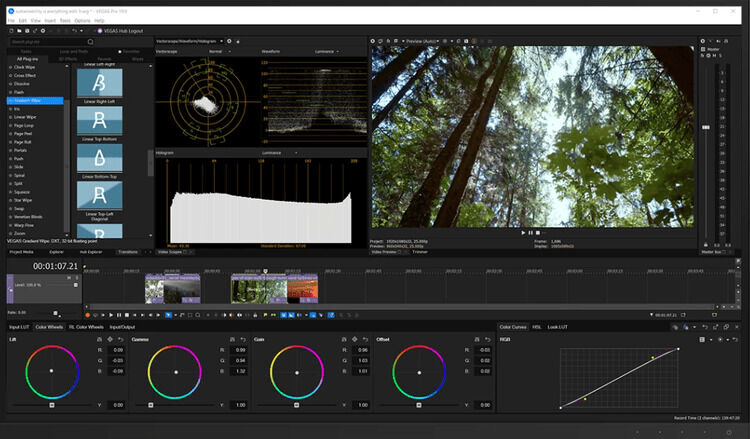
Even with top-of-the-line recording equipment, color enhancement and RGB adjustments are made to add a professional finish to your video. Vegas Pro 20’s HDR color utilities will allow you to manipulate color curves, wheels, and correct white and black color points to bend the visual spectrum so you can find a palette that meets the needs of any project. A collection of professional HDR video scopes are also available to help you hone in on exact parameters. Best of all, you’ll be able to import and export any LUTs you come up with, allowing you to save previous color schemes you find interesting or even share your favorites with other editors.

Impressive audial management for every project
Your video isn’t the only aspect you can optimize in Vegas Pro 20. You’ll have the opportunity to add, mix, and channel multiple audio samples easily with included access to SOUND FORGE Audio Studio. Add in your own custom blend of scores, dialogue, or sound effects with the ability to add reverb and EQ to create an authentic atmosphere to all your video projects. When paired with an enhanced resampling engine and mastering capabilities to add the finishing touch, your final mixes will come out sounding professional and industry-standard.
MAGIX Vegas Pro 20 Video Editing Software Features:
- Create professional video edits with an intuitive interface and a wide range of high-definition export formats including Apple ProRes, HEVC 10bit 4:2:2, Sony XDCAM & XAVC, and more
- Hundreds of pre-loaded effects, filters, transitions, and other creative utilities
- Optimize your video palette with adjustable color curves, correction, and range-limited color wheels
- Stream up to 10 Vegas Pro-editable live sources with Vegas Stream
- Colorization, upscaling, and style transfer AI tools do the work for you, keeping your projects efficiently fast
- Add effects, color correction, and envelopes to multiple tracks at the same time
- Built-in motion tracking can apply titles and data to on-screen objects, with the ability to exclude unwanted objects from detailed view
- An innovative audio editing tool and an arsenal of stock sounds creates automated mixes from scores to sound effects
- Endless creative opportunities with VST3 audio plugin support
- Accurate preview viewing mode provides a near-perfect visual representation of your current project
- Social media project templates create upload-ready video exports