
State-of-the-art Recording, Editing, and Mastering
Magix Sound Forge Pro has long been a top-tier recording, editing, and mastering solution for your Windows PC, and version 14 brings with it creativity-boosting workflow enhancements, a range of precision meters and analyzers, plus a bevy of high-performance under-the-hood changes. Record on up to 32 channels with premium 64-bit/768kHz quality, then edit and master with a bevy of high-quality processors, including iZotope Ozone 9 Elements and RX 7 Elements. Your projects will also benefit from a redeveloped VST engine, additional ARA2 support, and the renowned POW-r dithering algorithms. Red Book-compliant CD authoring capability is also on tap. Whether you need basic 2-track editing or advanced surround-sound mastering, Sound Forge Pro is a great pro-level piece of software.
This is a special offer for users of older Standard/Pro versions of Sound Forge to upgrade to Sound Forge Pro 14 at a reduced cost. Call your Sales Engineer for more details.
Related Videos: Sound Forge Pro 14 Upgrade from older version of Sound Forge Standard / Sound Forge Pro
Powerful new features to turbocharge your productions
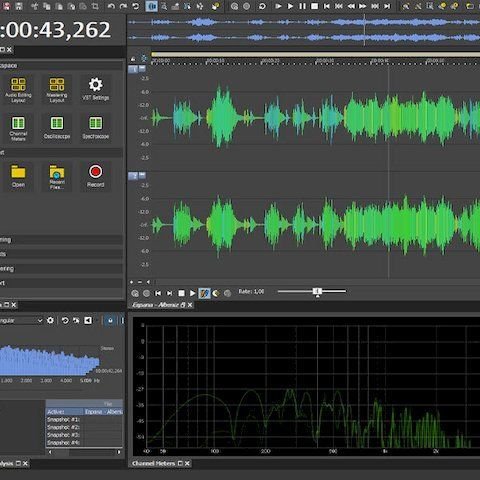
Sound Forge Pro 14 is chock-full of powerful new features. The most obvious is its optimized workflow. An Instant Action window provides split-second access to often-used functions, while Windows context menu enhancements make routine tasks like converting or normalizing an audio file a breeze. You also get a collection of precision meters and analyzers that streamline editing and mastering, such as the innovative WaveColor tool and a powerful spectroscope. Plus, a redeveloped VST engine and additional ARA2 support make using plug-ins faster and easier.

Mind-blowing recording workflow streamlines production
Thanks to its customizable working environment, the engineers here at Sweetwater find that Sound Forge Pro makes capturing audio as productive as possible. Adjust and monitor up to 32 channels of incoming audio, then arm, record, and review your work all in a single workspace. Sound Forge Pro also includes a fantastic Waveform Overview Bar to simplify file navigation and innovative recording options such as one-touch recording and schedule recording for automatic sound capture.
Advanced editing and processing tools for any task
Whether it's mono wave files or multichannel audio, Sound Forge Pro puts sample-accurate editing tools right at your fingertips. The comprehensive Event Tool splits, trims, fades, crossfades, slips, and otherwise manipulates audio throughout the timeline, without fumbling about for the proper function-specific tool. In addition to other advanced processing such as ACID loop creation, Sound Forge Pro includes round-trip workflows for integrating Steinberg’s SpectraLayers Pro editing into your projects. And best of all, the editing environment in Sound Forge Pro is totally customizable.

DSP integration lets you get the most from your audio
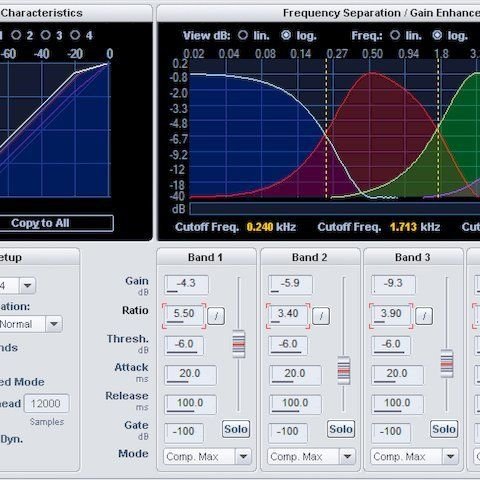
To say there's quite a bit of native DSP in Sound Forge Pro is a bit of an understatement. From mastering to metering to noise reduction and time stretching, Magix packed it all into this awesome application. Mastering effects, including a set of great-sounding coreFX dynamics processors, allow you to polish your tracks to perfection. Wave Hammer 2.0 is also included, supplying you with both a classic compressor and volume maximizer — your masters are sure to sound better than ever! iZotope’s RX 7 Elements put top-tier audio restoration tools at your fingertips. Along with Ozone 9 Elements, you also get a redeveloped VST engine and additional ARA2 support, enabling you integrate to a vast array of third-party plug-ins into your workflow.
Magix Sound Forge Pro 14 Features:
- An amazingly versatile audio editor for Windows PCs that supports up to 32-channel 64-bit/768kHz audio
- 64-bit architecture harnesses all of your computer's power to run large, system-intensive projects
- Powerful recording workflows provide one-touch solutions for most conventional recording tasks
- Instant Action window provides split-second access to often-used functions
- Windows context menu enhancements make routine tasks like converting or normalizing an audio file a breeze
- Puts sample-accurate editing tools right at your fingertips
- Redeveloped VST engine and additional ARA2 support enable you integrate to a vast array of third-party plug-ins into your workflow
- POW-r dithering algorithms ensure great-sounding masters
- Wave Hammer 2.0 supplies you with both a classic compressor and volume maximizer
- iZotope Ozone 9 Elements and RX 7 Elements supply top-tier mastering, repair, and vocal processing
- Mastering effects, including a set of coreFX dynamics processors, allow you to polish your tracks to perfection
- Customizable interface with 4 color levels, new icon design, and docking
- WaveColor tool colorizes a waveform to make it more visible
- Spectroscope offers precise and detailed real-time frequency analysis
- Benefit from video sound optimization without re-rendering
- Use scripting to automate common tasks and create customized features
- Transfer audio data between Sound Forge Pro and Steinberg’s SpectraLayers Pro seamlessly
- Waveform Overview Bar makes file navigation extremely easy
- Input bus effects let you create a vibe for your talent by sweetening your source signal with plug-in effects
- Automatic time-based recording schedules recordings on a recurring basis
- Use the Event Tool to split, trim, fade, crossfade, and perform other essential audio editing
- Open, edit, and save multichannel audio data from XDCAM, field recorders, and surround mixes, with sample-accurate precision
- Create your own loops for use in ACID software
- CALM-targeted metering provides super-accurate loudness metering
- Win the volume war with powerful metering options
- Fully integrated DAO CD mastering generates Red Book-compliant masters for duplication
- Channel Converter tool supports multichannel formats for easy downmixing of multichannel files to stereo or mono
- zplane’s élastiquePro v3 engine ensures natural, artifact-free time stretching and pitch shifting
- Peak Meter V2 displays the precise, current level of an audio signal
- Phase Scope helps you find phase cancellation among the channels in your audio
- Multichannel-capable spectrum analysis shows multiple graphs depicting fundamental frequencies and overtones in your recordings
- Batch conversion applies the same effects and processes to multiple files, saving hours of editing time
- Clipped peak detection and marking automatically scans files and marks clipped peaks
- Noise generators include white, pink, and brown noise for acoustic analysis and synthesis
- Acoustic Mirror software plug-in creates real physical space and signal path environments to your audio