
$6K PRS Line 6 Giveaway

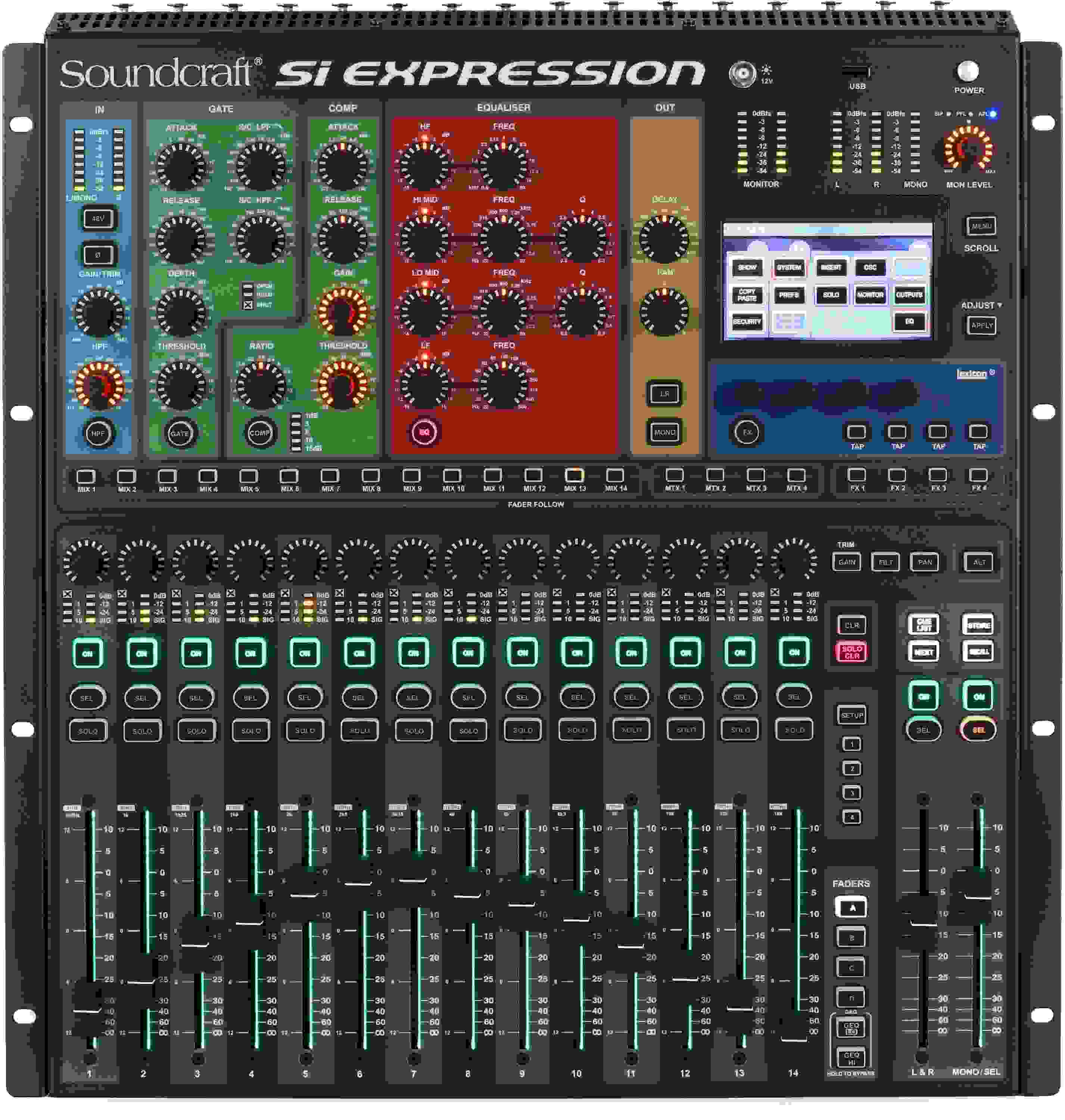
Soundcraft Si Expression 1 16-channel Digital Mixer
Item ID: SiEXP16
Soundcraft Si Expression 1 16-channel Digital Mixer
Reviews for

Soundcraft Si Expression 1 16-channel Digital Mixer Reviews

16-channel Digital Mixer with 16 Mic Pres, 66 Input Processing Channels, Automation, Lexicon Hardware-based Effects, And Expansion Slot

The Soundcraft Si Expression 1 16-channel digital mixer leverages cutting-edge DSP, component technology, and manufacturing techniques to deliver awesome mixing power in a compact, amazingly affordable rackmount package. The Si Expression 1 gives you 16 recallable mic preamps, four line inputs, four internal stereo FX returns, and AES in. A 64 x 64 expansion slot lets you deploy up to 66 input processing channels. Each sports a highpass filter, input delay, gate, compressor, and 4-band EQ. Robust automation and connectivity are the icing on the cake. Take your mixing to the next level, with Soundcraft's Si Expression 1 digital mixer.

More Details
Price:$4,120 and 00 cents
Special Financing - Ends Aug 2, 2026. $115/month with 36 month financing*
Add to Cart
We Can Get It!

While this isn't an item we normally stock, we can still get it to you as fast as possible due to our great relationship with Soundcraft. Go ahead and place your order and we'll follow up shortly to let you know when to expect it. Estimated June 2026.

Page 1 of 1
April 22, 2024

Kind of okay if you have very simple needs/expectations

By Shawn S. from Sugar Land, TX

I have worked with a variety of digital consoles over the years, including models from Yamaha, Behringer, A&H, Midas and PreSonus. Whenever I walk into a venue and they have this particular mixer, my heart sinks. It's kinda okay for simple mixing of live bands, but completely unworkable for plays, musicals or anything where your needs are more complex. The user interface is poorly designed and slow to respond, routing is extremely annoying, and I and other engineers I know have experienced erratic behavior where settings and scenes get inexplicably altered/lost/scrambled. If you look in online forums you will see that this board is widely hated by audio engineers. For the same money, you could do much better with one of the new entry level Yamaha or A&H boards, or for even less money with the Behringer X32 series or Midas M32R.

Read More
December 16, 2017

Good Things In Small Packages

By Sweetwater Customer

I own this console.
Good pres.
Quality compression.
Assignable faders.
Faderglow is very helpful.
Dedicated GEQ is amazing.
Touch screen interface has steeper learning curve.
iPad app needs work.

October 20, 2016

Great board, few quirks

By Sweetwater Customer

Bought the console in 2016, have a lot of consoles but needed another for smaller shows and rentals.

Likes:
-sounds great
-more mix channels than you could imagine in a small format
-reliable (can't say the same for our profile and sc48)
-option cards!

Dislikes:
-it didn't dawn on me until the first gig, it has 14 FADERS! How on earth does someone design a 16 channel console with 14 faders??? Blows my mind.
-then I realized, there's no talkback either! So now I just used up 1 channel for a talkback, again my mind is blown in a not-good way.
-the GUI feels a little rough and unpolished, when compared to our Qu-16 it feels like the Qu is an Apple designed product and the Si Expression is a Nokia phone. It works fine, just needs a major facelift.

We run Waves Multirack Native on it with the Multidigital card and it works flawless. We had to figure it out on our own, as a call to Soundcraft (who answered their phone 1st try) didn't know how to do it.

It's a bit awkward, as you have to set your insert points routing, then assign those inserts to each channel. The strange GUI Behavior kicks in here and when selecting which insert is going to a channel, it won't pop up on the drop down menu unless you first select that channel, completely defeating the drop down menu.

It reminds me of my Eventide stuff, capable of a ton, but the designers are hardcore engineers, not fully understanding a users perspective on how things should work based on simplicity.

If they hired a logical GUI programmer, it would really help this console.

Read More
December 21, 2015

Great Mixer! Will never go back to analog!

By Billy '. from Fullerton, CA
Music Background: Playing music since 1973

Great mixer! Soundcraft nailed it for those who aren't really up to par with digital mixer interfaces.
The amount of equipment you would need in the room with an analog board to emulate the built-in functions are staggering when you consider gates, compressors, eqs, four FX units, etc..
The unit is well made - the entire unit is made of that precious stuff called "metal" - NOT plasticky like some other products.

There are only a few suggestions I can make to Soundcraft for future versions...

1. Your APP for the iPad is quite limited. Might be because you are using a custom interface. You got it nailed with your interface for the Soundcraft UI devices (which also have internal wireless routers).

2. It would have been nice to have several of the inputs to be combo jacks, i.e. 1/4" or XLR, say 6 or so.Yes, you have four 1/4" inputs, and in a way, that actually adds 4 more ( 16 channel has 20 ! ).

3. How you handle FX to the MIX sends is unclear. I found out it was on the B page of the faders, but it should be BLUE faderglow color. It is also not documented anywhere nor is it on any of your videos.

Overall, I love it!

Read More
November 19, 2015

Fantastic Mixer! Realistic price!

By Wild B. from Southern California
Music Background: 42 Years live musician

Great Mixer! Once you do digital, you never go back to analog again!

Note to Michael (previous reviewer). He said you can't send FX to mixes. YES YOU CAN! You select the mix to work with, and select the B page of the faders. The FX are on the very right 4 faders. It's just that they were labeled bad (ST 1 ST 2..). That's how to add FX to the AUX sends.

The amount of analog equipment it would require to emulate a digital board like this would be immense! Just the multi-band EQ's available - one for each and every AUX send, etc., would take up several racks in analog. And then there is the gates, compressors, etc..

In short - IT'S WORTH THE MONEY! And to be able to sit at the back of the venue and adjust the sound via an iPad = PRICELESS!

June 28, 2015

Amazing Board!! Sound and Workflow!

By Aaron from Phoenix, Arizona
Music Background: Over 15 years playing, engineering, recording. Very Experienced.

I've been in the Pro Audio business as an engineer and musician for over 15 years and have gone through many boards in my time and always got the sound I wanted with whatever work it took. I would always get compliments on our sound (I'm always mixing and playing in these bands ). When I finally made the switch to a digital board to get rid of my older analog board with inserts for the 18 space rack of compressors, effects, headphone amps, ect. I looked/listened to all the comparable boards very closely and decided on the Soundcraft as I liked the workflow and they've always made quality products for years, and I'm glad i did. It sounds amazing and I get told that at every show! I'm playing with the band while I'm mixing a bit after I do a soundcheck with my ipad out in the audience. We play Americana, Folk, Bluegrass;3 vocals, Harmonica, 2 - Collins acoustics guitars, Weber mandolin, and electric Fender bass (DIs -Fishmen Platium, Fireeye Red-eye,L.R.Baggs ParaDI, Radial J48, SansAmp BassDriver). We Also switched in instruments such as, banjo, melodica, slide guitar, papoose. Being able to double patch inputs while maintaining different settings is great for some instruments that I can just plugin and switch channels so the EQ, Compressor setting are properly set for that instrument even though it's on the same input, so great! I've had to do so much less EQing on instruments than in the past, as they just separate in the mix so nicely and the vocals are just crystal clear and warm (I run a mono mix to btw). I do use subgroups and even compressed subgroups, I will say I'm experienced in this area, so I can't say someone new to live sound would easily get the same results as I do because it took years to tune and use my ears properly. I will say though that this board give you many options to grow into and great options to have such as Maxtix mixes, just rececetly did a gig on a boat where they needed a line from me to feed their board speakers throughout the upper and lower deck, took a second and they had the same great mix as the people in front of us and I was able to go downstairs and EQ the Matrix mix to fit the smaller speakers the board had.
I also have the Multi-Digital card and that is useful in more ways than just recording and playback.

I could go on and on about this board and the features.

One negative is that in the sunlight is very hard to see whats lit up and whats not... the buttons and the faderglow, I use an ipad on my mic stand for mixing so most the time I can see from the iPad just fine but when at the board, it'd be a huge problem or at least make thing a lot more challenging.
All in all, it's an amazing board for many reasons, but what I love most is the sound and it seems that what most other people like too without even knowing it.

Read More
June 23, 2015

Great board, poor iPad App

By Michael
Music Background: Professional Audio Engineer, Musician

I have used this board for about a year now and have many positive things to say about it.

The work flow is excellent and I really appreciate having all of the most commonly used parameters (compressor, limiter, gate etc.) located at the top of the board. Just hit the select button on the channel you want to edit and it is all right there at the top of the board. No menu's to scroll through. The preamps also are excellent. Setting up Aux sends is also incredibly easy on this board. Press the Mix 1 button and the faders now become sends to that particular aux output. Makes monitor mixing a breeze. The color coded faders also makes for a quick visual reference as to which layer you are on.

I do have several small criticisms. First of all, Only the first 14 channels are on the first layer. Having just 2 channels on the second layer is really a workflow headache. Wish they could have fit them all in on one layer.

Next, the iPad app is really poor compared to the X32, Roland M series and PreSonus. There is no input metering available on the main mix screen which makes you feel like you are working blind. You also can't adjust gain levels, access effects or numerous other features. Basically you can mix FOH and adjust monitor sends, compressor, gate and EQ. That's about it. If they would upgrade their app, this board would dominate this price point. Effects also get a deduction from me. You can only route effects to your FOH mix and not to the monitors. Many a vocalists likes a little reverb in their monitors and you can't do that with this board where as you can with Roland, PreSonus and other boards at this price point.

Overall, it is a great sounding board that is easy to work with. However, the shortcomings I noted above keep it from being a 5 star rating.

Read More
January 12, 2015

Great Mixer

By Nicholas F. from Petal, MS
Music Background: Pro Musician

This is a great board, easy to navigate with the color glow feature. I have used board for about year now, and very pleased with it. Used in acoustic setting, and recently using in band setting, works great in both.

April 30, 2013

Best Console Ever

By Jonathan from Atlanta
Music Background: Live Sound Engineer

I have used Si Expression for over a month.Man!!!The flexibility it offers are just mind blowing.I wouldn't want to even think of any other console.Absolutely Fantastic.

of

Have Questions About the Si Expression 1 16-channel Digital Mixer?

Or call us at (800) 222-4700

Questions about the Soundcraft Si Expression 1 16-channel Digital...?

Sweetwater's Sales Engineers are regarded as the most experienced and knowledgeable professionals in the music industry, with extensive music backgrounds and intense training on the latest products and technologies. They are available to offer you personalized product advice any time you need it.

Type your question below or call us at (800) 222-4700
Thank You!