
New Softube Flow Studio Controller

Studiologic SL Mixface Control Surface
Item ID: SLMixfaced6
Studiologic SL Mixface Control Surface
Reviews for

Studiologic SL Mixface Control Surface Reviews

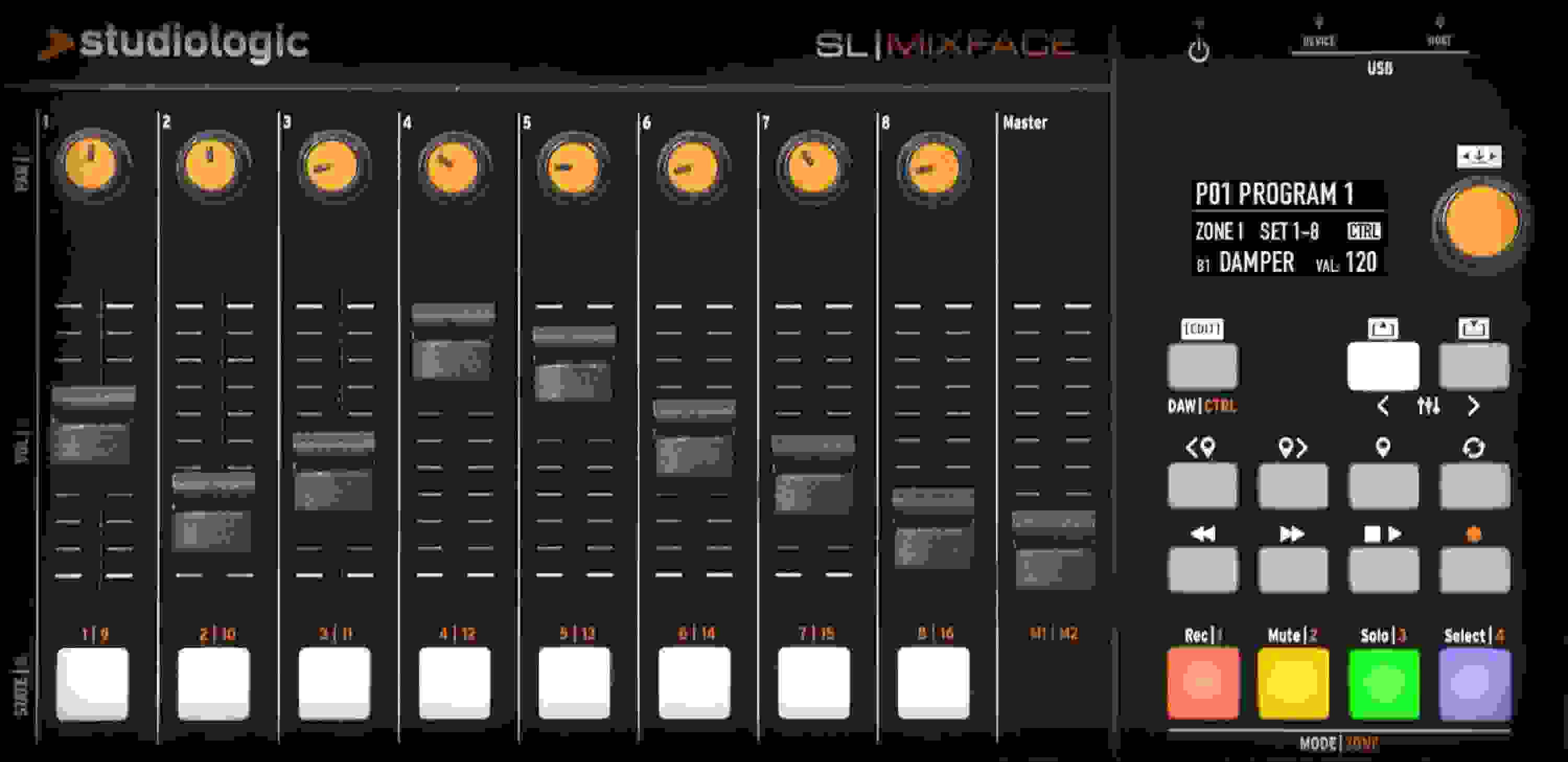
Compact MIDI Controller with 8 Knobs, 9 Sliders, and 8 Buttons; Micro USB-to-device, USB-to-host, and Bluetooth 4.2 Low Energy Connectivity

The Studiologic SL Mixface is a powerful, stylish compact controller designed for maximum mobility. SL Mixface hosts and automaps to major DAW software, so you can bring it everywhere and use it with complete freedom. Its connectivity and internal batteries make it an ideal portable device that's also perfect for your desktop studio setup. With instant DAW/Control mode switching, you're ready to control your DAW and virtual instruments with the press of a button. The Transport controls are always functional whether you're recording, editing sound parameters, or mixing.

More Details
Price:$269 and 96 cents
Savings: $29.99

New for $299.95

$45.00 suggested monthly payments with 6 month financing‡ 36 month financing available* with $399.00 minimum purchase on one invoice.
Add to Cart
Page 1 of 1
March 22, 2026

Great build, limited fader support in LUNA

By Pal from PHOENIX, AZ

The Studiologic SL Mixface is a really well-built and thoughtfully designed controller. The faders feel solid, the knobs are responsive, and overall it has a premium, compact footprint that fits perfectly into a smaller studio setup. For build quality and general usability, it absolutely earns five stars.

Setup was straightforward, and in most DAWs it should integrate well using MCU/HUI protocols. However, if you're using Universal Audio LUNA, there's an important limitation to be aware of.

In LUNA, transport controls, mute/solo, and even pan all work correctly—but the faders do not respond. This appears to be due to how LUNA handles MCU data, specifically high-resolution fader (pitch bend) messages. The Mixface is sending the data, but LUNA doesn't fully interpret it.

So while the unit itself is excellent, LUNA users should know this ends up functioning more like a transport/control device rather than a full mixing surface.

If you're in Logic, Cubase, Studio One, etc., this is a fantastic compact controller. Just be aware of the current limitations with LUNA.

Read More
February 11, 2025

Failed short after warranty expired.

By Doug from Kansas City
Music Background: Hobbyist

I liked the device but was going through chemo when I bought it and gave it minimal use. When I got around to making music again the device worked fine for a couple of months then started behaving oddly till it finally failed. Just outside warranty period. No mercy from Sweetwater or Studio Logic. Repair was not an option. I don't like my Korg Nanokontrol 2's as much, but they do work. I'm not quite willing to spend another $300 on this device.

February 6, 2025

Works flawlessly With Ableton Live (Win 11), Cubase, and Cubasis (iOS)

By M. G. from Florida

Would be a five star review but for a couple reasons:

1) Has a micro USB jack on the device. That is an old connector.

2) Had problems with Studio One 6 (Windows 11) as far as getting it to work properly.

Otherwise, it's an affordable, portable, versatile control surface that works great with various DAWs. It just needs an update to USB C.

May 1, 2024

I don't recommend for Sound Devices 8 series

By Jose P. from Glendale, CA

SD website says it supports this 3rd party controller, but as soon as I plugged it in there were problems. The faders and knobs worked intermittently in both Reaper and Cubase DAW mode and after just 5 minutes my 888 froze up and I had to shut off the machine and disconnect the controller to get up and running again. This is not something that I can have happen to me on set so beware. I'm sure Sweetwater will take care of me, they always do.

November 15, 2023

Needs better quality control!

By Sweetwater Customer from Manassas, VA

There was a fader that the parameters keep moving by itself. It was like it was caught in a loop going up and down. I lost total confidence in the unit right away and had to return it.

I think it is a great controller if you get a working unit. I think SL88 users would benefit the most from this controller. If they come out with a revised model in the future I would give it a try but I will pass on this model.

October 3, 2023

Very functional for the money

By Vlad from USA
Music Background: Arranger, keyboard player

Good and stable midi controller. Flexibly customizable. But if the faders were motorized, I would give it 8 stars. I give 4 stars for the lack of software. Everything needs to be done through menus and submenus and submenus and submenus. Setting up takes a lot of time.

June 5, 2023

Incredible controller with powerful Bluetooth!

By Jim T. from Martinez, CA
Music Background: Jazz, Classical, Gospel, Worship music, home studio recording

Saved my live rig running Omnisphere. This controller sits perfectly on my Nord Piano 5 without moving (it has a magnetic that just latches to my keyboard).

I need a portable, versatile controller to control Omnisphere patches while also playing internal piano patches from my Nord. I also wanted to minimize cable clutter. I was skeptical of of the Bluetooth but that the wireless connectivity running in battery lasted through 3 services on Easter Sunday where each worship set was about 30 min not including warm/up practice.

I also used to control Cubasis on my iPad/Cubase Pro DAW on my laptop when I'm composing on the go. The only challenge I haven't solved is using the usb host for midi pass through. Somehow the port doesn't recognize my keyboard. I'm spite of this I still give it a 5-star!

Shout out to Chris Leonard who convinced me to get this.

Read More
November 14, 2021

Generally good, but one big limitation (power hungry USB)

By Richard P. from Thousand Oaks, CA

I use this to control Omnisphere on my Mac, which works perfectly because you get 8 sounds to choose and modulate. The problem is that it evidently uses a lot of power over usb, which either drains your computer slowly (even when plugged in), which can lead to a catastrophic power drain in long sets. I plan to unplug it and use batteries and run it bluetooth, which should help, but it would have been nice to be able to run it USB only.

November 8, 2021

Beware - SL Mixface does not work with Pro Tools 2021!

By Brian B. from New York City

Using the SL Mixface with Pro Tools 2021, the cursor buttons that allows you to shift from channels 1-8 to 9-16 etc. do not operate. SL customer service say that they did not receive a copy of Pro Tools 2021 and so were unable to test the Mixface on this latest version. Very frustrating for those of us who purchased this for use with previous versions of Pro Tools (2019, 2020).

September 29, 2021

WARNING

By Angel
Music Background: Music Producer

This thing its gonna move by itself it can screwup a mix in no time, discontinued immediately from my workflow.

July 10, 2021

Exactly what I’ve been looking for

By Ryan from Los Angeles

Small yet powerful. The SL Mixface really sped up my workflow and I love that it's compatible with every DAW I use as well as being able to control my plug-ins from it as well! Honestly, I haven't found a mixer like this one that's better, especially with how affordable it is.

June 15, 2020

Good....but

By Johnny B. from Valley Center, CA

Unit is trying to do two things, does either well, but ends up doing neither as well as it should.
See final notes.

Physical aspects, buttons, sliders, really good quality.
Soft buttons for transport functions etc. feels good and works well.
Pan buttons are slightly too small, for guys with big hands. But then those really don't get used much.
Screen is a little small but very usable.
The PVC mat that came in the box is really really great. Initially the sliders are stiff, and with the unit on my desk, on the mat the unit doesn't slide around.

The unit didn't work for me at all with the stock firmware; I spent about an hour scratching my head and then used the management software to update the firmware to the newest version which is 1.0.3 I think. And voila suddenly everything worked.
The management software is almost useless in that, all it can do is update the firmware. There is no way to edit the configuration with it. It is almost bizarre in that it should be trivial to be able to update and save the configuration on my computer and then upload it to the device. But it seems you can only do configuration on the device itself.
This is odd.

Couple of issues which need to be addressed in future versions:
1. Big potential problem is the cable connections in the back, they seem weak. With desk space at a premium it would be easy to forget and snap them off.
2. The three way on / off / battery switch is way too small and really awkward to operate.
3. The intensity of the back-light on the screen and buttons is super bright. At night the ambient light in my studio is medium to low. As it is the backlight on the this unit is so bright, it's really distracting. A way to lower the light intensity is needed. Or even to turn the backlight off completely.

Now to the big issue. This is an almost deal breaker to me. DAW vs. Zone mode.
The unit has two modes.
In the DAW mode the unit maps sliders to tracks, and buttons to transport functions.
In the other mode, which we'll call Zone mode you go into the global configuration and assign MIDI CC to sliders, buttons etc.
There is no way to edit any MIDI in DAW mode.
Erm. Huh?
Yes, so when in DAW mode, there is no way to permanently assign any MIDI to any of the sliders, or buttons.
So in DAW mode unless you use the "learn" function to temporarily set a slider to something, there is no way you can record any CC stuff. This is really weird to me, since I want to be in DAW mode and record EXPRESSION etc....
Anyway the unit can't do this.
I don't see much point in DAW mode without the ability to control any MIDI CC.
That's a big issue to me. So right now I'm in Zone mode, because I have to be, in order to map sliders to EXP, DYN etc...

Overall the unit as a vanilla fader, or as a DAW controller is okay.
It should be very simple to change that, which will elevate this unit to the stars.

Read More
February 14, 2020

Perfect!!!

By Sweetwater Customer
Music Background: Retired music professor, composer, electronic musician

The Mixface is beautiful!

The Mixface is very compact, but faders and knobs are full-sized, very smooth and comfortable to operate.
Set-up is a snap. (I'm using it with Cubase.)

It's nice not to have it cluttered up with more buttons and knobs than I need. In DAW mode, it's a mixing surface. Push a button, and it's in control mode for automation reusing the same faders and dials.

I'm very impressed with the quality, design and operation of Mixface and love that it is so full-featured while using such a small space in the corner of my studio desk. I love that it tilts, giving more options for placement.

Also -- its really beautiful to look at!

April 18, 2019

Does A Great Job So Far...

By Santiago from Los Angeles, CA

I bought this unit to work with CuBase 10 and as an articulation fader for Orchestral Samples. Works great for that. Easy to set up in Cubase and use with Spitfire Audio sample libraries. Connects with supplied USB cable and that alone powers it up.

My only complaint is that the fader part where you put your fingers is a bit hard to grab. Your fingers tend to slip off a bit which makes it a little hard to do this with fluid motion. I expect that the faders will loosen more over time. I might have to add some rubber or some type of grip on the top of the fader so fingers will stay.

Otherwise It is a great unit that has many useful applications.

March 6, 2019

All you need to know

By John O. from Modesto, Ca
Music Background: Performer/Passion Project Engineer

Questions you may have: (none of this has to do with a DAW)

• Can I use this to control a module apart from using a computer? Yes, as long as you pair it with a SL-73/SL-88.
• Is the communication between the Mixface and SL-73/88 bidirectional? Absolutely! It"s great. In fact, you can custom associate patches in both to align however you wish. As you choose patches in the SL-73/88, the Mixface jumps to the patch you custom associate with the SL patch.
• Can I enable/disable zones on SL-73/88 with the Mixface? Yes. This is because Mixface/SL communication is bidirectional. This is an awesome feature!
• Can I use all faders as the 9 drawbars of a VST Hammond B3/C3/A100? Yes.
• Can I connect to Bluetooth, Device and Host simultaneously? Yes, BUT the Mixface uses only one Mode at a time, depending on where the active zone is directed. You can only use one Mixface zone at a time and one communication method at a time.
• Can this be used with Windows? Yes, provided you intall MIDIberry and and Loopmidi and create virtual ports with loopmidi (look up my video on youtube by searching "Mixface Reviews."
• Can I run everything when only powered by batteries? Yes, absolutely. Total battery life is good for only one gig. Replace per gig. It uses 3 AAA batteries.
• Do I have to have the Mixface connected directly to a computer to use it? Not necessarily. You can use BT or Host. These connect to computer wirelessly, or via host to go through the SL-73/88. Using a different brand/type of keyboard connected to the Host port means that the Mixface is the master and must be connected directly to a computer. With the SL73/88, communication is bidirectional.
• Do I have to have an SL-73/88 to use the Mixface? Not necessarily. HOWEVER, to use all amazing features, you must have the associated SL-73/88 otherwise; the mixface is a mediocre 4 bank midi controller with bluetooth capabilities.
• What is the difference between Device and Host ports? Device port connects to Laptop/Computer for wired data communication and power. Host port is to connect a keyboard/pad controller to pass through the Mixface.

Pros:
Great addition to the SL73/78! Hence the 5 stars, as the cons are not that big a deal to me.
Durable and easy to set up
Magnetic adherence is strong to make it stick to the SL-73/88
Can be battery powered
Has Bluetooth connectivity that is fast
Enable/Disable zones with it. Great feature.

Cons
Can only use one Zone at a time, making it a 4 bank controller, rather than a zone controller, if you use a keyboard other than the SL-73/88
The orange flap has to be flipped up with a butter knife, it can"t be done with the fingers. If you flip it up with one of the tab openings, you may disengage the battery door accidentally. You might unwittingly lose the battery door in that case. Be careful!
Battery door is TOUGH to open and then tough to install securely.
Faders are just a slight bit too stiff for a Hammond player. Hope they loosen!

Read More
of

Have Questions About the SL Mixface Control Surface?

Or call us at (800) 222-4700

Questions about the Studiologic SL Mixface Control Surface?

Sweetwater's Sales Engineers are regarded as the most experienced and knowledgeable professionals in the music industry, with extensive music backgrounds and intense training on the latest products and technologies. They are available to offer you personalized product advice any time you need it.

Type your question below or call us at (800) 222-4700
Thank You!