
$6K PRS Line 6 Giveaway

Nektar Panorama CS12 Channel Strip Controller
Item ID: PanoramaCS12d3
Nektar Panorama CS12 Channel Strip Controller
Reviews for

Nektar Panorama CS12 Channel Strip Controller Reviews

Channel Strip and Plug-in Controller with DAW Integration, Motorized Fader, Rotary Encoders, Transport Buttons, and 3.5" TFT Display

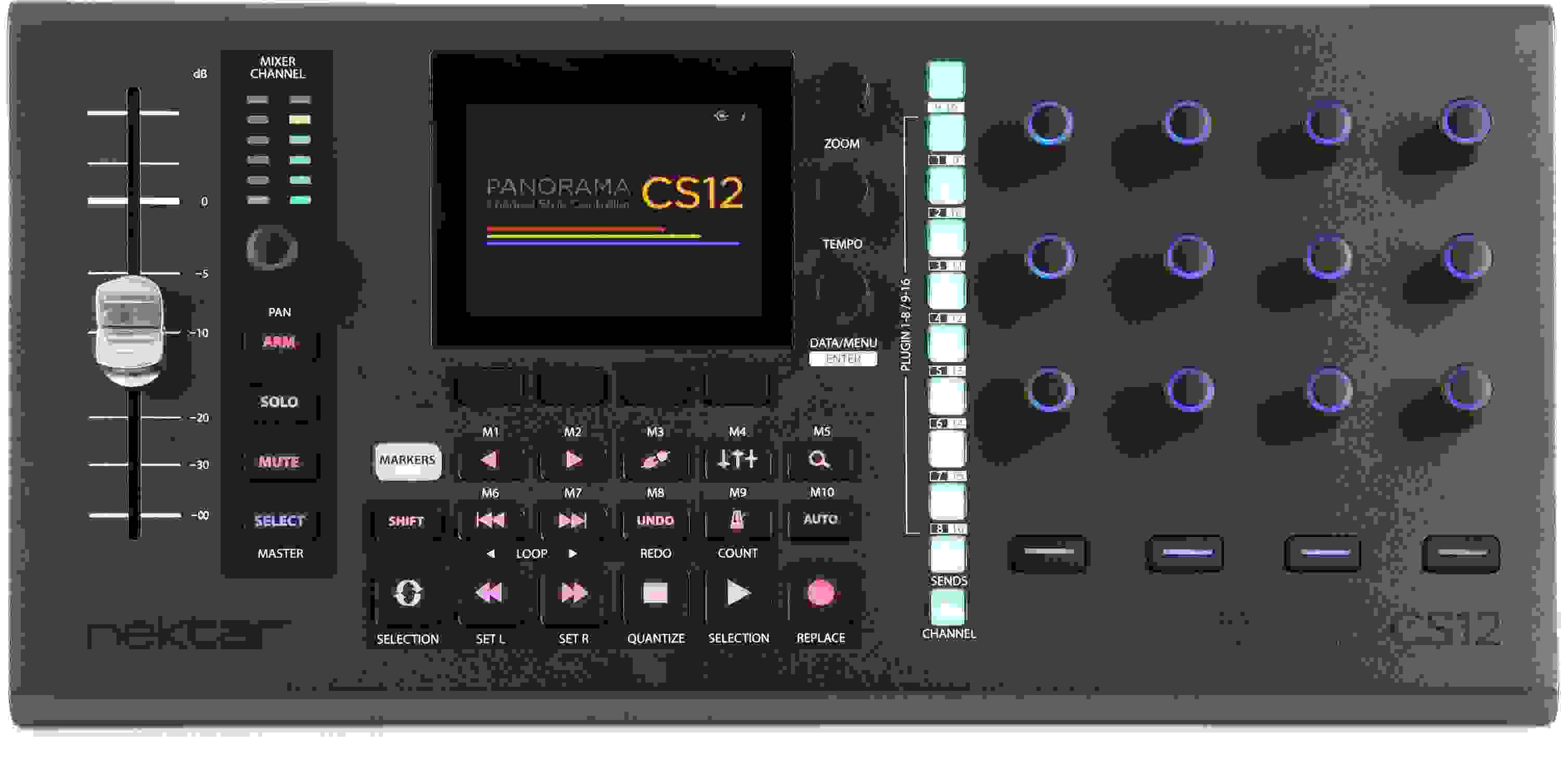
The Nektar Panorama CS12 offers extensive hands-on control over your DAW’s mixer, plug-ins, timeline navigation, transport, and other frequently used parameters. Its Mixer Channel section includes a high-precision motorized fader, a Pan rotary encoder, and dedicated Arm, Solo, Mute, and Select buttons, all complemented by real-time LED metering. Equipped with a 3.5-inch TFT display, the Panorama CS12 shows your plug-ins and control assignments, bolstered by three assignable display encoders and four buttons for parameter control and page selection. This versatile hardware controller features 18 function and navigation buttons, with secondary operations accessible via the Shift button. Additionally, it offers 11 buttons, 13 endless potentiometers, and four extra parameter control buttons, all with RGB illumination. The Panorama CS12 also includes a Fine mode for high-resolution control over its 360-degree rotary encoders and a footswitch socket for hands-free DAW control. Finally, the Panorama CS12 sports a USB-C port and bus-powered design, ensuring hassle-free use with any studio setup.

More Details
Price:$359 and 10 cents
Savings: $39.90

New for $399.00

Special Financing - Ends Aug 2, 2026. $60.00 suggested monthly payments with 6 month financing*
Add to Cart
Page 1 of 1
April 6, 2026

Long Time Owner - Cubase User

By Q from Denver

Hello Everyone, First off when this product first launched there was a fader issue on my unit. Nektar support was 10/10 and even sent me a special USB cable to try before they realized it had to be on the firmware side of things.

First few months - because of the firmware bug I kinda just left it on the shelf. Tried it out when they had a firmware update again - which they do pretty often to be fair so I maybe missed out on an earlier version with the fix.

Post this problem being fixed this is by far the best controller I've ever used. I have the roto control which has motorized faders (would be sick on a cs12 but would probably make it cost way more). I also have the Yamaha CC1 the new half stream deck fader thing.

CS12 fader is soooooo good. If you press shift and tap the fader it goes to 0.0 db which is super nice to reset the fader if you want to reset that tracks volume. You can press select and tap the fader to go to -infinite. That being said this is more of producers tool - some engineers that deal with a lot of automation will love this - but the single fader focus - even though its amazing - i recommend a multiple fader controller over this - if you already have one though this is a great companion.

The ease of use to select a plugin and automate it - so much easier then both the roto control and cc1. CC1 comes kinda close with the AI button that automatically detects a plugin parameter your over (works with cubase plugins and a few 3rd party ones). But this cs12 works with everything!

The hardest part of the cs12 is installing the firmware - the controller itself is so intuitive. I couldn't recommend this product any higher. This is the midi controller I've always dreamed of since I was a kid and I got my first livid instruments controller (rip).

If cubase was smart they would advertise this - it makes the experience of the daw so much better. I've used it with logic pro as well - while im not a logic power user - its incredible in that daw too.

Read More
March 20, 2026

Works great in Logic, slight learning curve

By Ryan M. from Seattle, WA

At first I didn't like it. The auto mapping they did for some of the plugins I use often, I don't love. Remapping is easy once you know how to do it though. It can do a lot, and you really need to read the manual and practice with it a little bit. However, there is not much on the market that has a master fader control, full transport controls and customizable plugin editing.

January 7, 2026

Great DAW controller for Logic Pro

By Ben
Music Background: Producer past five years

I wanted an affordable hardware controller for Logic Pro and the Nektar CS12 works great out of the box once you update the firmware and install the Nektar software for Apple Mac platforms. I still need to map the plugins to all buttons but most work great easily so far. The transport controls work well to play, stop and record tracks and no issues with the main fader as well.


I love using it with the free Logic Pro remote app on my ipad to have the Nektar CS12 as main plugin and transport controller and use the free ipad Logic Pro remote app for the mixer and effects controller and step sequencer.

December 16, 2025

No Better Logic Control Surface, Period.

By Denny from Madison, WI
Music Background: Gigging bassist, Home Studio Enthusiast.

I am NOT a professional studio engineer, so read this review with that in mind.

I do however have a modest home studio, and I know my way around Logic Pro, I have used a few other controllers with Logic, the Presonus Faderport V2 and Fader port 8, iCon V1-M and P1-M.

All of those controllers have their own strengths/weaknesses, but NONE of them have such deep integration in Logic as the CS12, period, full stop. There is NO comparison.

This control surface looks great on my desk next to my iPad (running Logic Remote for the fader control). It functions smoothly, nothing feels really cheap despite the fact that most (or all) of this device is made of plastic. I has a nice weight to it, so it doesn't scoot around while you're using it.

I (so far) haven't had any of the hiccups or glitches others have described, my unit has been rock solid stable, and I've got plenty of hours on it now.

The Nektarine software makes custom plugin mapping an easy process, and lets you get WAY out in the weeds with your custom maps (in case you don't like the existing mapping that's already there). There's also a "quick mapping" feature that makes changing mapping on the fly easy if that's your thing.

Every single plugin has been mapped well enough except one…The Brainworx bx_console N….That one is not mapped correctly, and for whatever reason the device will NOT let you map anything… I let Nektar Tech know, they verified the issue (on their end) and are working on it now.

With every great review there's always some negatives, but in this case I'd just call them shortcomings, or missed opportunities.

1. This thing would be better with at least a metal top panel, what's here is great, but it just doesn't have that polished SSL or Softube look….but it's also half the price so…

2. I would LOVE to see this exact unit with 8 faders…or maybe a Nektar "fader expansion" device I could sit next to this…for now my iPad with Logic Remote works just fine.

3. It's maybe no big deal to some people, but I REALLY miss my jog wheel from the Faderports….yes, I know you can repurpose one of the CS12 knobs as a jog, but that's not what I want.

4. I wish this came with a power supply, my Mac mini is just barely able to power everything, so I use a powered USB hub instead.

Read More
November 3, 2025

Excellent controller for Cubase

By Mark W.
Music Background: long time engineer, mixer and producer.

My work is primarily mixing, and I am glad to finally have a modern controller that can be set up for Cubase. The single fader works well for me, and being able to control clip gain, EQ, and other functions with physical knobs is wonderful. There are a few things I often use, such as combined stereo panner, and those are not yet set up to work with the CS12. However, Nektar says they are working on it and I can always use the trackball or keyboard commands I always used in the meantime. The CS12 is nicely built for a $ item and the lighting options are another great feature. When I select a channel in the computer, the CS12 is immediately there and ready to go to work. Support from Nektar has also been excellent, so consider me a happy new CS12 user!

October 27, 2025

WOW and for this price

By Wayne A. from Ringgold, GA
Music Background: Singer, Songwriter, and producer.

I had been searching for a DAW controller for some time that would work with Cubase Pro. This unit does it all. I will admit that it is a little intimidating as it does so much that it took a minute, a little experimenting, and some reading to get a basic understanding of the controls. The fact that it does control 3rd party plugins as well as the channel strip, I believe, in time will greatly improve my workflow.
One thing I discovered by accident is the marker buttons. I have markers set up in my project, the marker buttons allow me to "jump" to the marker I want and not scroll forward or backwards to get there...how cool is that?
Anyway I am very pleased with this product and only thing I would recommend is that anyone that purchases one be willing to take the time to learn it...the rewards are worth the effort.

Read More
April 12, 2025

AN INVALUABLE TOOL

By Sweetwater Customer from Illinois

One of few devices that claimed to be virtually plug and go accurately. I use it seamlessly and flawlessly with Logic and it vastly improved work-flow. I would recommend this to anyone working with Logic.

April 3, 2025

Fader doesn't work

By Alberto G.

This product has a lot of issues. I want to return it and forget about it, unfortunately I don't live in the US and I bought it there. The fader doesn't work at all, it puts resistance to your finger because it doesn't detect your finger's capacitance. The other controls work sometimes, like 3 out of 5 times. - I regret buying this.

March 11, 2025

As long as this thing is OFF it works great

By Steven S.

Complete garbage. Disconnects, tried different cables, different usb ports, even an entirely different PC -- everything in my rig is stable and runs fine for weeks with no problems, until I turn this POS on -- within minutes, if not seconds Cubase freezes up/hard lock, have to kill the process and turn off the Nektar. I have uninstalled/re-installed multiple times, rebooted multiple times. I have a very bare bones install with updated drivers -- my DAW rig is optomized for Cubase and runs stable otherwise. Very disappointed.

December 30, 2024

Amazing but could be perfect

By Tastemaker A. from Los Angeles, CA
Music Background: Recording engineer and musician

This thing is amazing as a plugin controller. That feature alone pretty much makes it the best DAW controller ever. If you use Logic and want more of an analog feel to mixing, this is for you. That said, it's not perfect.

One major flaw that's holding it back, is that the main fader is sort of garbage. Half the time it doesn't respond and other times it tends to jump suddenly and doesn't feel smooth. It seems to work better when the track isn't playing, but that defeats the purpose. There is a mode where you can control the volume using the pan knob. That's a work around but not ideal.

Another minor thing is it sometimes takes a while to connect to Logic. If I see its taking a while, I can usually just turn it on and off again and solve the problem. Not sure what the issue is but I work around it.

I run this alongside a PreSonus Faderport 16. The faders feel nicer (still not perfect) for mixing and writing automation, and it's easier to select and balance each track when they're all in front of me. The Nektar is much more intuitive than my Faderport, but I ended up keeping the Faderport because of the issues with the fader and having multiple tracks in view without scrolling.

With the cons out of the way it's still an amazing unit. The build is solid, the price is reasonable, and you'll actually use it because it's not tied to a specific brands eco system like say the SSL controllers, etc. I read some people complaining about the buttons being rubber. It's fine by me but time will tell if those degrade with wear and tear. It's super easy to control any parameter you want by just clicking on it. It's also pretty simple to map your most used plugins after putting a minimal amount of time to learn the process.

Anyway, if they'd fix the fader this thing would be unrivaled. They come out with a version with multiple working faders and this would pretty much be all you would want out of a DAW controller.

Read More
September 20, 2024

Awesome! When it connects

By Jacob F. from Eugene, OR
Music Background: Pro Live and Studio Musician, Instructor

I have had this for a couple months, and when it works as it is programmed to work, boy is it great. It's extremely useful. BUT there are so many times when I go to use it, and for whatever reason, it doesn't respond, or if it responds, it's unpredictable at best. Hoping for a firmware update because I want this to work. I will update my review if Nektar update's their product to function as advertised.

August 22, 2024

COOL CONTROLLER

By Travis H. from Edmond, Oklahoma
Music Background: Audio Engineering at Mixhaus

Overall I love the controller it does what it's supposed to do. I paired this with the ICON P1-X expander to have extra faders. Only problem I have and I seen this with other reviews is that the fader is janky, especially compared to the faders on the P1-X.

July 22, 2024

Fader doesn't work for many people

By Sweetwater Customer

Love the color options and quality of the knobs, along with the integration with Logic Pro. Big downside is that many people, including me, have problems with the fader either not working at all or working intermittently because of grounding issue with design. Like another reviewer, I have to touch metal with one hand while moving the fader to get it to work correctly. This varies depending on the electrical signal quality in the environment. However, I've had other brands with same type of fader in same environment work without problems. I think if they re-release in a metal chassis (instead of plastic) it "may" solve this problem.

May 24, 2024

good but not great

By peter g. from waltham, MA
Music Background: 45+ years semipro bassist, home studio hobbyist

the nektar CS12 is indeed a useful addition to my logic 11(!) setup, but it's not PERFECT. i do have a couple minor quibbles, but i emphasize that these are minor: 1) the motorized slider is far from silent, especially over slow movements like long fades - you'll want to work around this when recording acoustic instruments nearby; 2) the rubberized "chiclet" -style buttons feel utilitarian; at the price point, i feel they could have gone with higher-quality hard plastic buttons to put this over the line. these minor points aside, though, the CS12 is a welcome addition to my desk, and i'm looking forward to a few years of fun with it.

May 1, 2024

fader doesn't work. complaints of fader online go unsolved.

By Sweetwater Customer from Cincinnati, OH

Fader doesnt work on my unit. I've googled and found a few forums of people having the same issue. If this fader worked this would be a 5 star review as all the features are there it just doesn't work for me. I shouldn't need to ground my left hand to touch the fader with my right. kinda wish they made the unit without the fader anyways. i feel like a lot of the market they are going after already has an eucon or something to mix with. this provides next level parameter control. I wish they focused on that.

April 15, 2024

incredible controller

By Damon N. from PORTERVILLE, CA
Music Background: CRAS Grad, Drummer, Vocalist, Audio Tech in Training

I learned on a board and I have been looking to recreate that feeling for Logic Pro since it's my DAW of choice, if you are like me you NEED to get this product.

I have Nektar's CS12 as the center piece for my setup along with the Icon Platform M+ and B+ married perfectly with this thing.

It glides like butter, and it does everything it advertises. It has its bugs, but it's brand new and updates are happening regularly. Please keep in contact with Nektar if you run into any issues.

If you don't have much desk space like me it's perfect, if you're on a budget it's perfect since the price is very reasonable. Nektar is incredible for making this!

April 10, 2024

Essential for Logic Pro Users

By Michael from Norfolk, VA
Music Background: Songwriter, composer, producer

I used to have a project studio in Seattle built around one of the original Mackie CR1604 mixers (Greg Mackie's factory was literally a mile from my house in Woodinville) and a pair of ADATs that replaced a Tascam PortaStudio 8-Track as my work got more sophisticated. I recently got back into music production in a serious way after a 30-year break and wanted to incorporate hardware controllers into my setup. I was fortunate that SSL had started releasing their outstanding controllers right at that time and I now have and love my UF8/UF1/UC1 setup. However, there was no *practical* way to use them for plugin control beyond SSL's own plugins themselves. The release of 360 Link that allows the UC1 to control any plugin is a big step forward, but it still relies on a host-model for the plugin, and the layout of the UC1 hardware is optimized for a channel strip plugin. I purchased a RockSolid Micro 3 as a universal controller but it too is geared towards a channel strip type of plugin and, further, only works in "Mouse Mode" in Logic; its hosted architecture is only available for VST3 at the moment although the developer says he's working hard to add AU support. Enter the CS12! By working with the Logic API and not just Logic's MCU implementation, they've been able to deliver "native" control of all of Logic's own plugins, many 3rd-party programs, and provide a straightforward way to map any plugin to its controls. The physical layout, the UX, the use of colors, etc. is all extremely well thought-out. The build quality, while not on par with the SSL hardware (nothing is), seems excellent. I am knocking a half-star off my review for two reasons: 1) The Nektarine software which can be used for more extensive customization of plugin controls is not intuitive and there is no specific documentation of how to use it for the CS12; 2) The CS12 drops the connection to Logic every now and then when idle requiring one to power off it and/or restart logic. I would anticipate that future firmware updates will address this. The only question I've been wrestling with is what to do with my SSL UF1 which is simply a beautiful device. For now, I've moved it to the side of my UF1 because it does provide several nice-to-have features: the fantastic jog wheel (although the CS12 provides a perfectly usable approach for shuttling/scrubbing), the excellent display, particularly nice when showing the SSL Meter plugin interface, and some of the extended menu controls for parameters in the SSL plugins. Had I gotten the CS12 first, however, I don't think I would have purchased the UF1 and may still end up selling it. Early days on the new setup as yet. Bravo Nektar!

Read More
April 8, 2024

This could be game-changer for Logic Pro users!

By David T. from Corvallis, OR

I've only had this unit for a week, but it feels like it's going to really improve the efficiency of my Logic Pro workflow. The integration with Logic's built-in plug-ins is fantastic, and I was pleased to find that all the 3rd party plug-ins I've used so far, mostly UAD and Soundtoys, are already mapped to the CS12's pots. It feels solidly-built, the fader and encoders feel smooth and good quality, and, so far, the software has been rock solid. Have not found any issues with it as yet. Highly recommended!

April 8, 2024

Good but the fader can be laggy at times..

By Rance

I really like how everything on this controller is already mapped out of the box for Logic and it was clearly well designed for the most part. However, I'm still having a hard time fully trusting the CS12 while mixing due to some unpredictable behavior that I've encountered. At times (and I can't figure out why), the fader can start to be laggy and either won't respond correctly or will suddenly JUMP while I'm adjusting levels. I'm running the most up-to-date version of Logic on a M2 mac. This is rather annoying as there is no way to undo fader moves in Logic (unlike some other daws) and it can start to create some issues during critical mixing sessions. I've read online that other people with the CS12 have experienced similar issues with fader lag. The other gripe that I have with the CS12 (which is not a deal-breaker by any means) is the included USB cord and the position of the USB input on the back of this controller. It sticks out from the back at an annoyingly straight angle and if you're like me and already have limited desk space/ other midi controllers or devices, it just gets in the way. This problem can be solved by purchasing a 90-degree USBC cable the fits flush with the controller but IMO, Nektar should have thought about this given the price-point and the market for these types of controllers in 2024.. Otherwise, this is a nice tool to have on your desk to supplement your mouse if you're using Logic.

Read More
April 8, 2024

Nektar!!!! Panarama CS 12 is the BOMB!

By Randy B.

Love this Logic controller!!!
LOVE
LOVE
Sure makes the DAW easier to not have to click mouse and curser and cuts out the minutia of having to use the trackpad for every detailed control operations. Thank God for NEKTAR!

March 22, 2024

Absolutely insane

By Santi S. from Bellevue, WA
Music Background: Professional in Game Audio

I've been a Sweetwater customer for around 7 years now. I have never been motivated to write a review in that whole time. Until now. I cannot express how awesome this controller is. It has increased my workflow DRASTICALLY. It working with ANY plugin is insane!!! And so nice!!!! Personally, I really like to be able to close my eyes and affect a parameter until it's just right. Something about doing it with a real fader or encoder just hits so different. At the moment (3/21/2024), Logic Pro is the only supported DAW. But the support team has told me that they're currently working on Cubase and Reaper (and I'm assuming more). This thing is insane. And at only $400... phenomenal product. Some of the best money I've ever spent.

Once Reaper support is up and working, this will officially become the best piece of gear I have ever owned.

Well done, Nektar!

Read More
March 5, 2024

A Must Have

By Ron B. from Califon, NJ

If you're a Logic user, this is a must have. I only use gear if it serves a purpose. I rely on five different controllers which include the NI Kontrol S88 Mk3, Icon VI-M, Stream Deck, Logic remote control, and now the Nektar CS 12. They all served their own individual purpose. While the CS 12 does many universal tasks, it is primarily focused on the channel strip. I really can't say enough about this piece of gear. Well-made, well engineered and in my opinion, a great price. Five stars!

February 27, 2024

A true gem at a VERY reasonable price point

By Sweetwater Customer

This seems almost too good to be true. But after using it for a while, it is clear that this is the real deal.

Solidly built and with an excellent physical design and layout. This was clearly designed by USERS, not just engineers. While it can be customized, I have not yet found a need to do so. I think as I get into it more deeply, I will make some custom configurations for plugins for which the CS12 has not yet been optimized.

The software (hidden from view) can look into any plugin and allow its control by the CS12 hardware. It is those mappings that can be customized, but the default behavior works well, too. The Nektar plugin that does this communication is very good at figuring out the parameters of a plugin, apparently even one it has not yet encountered.

I added a Contour Shuttle Express that sits next to the CS12 to complete the control surface(s) that I use to control Logic Pro. I also added some inexpensive "laptop feet" to allow it to tilt slightly forward so I can see and use it better.

Read More
February 20, 2024

Game changer

By Maurice C.

I rarely use the term but this is really different. I own several control surfaces and nothing else allows this level of plug-in manipulation. Nectar sent this to me for review prior to NAMM 2024. It's amazing.

of

Have Questions About the Panorama CS12 Channel Strip Controller?

Or call us at (800) 222-4700

Questions about the Nektar Panorama CS12 Channel Strip Controller?

Sweetwater's Sales Engineers are regarded as the most experienced and knowledgeable professionals in the music industry, with extensive music backgrounds and intense training on the latest products and technologies. They are available to offer you personalized product advice any time you need it.

Type your question below or call us at (800) 222-4700
Thank You!