
Track. Mix. Master. Save Up to 50%.

Avid Pro Tools | Dock Control Surface
Item ID: PTDock
Avid Pro Tools | Dock Control Surface
Reviews for

Avid Pro Tools | Dock Control Surface Reviews

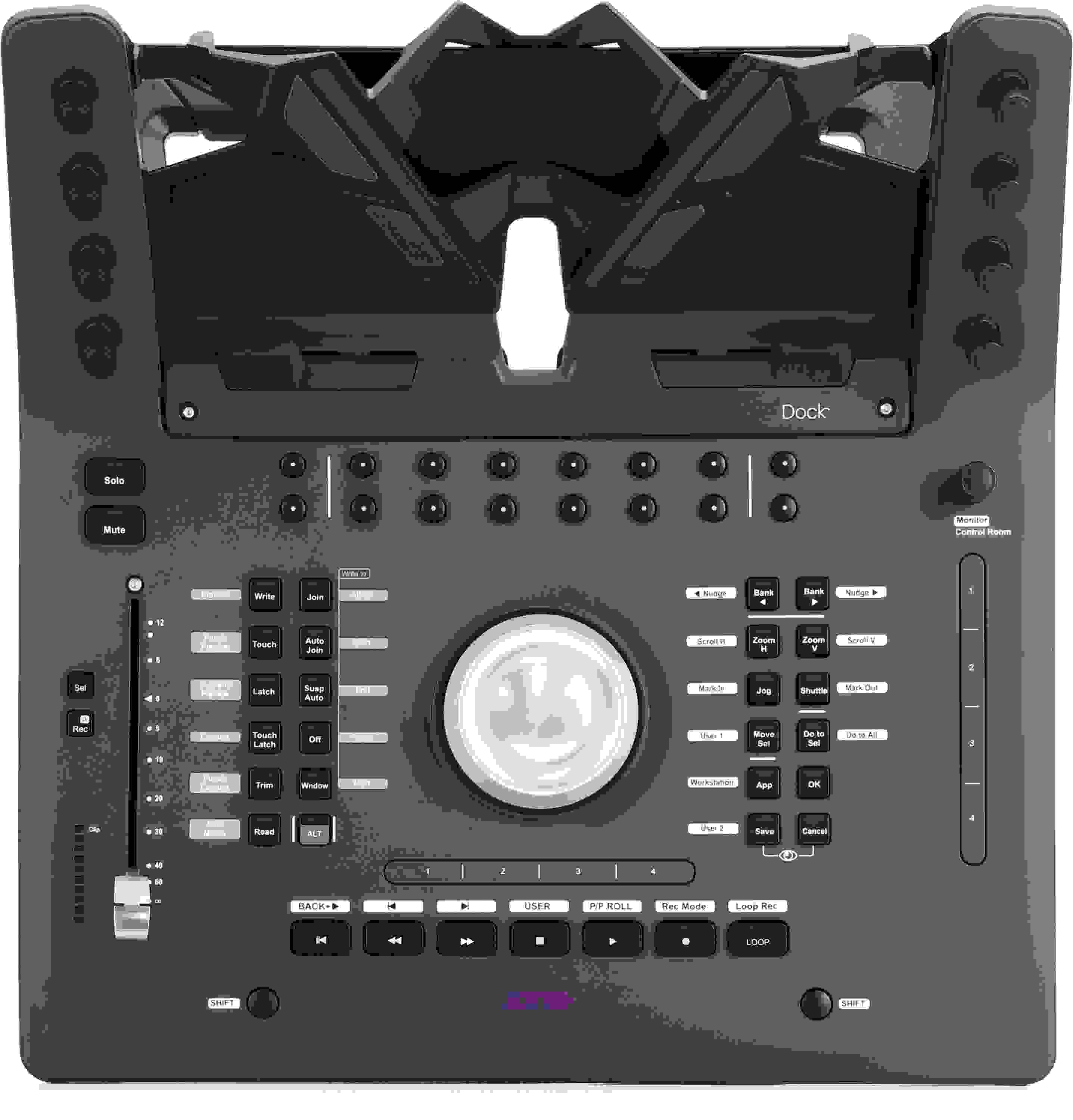
iPad Dock for Pro Tools with 16 Soft Keys, 8 Soft Knobs, 2 Touch Strips, Transport Controls, Jog Wheel, and Channel Fader

The Avid Pro Tools | Dock integrates with your iPad, extending the Pro Tools | Control iOS app's functionality with transport controls, a jog wheel, and automation controls. A channel fader, color-matched soft keys, and soft knobs round out the Pro Tools | Dock's functionality. You can use the Pro Tools | Dock as a standalone device or in conjunction with your S3, arming you with ergonomic, tactile control over your DAW. Pro Tools | Dock provides many of the center section functions of Avid's class-leading S6 control surface, such as a channel view for editing inserts, sends, pans, and more in a compact form factor.

More Details
Limited-time Offer!
Lowest price in 90 days
$200.00 Off!
Purchase this item at Sweetwater, and get $200.00 off! The price shown reflects your savings. Effective now through 6/30/2026.
Details
Price:$995 and 00 cents
Instant Savings: $200 and 00 cents. Original price, crossed out: $1,195 and 00 cents
Special Financing - Ends Aug 2, 2026. $28/month with 36 month financing*
Add to Cart
In Stock!

Page 1 of 1
January 14, 2026

The best Control Surface on the Market

By Sweetwater Customer from Santa Cruz
Music Background: 40 years mixing

This is a no brainer if you use Pro Tools but many other Apps are EUCONized like Cubase, Logic, Nuendo, Motu. It also can control Live and Luna via Mackie Control pretty well. The Softkey Macros are out of this world powerfull! The free Avid Control App makes feedback super easy and I'm about to expand with a couple of S1's for full mixing control.

December 13, 2023

Incredibly well thought out

By David R. from Glens Falls, NY

Very Very well concieved. Eucon is an absolutely brilliant control platform. If you are working with pro tools, there is nothing else thats even in the same century. You can literally have one button on this thing do anything you want in the software. You can control any plug in in pro tools with this. How has the industry been sleeping on this? Get this, and an ipad and you are now 100% in the spaceship like never ever before.

October 23, 2023

Excellent product

By Jason S. from New York, NY

This is an excellent product to go with a home studio setup. Moving away from a mouse to the dock was a wonderful transition. Setup was simple and smooth.

January 23, 2023

Rock Solid - 100% Workflow Improvement

By Gale P. from Sebago, ME

The Avid Pro Tools Dock Control Surface has improved my daily broadcast production workflow! I have been a fan of Avid software (ProTools) for a few years and now I'm very excited to have added my first piece of Avid hardware to my studio. I'm really impressed with the physical build and how smooth the jog wheel/fader interact with ProTools. The user assignable soft keys have eliminated several keyboard steps for me. To say this is a huge step up from the control surface I was using is an understatement! I have also added the Avid S1 to my studio.

October 3, 2021

Efficient Tool and perfect match for S3

By Sweetwater Customer

When I originally bought my S3 i debated on whether to get a Dock or not. After several months of going without I finally decided I wanted to have one mostly for the transport controls and quick access to soft buttons. The inserts function for each strip by way of the AVID control is much more efficient and simple than using the same function via the S3. Can you live without it if you have an S3 (or presumably an S1)? Certainly, but I can do it a hell of a lot quicker on the ipad on the dock. You dont need a dock for that though, you can do it simply on AVID control on an Ipad. However, the transport control is much easier than anything else Ive tried (Slate ravens, touchstrips on the S3, among others). I had been using the Slate Ravens for track editing using finger swipes, etc and the time I save using the dock to move things around is significant. Pocketing a snare sample onto a real track takes half the time for me (still do it manually). That big *** round dial in the middle of the dock and those buttons on the button are just plain awesome (especially when you can adjust the sensitivity and not move at Warp 5 on your tracks). The touch strip above the transport buttons need to be reprogrammed when you get it, however, because you will find if you dont pay attention to where you rest your fingers on the dock you may end up going someplace you didnt expect in your track. The dock is built solidly, and feels like the same quality as the S3. The eight knobs on either side of the touchscreen pad area are nice, although you will need to spend some time programming them with your DAW to get them where you want them. That process is not complicated and I havent really invested too much time in that and still get around just fine.

I had been a long time Slate Raven user and I still have them but the S3 and Dock combination is by far the most effective and efficient means of workflow than anything else Ive tried. The AVID combination just friggin WORKS and does so ALL the time. I couldn't say the same for the Slate displays, which i spent more time either restarting the Raven app and V control Pro or not having continuous problem free operation more than 50% of the time. When the slate system works its great, but I dont have time to spend troubleshooting problems, particularly considering the cost point of the system. The two systems (AVID and Raven) do actually simultaneously work together in LPX which I had done for about a year, however after getting the dock I dont even open the Raven app anymore and stick solely with the AVID system. I will occasionally do some swiping with my right hand on the tracks to move things around which you can do without the Raven app open (and outside of music its nice to have touchpad capability for things like drawing/editing for cover art, etc).

Only thing I cant speak to is reliability. Ive had the S3 for almost a year, bought it used and havent had any issues with it thus far save for the recent Apple IOS update botch, and of course the dock is recently new, but I havent had any problems yet. Its nice that you can plug the Dock directly into the back of an S3 versus having to get an ethernet swtich.

I did the research to figure out the best Ipad/Android size to buy, as I was concerned the amount of touchpad real estate would be an issue for me (having gone from using a pair of MTZ displays). In the end, an Ipad air with a $15, 90 deg angle USB C charging cable from amazon works perfectly for me and keeps the thing charged nicely. Having to buy another ipad is a gripe on the total cost, but I found it was worth it.

Efficient and reliable and the people that keep saying "much better workflow" are spot on in my opinion.

Read More
July 1, 2021

A time saver.

By Fred S. from Charlotte, NC
Music Background: Composer. Audio post-production mixer.

I've only had the unit for a couple of weeks and am still in the process of programming soft keys to accommodate my workflow. But it's already saving me time and I expect the efficiency to improve even more as I figure out more ways to utilize it. Using the wheel to adjust clip gain and navigating large projects via Avid Control's track view are particular time savers.

I'm also impressed with the Dock's build quality. When deadlines loom, reliable gear - and being able to work faster - matters. I'm feeling great about adding the Avid Dock to my setup.

June 27, 2021

To Dock or not to Dock

By Matt R. from Texas

As a Pro Tools user I was excited that they had developed a new interface for their DAW and purchased one when finances allowed. The Dock requires an iPad or android device as a display to fully take advantage of the Dock's functionality. Their literature suggests that the Dock can function without a display device but it's functionality is limited without one. Though I didn't have the Dock long enough to explore it's functionality sans display in depth I can report that without display you can't select a track with the Dock and must use your mouse to do this … which would seem to defeat the purpose of the industry's move toward interfaces that get you away from the mouse/screen paradigm and has you operating real knobs and faders.

While we're on the subject of faders, the lone fader on the Dock is extremely stiff. So much so that when I tried to pull it down with normal pressure my finger slipped off of it. I literally had to use my thumb and index finger to move it with any confidence. The Dock itself is mostly plastic and exudes an inexpensive vibe except for the central control knob which is massive and inspires some confidence in it's long term functionality.

Circling back to the subject of the display, I have to report that I never was able to get the iPad Air 2 I purchased to communicate with the EUCON software. I reached out to AVID concerning the problem and never got a response. Fortunately I purchased my Dock through Sweetwater and they attempted to help me resolve my issues. Having updated everything except Pro Tools I was advised to purchase a year long subscription renewal which I never received credit for from AVID (another review for another time). After all these efforts failed, a call from Sweetwater carried enough weight to elicit a response from AVID and so began a three way conversation between AVID, my Sweetwater tech and myself. This resulted in a delay of 3 or 4 days between AVID making a suggestion, which were mostly manual references, and them receiving my response. After this went on for a couple of weeks AVID suggested I buy a new modem. As I had successfully downloaded and updated both EUCON and iPad Air 2 software through the one I already had I thought this to be yet another ineffectual attempt to solve a problem they obviously had no clue as to it causes so I declined their suggestion and returned the Dock.

So, I am now the owner of an iPad Air 2 that I have no use for but, if experience is of any value, then I suppose there is a net gain to be had here. This and other similar experiences have brought me to the point that I am liberating myself from the ongoing merry-go-round that is AVID's ever worsening support and value offered to a music industry that both they and Apple feel they command and control by right of them having had the good fortune to be the first to be embraced by said industry. If you are just starting out and thinking of jumping on the AVID band wagon I would counsel against it. If you are locked into the AVID continuum I would suggest there are now many viable alternatives. You can't even buy customer support from them anymore …

… that is unless your name is Andrew Scheps.

Read More
November 29, 2020

Loads of Fun!

By Ryan M. from Earth
Music Background: Lots O' Stuff

I'm running an Avid MTRX with eight analog I/O. PT Ultimate. Outboard gear, preamps, mic's, EQ's, compressors, the list goes on. Using a Grace Design m905 as my monitor controller. When the Avid S3 came out some years ago, EUCON was NOT exactly the best out there. However, that has changed. EUCON is much more reliable than it was in times past. Look, if you're Avid all the way, this dock is the way to go. I'm having very few issues with my avid dock and my ipad. I plan on getting an Avid S1 control surface but I will say the Dock provides almost all you really need (unless you prefer just using a mouse but thats no fun!) to operate PT ultimate with sustainable and practical workflow. I highly suggest this dock if you're married to Avid like myself. Otherwise, invest elsewhere.

December 10, 2019

if You Have An iPad, You Absolutely Want This!

By Sweetwater Customer from NY

Dock plus Avid Control app are the absolutely best (and most fun) way to mix with Pro Tools. It's a no-brainer. Control all the way down to plug-in level (amazing integration with UAD plug-ins for example). Just get it already!

November 11, 2018

take your hand off the mouse

By Sweetwater Customer

Great price for the performance. Very powerful for advanced automation/mixing with plug-ins using Preview/Capture Punch Preview/Punch Capture. Hard to use Pro Tools w/o a Dock once you get used to it.

July 8, 2018

Astounding

By Sweetwater Customer

Absolutely astounding piece of gear! Avid is just on top of their game, again. Improves speed and accuracy working in Pro Tools. Couple this Dock with the S3 controller and you'll be completely blown away! I love it.

December 9, 2017

Great addition

By Mike C. from Missouri

Again, I have to say thank you to Sweetwater and Mark Thompson! As usual, top notch as everyone has come to expect!

I received this earlier this week so I have had a chance to use it a little (still working on how to use this for the best workflow).

The dock seems well built, it feels good. It was easy to set up and get it going right away. This will really help with some of my workflow streamlining.

Two things that I wish were improved (these are really minor).

First I am using an iPad air and the standard power cable is a little long so it does not sit as well as it should. I found that this is easily fixed with a 90 degree lightning cable (this is apparently a known issue with the iPad air in these). Again this is not really a major issue, just would be nice to know ahead of time.

Second, is the configuring it for the best workflow. It might be nice to possibly have some suggestions on the assignable keys used by others, it is just really flexible and it is just taking a bit to get it set up for my best workflow (might make it a little quicker to setup with some suggestions on how others are configuring).

Overall, very nice. Also, a black iPad seems to look better than using a white one in the dock.

Read More
September 15, 2017

HALF WAY THERE

By EM from New York
Music Background: Singer, Song Writer, Producer

Everything right at your fingertips. Thanks Geoff Allen, its everything I needed and more. Once you customize the soft keys sky's the limit. Awesome product.

August 9, 2016

Fascinating piece of equipment

By Jimmie W.
Music Background: Recording bassist

Still getting used to it but I like what I see so far

of

Have Questions About the Pro Tools | Dock Control Surface?

Or call us at (800) 222-4700

Questions about the Avid Pro Tools | Dock Control Surface?

Sweetwater's Sales Engineers are regarded as the most experienced and knowledgeable professionals in the music industry, with extensive music backgrounds and intense training on the latest products and technologies. They are available to offer you personalized product advice any time you need it.

Type your question below or call us at (800) 222-4700
Thank You!