
Mackie MCU Pro USB & MIDI Control Surface
Mackie MCU Pro USB & MIDI Control Surface Reviews
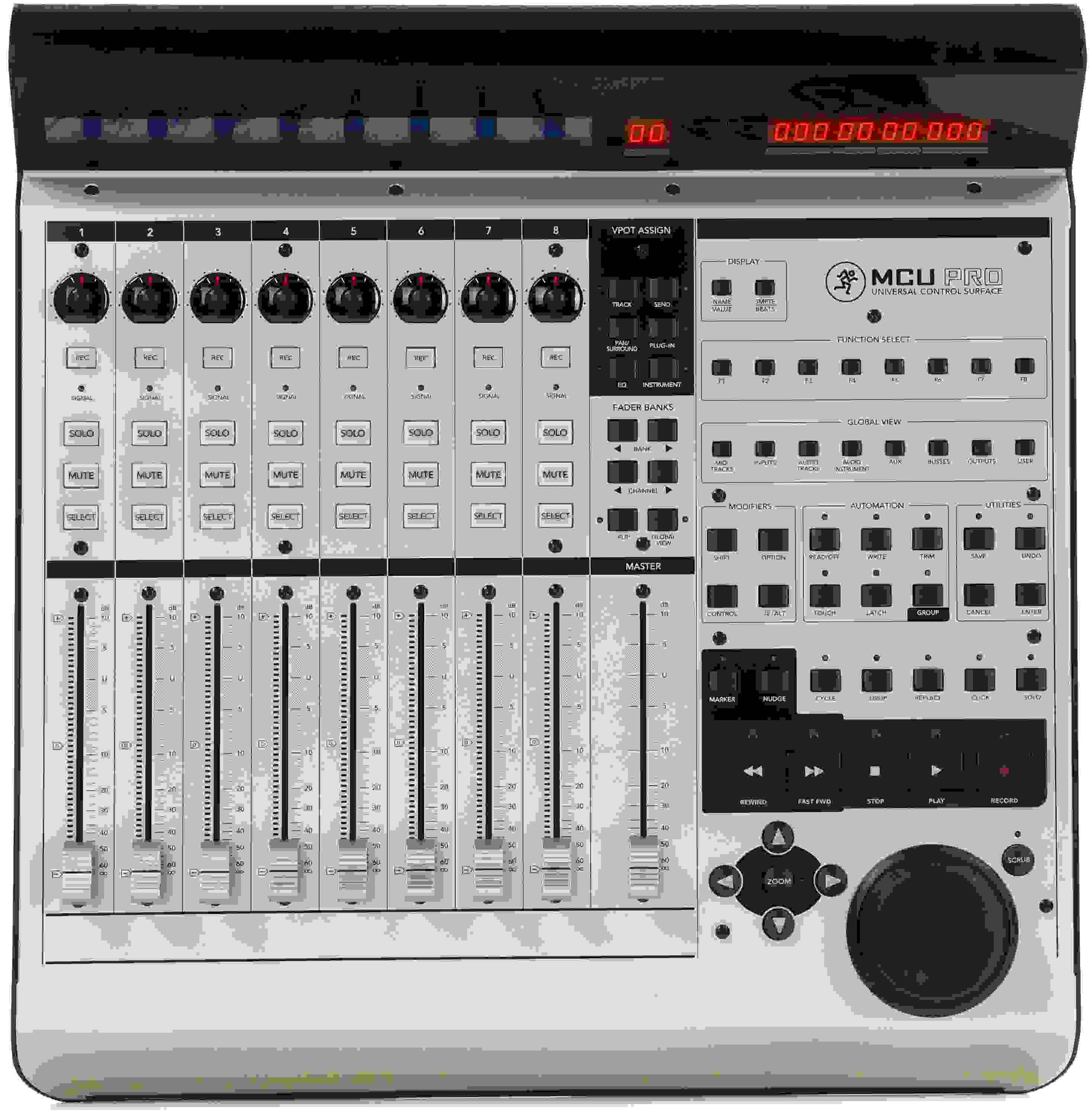
The Mackie MCU Pro control surface completes your music production software by giving you ultimate hands-on control of your mix. Nine motorized, touch-sensitive Alps faders, eight V-Pots, and more than 50 master buttons let you tweak parameters to your heart's content. Unlike generic MIDI controllers, the MCU Pro employs a sophisticated communication protocol that delivers ultra-precise control, makes setup easy (no mapping required), and enables you to see your mix in action with real-time visual feedback via the huge backlit LCD and eight LED rings.
While this isn't an item we normally stock, we can still get it to you as fast as possible due to our great relationship with Mackie. Go ahead and place your order and we'll follow up shortly to let you know when to expect it. Estimated May 2026.
Sales Engineer Reviews

Carson McClain

Mike Conyers
Customer Photos & Videos
Where are the instructions ???
It comes with a quick start guide but no full instruction manual. Seriously Mackie? As much as this thing costs, you're too cheap to include the instruction book? Went online, can't find the .pdf anywhere. Now I have contacted tech support for help. Not off to a good start.
Perfect for Logic
This board is made for Logic, and it is evident! Super easy to use. Loses 1/2 star because I think it is due for modernization.
Wonderful Consistent Ground Control
Owned over 10 years
When the MCU Pro is paired with Logic X or Nuendo, it works like a dream. You have to turn it on before opening Nuendo but you can turn it on and off in Logic X and it latches each time.
Mackie MCU
I love this unit. I use logic pro x so I didn't have to do anything, just plug it in and go.
If you use Studio One, this is not for You!
Amazing Controller...but.
The controls on this are hands down amazing and work perfectly with Cubase. But..as you can see in the pic, the scribble scripts on the new extension in the middle is much brighter because it's new. After a couple years of use they dim significantly are difficult and costly to repair. This is a great product otherwise Mackie but it's time to roll out the next gen version! Slim it down, add more faders, and scribble script panels that don't die!
1 very major caveat
While the great reviews aren't wrong it should be stressed that there is a design or production issue with the display. The backlight will dim within a period of a year to the point where it becomes illegible and the entire display needs replacement. I've experienced with 3 different units.
The Search is Over
Mackie Control Universal Pro with CuBase
This is a very solid piece of gear and I'm getting more comfortable each day. Old habits die hard but I'm really enjoying what it does. The lack of comprehensive tutorials makes learning somewhat of an adventure. I'm working with Cubase and probably using less than half of what the unit is capable of as a controller. If there are more resources out there please let us know. In the interim, I'm learning to go for the button instead of the mouse whenever possible.
What I had been missing - great with Sonar Platinum windows 8.1
This DAW controller is what I have been missing in my studio - mouse usage reduced to a few specific things. Build quality is great, box says proudly "built like a tank". Layout is terrific and makes music production so much quicker. Press button and bam - new audio track created. Press another and bam - new midi track! Buttons also confirmed to work - UNDO, SAVE, FIT PROJECT, FIT TRACKS, and many more. Using in Sonar Platinum 64bit was plug and play... Just setup once the MCU on startup to MCU then in Sonar select MCU USB as midi device and your in.
Loving it - only wish it was cheaper.
Best Control Surface
I actually got to use the original 1998 Mackie HUI control surface which is a little bit different than this. It has meter bridges so you can watch the meters rise and fall, it has monitoring capabilities, talk back, it has preamps, its really a mini-console. I've used the Universal Pro, Artist Series, and some others and nothing compares to good old fashion HUI. Forget about EUCON. Its unstable. IMHO. HUI at least has been around for 18 or so years. So although I did not purchase this EXACT Mackie model, I can attest that you would be wise by going along with a Mackie control surface. And yes they all work with PRO TOOLS HD 12.
I love my Mackie
Does what i
s supposed to. Incredible amount of control over paramaters. I'm simply mazed at how much these units can perform. I use MCU with an extender and the C4. Best choice for the price.Sometimes can be a headache when Logic updates but things eventually work themsevlceout.
Awesome control
I've been using the Mackie Control Universal Pro for a week and I'm completely blown away. I'm in the mix down phase of a project and the Mackie Control Universal Pro has made mixing faster and more intuitive. I've been using the mouse less and enjoying (for me), the easy learning curve. I also have the extender and I can't believe I waited this long before I made this purchase.
Not bad but just ok as a Control Surface.
I've had my MCU Pro for a couple of years and I feel there is one "Big" disappointment and it would be the "Backlight" display. I've changed mine three times now and there is No problem with the electronics & electrical area, it's the "Filament", I've asked Mackie if there is an Alternative, they say no? and they have told me to expect about 1 1/2 to 2yrs of life, and its hard to find replacement Filament?? and if you send it to Mackie or authorize repair they may or may not have it in stock. Other than that its decent, not as good as I would expect, but after having it for a short time, all I could honestly give is "Two Stars"
Sweetwater is where I bought mine from, and they are the greatest!!!!
Good Buy
Awesome tool
I use this with Cubase, Ableton Live and Final Cut Pro. It mostly replaces the Avid controller I loved to hate. Faders work well, smooth and quiet. The buttons are large enough and easy to hit with positive action. Jog feels great, and once used to where all the controls are you can really fly with this thing. Built solidly for real use.
Works Like a Champ!
Should have spent the $$ on this first. I use it with Pro Tools & so far it does everything I had wanted & more. Only con so far is that it does not support the PT Master Fader. For the price, it is really a solid piece of equipment. Highly recommend.
Pretty Nice
I've had my MCU unit for a year now and it works pretty nice.
I had an issue where the screen blew out (which I hear is common) and got it fixed under warranty, other than that the unit is everything it says it is.
I use it for both Pro Tools and Logic, this thing works seamless with Logic, I mean EVERYTHING can be controlled in this unit. Not so much so with Pro Tools, couldn't get the jog wheel to work and can't change the counter display options, but definitely not a deal breaker.
I would recommend this unit over any other units in it's price range for sure!!
Great Control Surface for Sonar
Great control surface and the new version with the improve faders works like a charm. I had been looking for a while to improve my current control surface for Sonar X2 (2 x BCF2000). I thought that the MCU looked great but was a bit expensive. Now that I'm using it with 2 MCU XT I should have done it earlier. The VS-700 has some tricks (x-fader, surround panner) that the MCU doesn't have but I'd rather have 24 faders. If you own Sonar X1 or X2 that's the way to go. Grab them while they're still available.
Awesome!
Newest purchase to home studio using Logic Pro. Finally, I can all but abandon my 'mouse'. Considering that this unit employs "80's low res technology" (not my words, but true), it is extremely high quality, and it's functionality is on par with most good quality consoles. The faders are extremely responsive (maybe a bit too much on mix down), and it's designed to make recording/mixing/mastering via software easy via tactile surface.
Will be looking to purchase the extenders soon.
Is Good
Every thing is ok bot i whish a beter manual so i can operate the contro the control manual for mi is a litle confuced
A Significant Improvement Over Mouse Usage in Software DAWS
I have all the control universal pro series
Simple, heavy-duty , original, best original protocol made by mackie.
I can put as many extender units as i want making it a big console.
plug and play, and this new alps faders are excellent. The look, the sizes and the feel of the units are just perfect
I have used the euphonix/avid artist mix series, they are made of plastic and the protocol is very unstable, and don't really look like a console.
Rocks My Socks
After having used the Behringer BCF2000 and dealing with the terrible issue of getting it set up with FL Studio I decided to bite the bullet and go for the model it was emulating.
This controller has got it down in all the right places. The build quality is top notch, the fader action is smooth, quiet, responsive and accurate. The display and LED VPots are awesome, and all of the transport controls and function buttons make it a breeze to navigate with.
FL Studio users, if you've been looking for a control surface for mixing and general use look no further. This is a beast.
Now, to get some expansion modules...
Not bad at all
It didn't work as advertised. The "USB only" thing just didn't work for me so I had to connect the midi cables as well and then it worked + out of the box, I had to do some major work to get it to work with Logic. With Ableton, it worked like a charm. All good now.
Perfect
This is what I've been needing to complete my home studio. The only thing I've encountered is the backlight went out for about five days, but its back on now. Other than that this is a great control surface.
Great DAW Controller!
MCU Pro, very nice controller! I'm using Sonar X1 Producer and the instillation was simple and easy. The moment that you connect the MCU Pro, the drivers are found and in a matter of a couple of minutes your controlling your projects! The operation of the board is smooth, and intuitive, the jog wheel is weighted and has a great feel as you work your way around the song to multiple locations. I've used a few other DAW controllers, Tascam, Alesis, Avid and the MCU is a wonderful tool, I have a friend that uses an SSL mid-priced board and he was blown away of the operation of the MCU! Also the people at Sweetwater are great!! Very helpful professionals Overall very impressive DAW Controller..
Mackie Control Universal Pro
This unit is great! I had a problem at first for while getting it to sync with logic... after hours of trying to figure it out, I realized that I can't have the Maschine (Native Instruments) component file in the components file and run the maschine plug in in logic.... Now it works perfect.... It's the best bang for your buck.... Really well constructed... great feeling faders. All the shortcuts right at your finger tips....
Paradigm shift
As I started my studies of music production at our local community college, my fellow students and I were taught signal flow, tracking and mixdown on a 24 track board. When I commenced building my home studio, funds were tight and I reasoned I could mix "in the box" for a while and see how things progressed. I produced about 80 tracks then was able to get the MCU Pro. What a paradigm shift! The "hands on" feel of working with a board plus the wonderful DAW control has boosted my production tremendously. This definitely was the missing link in my studio that ties it all together for me and facilitates a professional workflow. Most heartily recommended.
It's everything I hoped it would be!
The perfect bridge between old school engineers and new school technology
After about 10 years out of the game I decided to get back in to recording, albit on a smaller scale. I realized that a lot has changed over the years, but this thing makes me feel right back at home. The layout of this unit is perfect to how I would set up my stuff and it integrates flawlessly with Logic 9. I haven't used it with PT yet as I'm not a big fan since Avid took over, but I'm sure it works just as great with that. This really is the perfect bridge between user and computer, especially for an old school guy like me.
Awesome Control Surface
I just replaced an M-Audio Project Mix with this and a Focusrite Liquid Saffire 56. As a control surface this puts the M-Audio to shame. It setup seemlessly, has way better control over Pro Tools (odd since M-Audio and Pro Tools are both Avid Products, but whatever), much clearer LCD and much more of a quality feel, over all. It's pretty much pre-configured, I haven't had to adjust anything yet, it just knows how to work in Pro Tools 9, right out of the box. I'll be recommending this to anyone looking for a Control Surface.
The Best!
I've been working with the Mackie Universal Pro for the past 3 years with 2 Extender Pro's to give me 24 faders. Since I'm already used to working with mixers and faders, I just can't work without faders for setting up my tracks and final mixdown. I also have to say that I can't imagine working with anything else. I've only used it with Logic Pro 8, but I know that it does work well with Cubase. It's very reliable and very well built. It not only "looks" serious, but IS a serious tool for Daw recording. The motorized faders, jog wheel, and transport buttons work flawlessly. If your budget will not permit you to purchase any Extender's, don't worry, this will still make working with your DAW a WHOLE lot easier.
Amazing features and DAW options.
This thing blows the competition out of the water. Supports many programs unlike the Digi products. Superb control features that are extremely intuitive with your favorite DAW software. Doesn't get much better than this! The faders feel great and are very sensitive to your touch great for writing automation on your DAW software. Mix like a PRO!
Mackie Control Universal Pro is GREAT!!!!
Mackie Gets it Right!
I've been a "user" since the HUI days, and having this much control over Logic, PT, FCP and all my other apps on the same unit, in an all-metal chassis -AND with the now-weighted jog wheel- is certainly an above average experience at the price. Direct USB connection and built-in MIDI hub... using the jog wheel for color correction in FCP...
No other company works with as many apps, as far as I'm aware, and that's exactly what I needed in my home studio.
Just wanted to give kudos where kudos were due!
Have Questions About the MCU Pro USB & MIDI Control Surface?
Or call us at (800) 222-4700
Sweetwater's Sales Engineers are regarded as the most experienced and knowledgeable professionals in the music industry, with extensive music backgrounds and intense training on the latest products and technologies. They are available to offer you personalized product advice any time you need it.
