

PreSonus FaderPort Production Controller
PreSonus FaderPort Production Controller Reviews
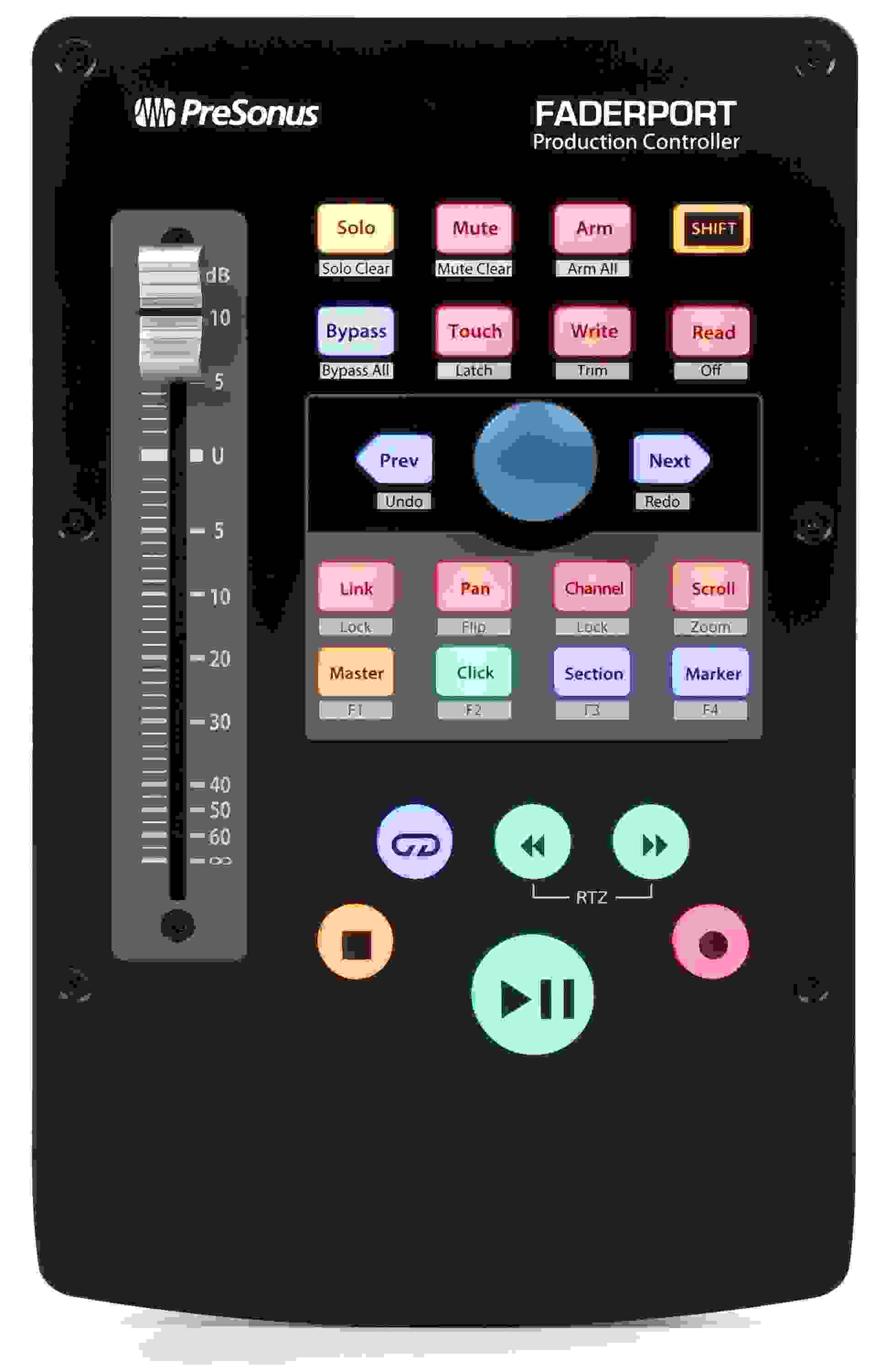
Taking a cue from PreSonus' FaderPort 8 and 16, the upgraded 1-channel FaderPort offers tightly integrated, optimized workflows and expanded DAW compatibility. Take control of your mix with a touch-sensitive, 100mm long-throw, motorized fader and 360-degree push-button encoder. Speed up your productions with convenient transport and automation controls. Enjoy seamless, native support for Studio One, as well as compatibility with Logic Pro X, Cubase, Live, and more via Mackie's Control Universal emulation. Pro Tools users will also benefit from tight integration via the Mackie HUI emulation. If you're searching for a way to maximize your workflow, the FaderPort is a great solution.
New for

Customer Photos & Videos
Like this one
I'm using this on windows 11 with studio one or fender one or whatever… I was using a faderport 16 which was giving me a lot of lag on the faders so I mostly used the transport controller part. I decided to sell that one and get this one and it has been great. No lag or delay and does not take up too much space on my desk.
Presonus Faderport
Great addition to my humble set up. Excellent workflow addition. I had wanted one for a while and really happy that I pulled the trigger.
Works Well Studio One license works
Good for tactile gain changes haven't used it for automation yet.
Navigating studio one is a lot easier than clicking around and it is close to dummy proof for application. Studio one full license worked as soon as it was registered.
Simple and Helpful
This has changed how I record and mix, and it was such a revelation. I'm so glad I was able to get this and add it to my process. Huge thanks to sales engineer extraordinaire Craig Mills for taking the time to talk with me and guide me to the right decision. His knowledge of recording helped me immensely.
Something I had no idea I needed or wanted, but I did!
Doesn’t work well with Mac OS Sonoma.
As soon as I installed the drivers and turned the unit on, I knew it was gonna be a problem. A recent update for Sonoma compatibility was released in early August… just a few weeks ago… and it still ain't right. I eventually found a workaround on REDDIT…. Yeah. So, I unplugged everything, uninstalled everything and I just finished packing it up to return to Sweetwater.
Better than expected
Is a faderport a need? No, but its really helpful. I'm really liking the fast forward and reverse buttons. The foot switch is like growing an extra hand. No question, it speeds up your work. As expected it works great with Studio one. Was on the fence for a long time, not sure why I waited.
Very Satisfied!!!!
I use Studio One as my arranger DAW and also do most of my recording (midi, vocals, guitar) along with my mixing/mastering. The ability to be more hands on with the start, stop, starting song at beginning of project, arm record, automation, etc has greatly enhanced my workflow. Getting of the mouse and keyboard allows for more in-the-flow creation. I was stuck on getting the other larger number fader Faderports, decided to start here mostly based on cost AND desk space. Not disappointed at all with the single fader. Any time you click a track it set the Faderport to the track that is currently selected.
PreSonus FaderPort Production Controller
Just purchased this FaderPort for my Studio One 6 DAW. Love it! Works perfectly as described. I especially like the Play/Pause feature and the Fader control. I regularly use about 70% of the available controls at this time. That may change as I continue to learn more. Great quality product!
FaderPOrt
Meets Expectations... obviously best suited for PreSonus Studio One (as Avid shows zero interest in supporting their customer base in moving away from HUI and allowing more robust SDKs for external companies to integrate with Pro Tools).
I replaced the original/legacy FaderPort... I wish this 2018 version had a smaller footprint - like the original controller, but it has more functionality.
Sadly, it is missing the "Bank" navigation (I could not find a reference in the manual, but it's possible I missed it). Aside from those 2 minor gripes, everything is definitely a step up from the older model.
Great for drum station
In my studio, I have a console area, which is also for guitar, and bass, as well as keyboard parts, and a drum station. Well, a drum station is not complete for the solo artist working alone without a monitor, keyboard, pointing device, and this puppy. If you ain't got it there, you're up a certain creek without a drumstick...
Faderport purchase...
Presonus continues to amaze me w the equipment they put out. The faderport is very cool, saves me lots of time recording instead of using the mouse! Sweetwater as usual was on the ball, ordered Tuesday afternoon, package was delivered less than 20 hrs later!
Thanks for the awesome service!!
Dave Stanley
Youngwood, Pa
Beware with Protools
The Fadarport worked right out of the box - so far so good. After computer reboot, it doesn't work and no setting changes in PT could get it to work. After many email exchanges with Presonus, it still wouldn't work. Seems the only way I could get it work was to reset the FP to it's original firmware then update the firware. I had to do this each time I wanted to use it. No thank you. Returned to Sweetwater. I'm not sure if this is a FP issue or a Protools issue but either way it didn't work for me.
Not as cool as the original
If you aren't using Presonus software, then this really isn't for you. I had the original FaderPort, which I was using with Pro Tools. I had to replace my old Mac with a new one, and the FaderPort wasn't upgradeable. So I got a new one - which isn't nearly as compatible with Pro Tools as the old one. The only functions that really work are the transport controls and the punch-in. As long as I have the punch-in, I'm happy. Not as happy as I'd be with all the other stuff working.
Presonus Faderport 2
Purchased Studio One 6 Artist as a DAW, then another brand of controller which I could never get to work with anything. So I took the plunge to try something proprietary, and it worked right out of the box. The Faderport works flawlessly, instantly. The power switch is a nice touch also. Reasonably priced, good build quality. Small footprint. I can only speak to the Presonus end of it. SO EZ.
Only writes volume automation
I picked up the FaderPort to write automation. This unit is limited to only writing volume automation... Read that again. ONLY VOLUME AUTOMATION. You can't write automation for plugins or sends. Ridiculous. I guess I needed to shell out another $ for the 8 fader version for that.
HANDS-ON CONTROL FOR APPLE LOGIC
Mixing Game changer!!!
This is the best recording-mixing-pre/post mastering tool!!! ...I liked Faderport so much I bought another one so I could mix from my EZ chair!!!
More Useful than Planned
Controls Not CC Assignable
The FaderPort works well for volume automation and transport control (in Pro Tools Native, in my case), but it's important to understand that neither the fader or encoder (or anything else on it) are assignable to control other parameters via MIDI Continuous Controller (CC) messages. That was something I discovered to some dismay after purchasing it, so I thought I'd make this limitation clear for others who may assume, as I did, that it will provide this functionality.
Very Happy With my Recent Purchase!
I just bought a PreSonus Faderport 2 from Sweetwater and I am really delighted. I had a couple of issues installing it and my Sales Engineer immediately directed me to a specialist, who solved my problem in nothing flat. Thank You Sweetwater and Nitish Kulkarni, my Sales Engineer.
Stopped working after a couple days
It worked properly for 2 days, but then the FaderPort fader stopped affecting the DAW faders (in Studio One 5). However, if I moved a DAW fader, the physical fader would still move. But, it wont work as intended. I did everything the Presonus support asked, most of which was pointless in my opinion. Presonus support was not helpful and very slow. Finally they told me I had to update my BIOS, my chipset, all drivers, etc... before getting back to them. I know that none of that will help. The equipment worked fine for 2 days, my BIOS did not suddenly go bad! I got the feeling they would just give me hoops to jump through, stringing me on for days. At this point I am really disappointed with Presonus. I had really wanted this to work.
Link Button Only Works in Studio One, not LPX, PT, Live
Great for mouse free production
My hand was cramping up from all the mouse work.
I got this it's a game changer use with pro tools daily
Awesome Fader!
This Faderport definitely beats using the mouse. My work flow is a lot faster now. Great product and I have an awesome sales engineer (Chris) that gets me my gear fast.
Great unit, typical PreSonus documentation
Great Concept. HORRIBLE function!!!
From the moment I plugged this into my MacBook Pro running Big Sur, it caused Logic to go CRAZY!!! When I'd open a new session (with a couple of instruments I've put into a template), It would blast a note from one of the VST's at you, and show a chord in the window that would be something crazy...and i wouldn't even be touching a note! What I couldn't believe is what it did to a session I'd been working on, then brought Faderport into to finish. It almost destroyed a couple days' work. Apple Tech Support helped me save it. Presonus sent instructions for a clean install. I followed the instruction to the letter. It still gave me that wacky result. If you use Logic Pro, STAY AWAY!!! This product has a great idea, but performs horribly. And I really wish it had worked, too.
Excellent tool
It is integrated with Studio One and works great! Love being able to avoid the mouse for most things. I got the single channel version which for me is perfect. My only install issue was the finite number of USB ports I have - just plan ahead so you know you'll be able to add it into your rig.
Super Add-on
I use Studio One on a laptop. I have been stretching from my keyboard to get to the mouse to start recording and stopping the transport. I love the fact that I can set the FaderPort up at my keyboard and control many aspects of the program from there. I really love it!
Thanks goes to Kevin Scott for his help. He's been my sales engineer since 2007 and he hasn't steered me wrong one time.
Great and not so great...
First: It's super convenient to have the play, stop, record, solo, mute, panning and more all at my fingertips. That alone almost makes this controller worth it.
Second: The (lack of) responsiveness and occasional lack of detection on the fader is unfortunate. Sometimes I move the volume fader and it doesn't even respond. Other times the built-in motor is forcing against my finger, not letting me easily move the fader. I have to jiggle it a bit to get it to become responsive again and level where I want it to go. This is really frustrating sometimes.
Nice, but.........
It's pretty, really lights up the room. Set up was easy and followed the manual.
I'm using Cubase. So far it mimics everything but one important (for me) item. So far, as far as I can find, they include no facility for toggling the channel monitor function. I really like having this on the box. I moved to this from the Steinberg CH and TP controllers mainly because I didn't care for the virtual touch sliders. So, I like the Fader Port OK but still relies heavy on the mouse.
Gets the job done
This is well thought out product, feels well made and just works, the fader is very responsive, I needed to replace a much more expensive controller that went bad thinking to just give it a try, I am happy so far with the Faderport and I like the size format as I can possibly put it in my backpack when traveling. I give it 4.5 stars just because I would love to have some kind of led information screen that provides some info, perhaps the name of the channel is active etc, perhaps on version 3? I can recommend the fader port
Huge upgrade!
I've had an original Faderport for years and really like it. The Faderport V2 is a huge upgrade in every way imaginable! Make sure to follow the setup guide exactly and it should be plug and play after that.
I also appreciated the fast shipping! Thanks!
Great addition to my studio.
Use to have the Mackie MCU Pro but it was over kill for me. I work on one track and a time and prefer to mix on in the S1 software. This just fits my workflow better. It completely works on S1 so I love it.
FaderPort for Cakewalk Sonar...a NO, NO
The FaderPort, to put it simply, will set up in Cakewalk Sonar. Right now, I have Presonus working on it and they have no answers at this moment. As part of the purchase, Studio One, the basic, also did not hook up properly, actually not at all.
As far as I am concerned, if Cakewalk's Sonar is your choice of DAWs-stay away from FaderPort.
Smooth and Easy
Simple to use and easy to navigate
Faderport 2
Game Changer
Great product, really makes your workflow smooth! I use ProTools so the Faderpkrt does need to be set to HUI MODE, but once that was done everything worked like a champ!
Nice and Simple
Great build. Easy to get working in Ableton Live. Works well! I found it rocks on its bas if I rest my palm on it, so I added some bigger bumpers in the back to get it to angle right for me and be solid.
My only question, and time will tell - if my hand is on the trackpad already - will it ever truly be easier to move it to the faderport to hit the button, or just use my old ways that seem faster? Time will tell.
Might be good, but not if you use Logic Pro X
I can see the potential of this product. Sleek, visually appealing, and its 'flexibility' to work with many DAWs.
I bought this to use with Logic Pro X, and was ultimately disappointed. The motorized fader stopped working shortly after I opened it (box, product itself were not damaged during/upon delivery). I've heard and read other reviews of Logic being the least friendly of the 'compatible' DAWs.
Give it a shot for your other approved DAWs though, maybe it'll be perfect for you.
Faderport
I had recently purchased the MacBook Pro and started having unexplained problems after a period of time. Discovered that I didn"t have enough memory for what I was trying to accomplish. I upgraded to the iMac Pro and Studio One professional to remedy this. After all this I found that the Magic Mouse was causing unintended problems when I would reach for it and found that at times it was making changes to the project that were hard to detect, so I purchased the Faderport to Remedy that situation, and it has solved all of those problems. I recommend Faderport 2018 highly for those working with DAW"S.
Great product!
I loved it, simple to use. The fader feels really great. But, it has some compatibility problems with cubase.
Presonus Does it Again!
I recently added this to my mobile rig and it has really helped speed up my work flow by leaps and bounds. No longer do I need to rely solely on my mouse when on the road, in a hotel or while working away from my studio. The FaderPort 2 is another beautiful designed piece by that integrates perfectly with my other Presonus gear. I love how seamlessly it sets up with Studio One 4. Having switched over from Pro Tools (10+ year user) to SO3 last year, my creative work flow has increased and my downtime setting up has decreased. PreSonus continues to impress me with their products, and FaderPort is just another piece that I would highly recommend to users of all stages.
Nice controller
Great product, everything works as I expected and is very intuitive, you'll get the hang of it in no time. I use it with Logic Pro X.
Faderport2018, good but needs tricky installation
Awesome Studio One Intrgration!
If you're a Presonus Studio One user, this control surface will be a welcome addition to your studio setup and workflow. The integration with Studio One out of the box is amazing. All the controls you use on a constant basis are now right under your finger tips. Much more organic than using a mouse. Download the manual and review the functions. Well worth the money. And with Sweetwater's typical customer service and support, you can't go wrong!
Have Questions About the FaderPort Production Controller?
Or call us at (800) 222-4700
Sweetwater's Sales Engineers are regarded as the most experienced and knowledgeable professionals in the music industry, with extensive music backgrounds and intense training on the latest products and technologies. They are available to offer you personalized product advice any time you need it.
