
New Akai Pro MPC Sample

Behringer FCB1010 MIDI Foot Controller
Item ID: FCB1010
Behringer FCB1010 MIDI Foot Controller
Reviews for

Behringer FCB1010 MIDI Foot Controller Reviews

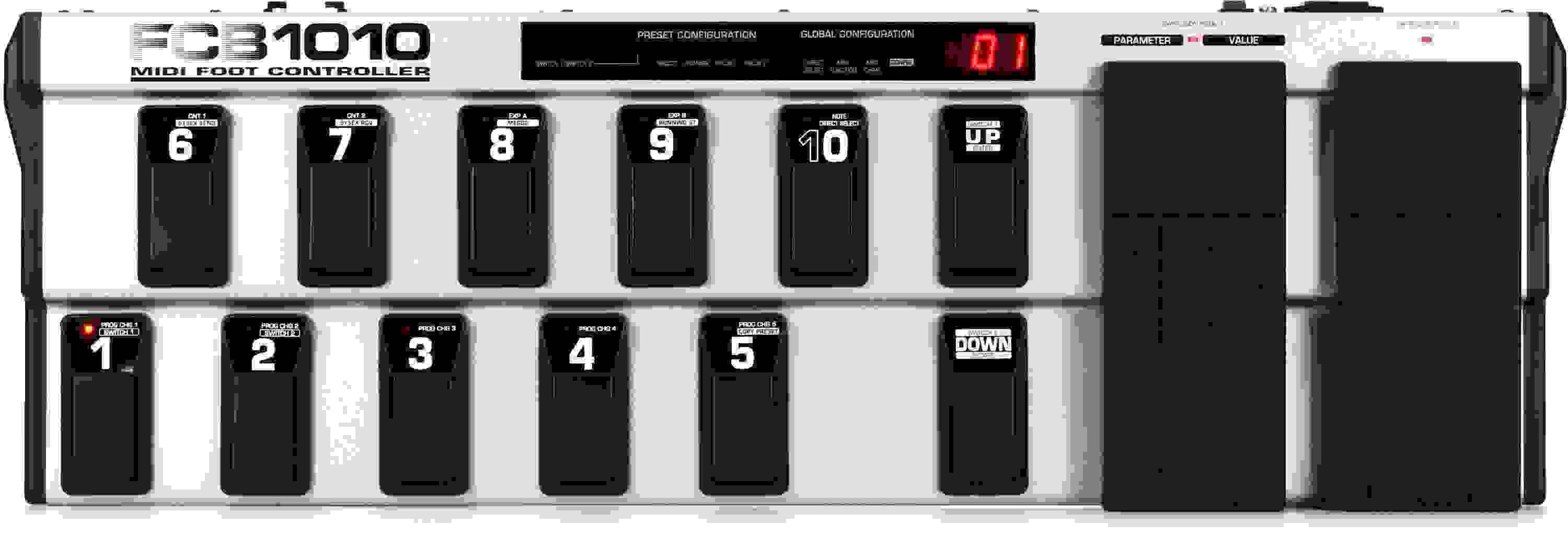
MIDI Foot Controller with 2 Expression Pedals, 10 Banks Of Presets, and 2 Relay-controlled Programmable Switch Jacks

The Behringer MIDI Foot Controller FCB1010 delivers a ton of flexibility in a road-tough package. Feel the emotive power of two expression pedals with freely assignable MIDI channel, controller number and range; ten banks of presets (each with ten fully user-editable presets); simultaneous transmission of 5 MIDI program change commands and two MIDI controllers per preset; and more. Everything's right underfoot and can be effortlessly programmed while standing. Get the most out of your gear without tying up your hands or bogging your performance down - with the Behringer MIDI Foot Controller FCB1010.

More Details
Price:$139 and 00 cents
$24.00 suggested monthly payments with 6 month financing‡
Add to Cart
Backordered - More On The Way!

This item requires extra delivery time from Behringer. Order today to reserve yours now, risk-free, or contact us for more information. Estimated July 2026.

Notify me when in stock
Page 1 of 1
April 5, 2026

pleasantly surprised with the build quality and shopping

By Steven from BRADENTON, FL

Just opened it up and am about to get to programming my daw. The quality seems impressive. More impressive was the care used to skip my package. Very happy with my purchase.

March 24, 2026

A true workhorse

By DAVID L. from Portland, OR
Music Background: Artist, improviser

In the past 25 years, I have repurchased just one piece of MI gear: the Behringer FCB1010. I bought one in (if memory serves) the mid`00s just as I was learning about MIDI. I didn't understand most of the terminology in the (quite terse) user manual, but eventually figured out how to make it work. I sold my first FCB 1010 in search of easier programming, scribble strips, colored indicators and more flexibility.

Fast-forward to 2026. Vendors of high-end controllers with the features described above are all defunct, as far as I can tell. Consumer-grade controllers with the named features have fatal flaws like requiring a smartphone having an obsolete OS.

So I am back to the 1010 as the controller for my studio. Now that I have a good grasp of how MIDI works, the manual actually makes sense. I programmed everything I need in a couple hours; with my feet!

I have a EurekaPROM on the way, but I don't think I will use it.

Read More
February 3, 2026

Perfect MIDI footpedal

By The D. from Jackson, MI
Music Background: Lifelong musician

Do you want to make a bunch of PC and CC changes with one button? This is your tool. Foot pedals work great.

January 4, 2026

Great Value but lack of quality software and latching are too much of a downer

By Tony T. from San Jose, CA

I have had this for a few years, but I don't find myself using it as much as I'd like to or could.

The main reason is that the software is repulsive. Also, the lack of an on/off led status (latching) feature makes it less useful. You can buy a modified EPROM for the latching; that isn't a smooth process.

I'll be selling mine soon and moving on to something better.

December 18, 2025

It works! But it requires some learnin.

By Joshua A. from BRISTOL, PA

I purchased in 2025 in the dream go fully digital with my guitar rig using only my computer and amp sims. But I wanted to be able to control my amp sim presets and effects inside the presets with a footswitch. This enabled me to do so! But it did take some learning.

Now I am a simple man with a simple use and there is a lot on this thing stating, "upgrade firmware" and all this stuff to "enable stomp box control mode". Well i did not do that because that just sounded like a lot of work. I found this 3 min video showing exactly what i need thank goodness and it worked perfectly. You essentially need to assign a note value to the buttons then in Cubase or plugin hit learn midi and boom I was done. Assigning the values takes maybe like 10 mins to do on 1 bank. You can have 9 banks, so you have a lot of flexibility basically assigning a note value to each one. I recommend making a spreadsheet with all this info saved so you know what's what as you go. Now I am sure this thing could even do more, and you could use it to control your DAW in crazy ways. But i basically wanted to spread the word that you do not need to buy or get anything additional to use it for this simple function of a stomp box in your DAW or DSP plugin as of 2025.

hope this helps someone!

Not a 5 start because the manual sucks, and not a simple plug and play device. Also it should really come with a USB port option for midi rather than midi port only. A simple cable fixes this but still... Feels sturdy and I only play at home really so I wont be able to give a durability check but it does feel solid.

Read More
January 23, 2025

Sit down undisturbed for an hour or 2 with YouTube tutorials.

By Noodle from Mechanicsville VA
Music Background: Newby

I have had a good amount of time, unfortunately, my wife and kids need me constantly. I got this around the beginning of the month and took me until the evening of the 23rd to finally get it set up for the first time using a stand alone Amp simulator. Once I figured it out it was a breeze to program. Behringer does not include any instructions for this board or software. I found, via a YouTube tutorial, The FCB1010 manager app download. I will update you later as I dive into this board more. I have a lot of good feelings about this.

October 21, 2024

Cracker Reviews

By Sweetwater Customer

Well this Cracker likes this pedal..... just wish the instructions were dumbed down a bit.
No fault of Sweetwater that manuals are written for people already educated in the language of midi, they play their expected role flawlessly but I wish I could say the same for the people who make the manuals for all these cool toys

June 10, 2024

A Truly Great Midi Foot Controller

By Jack Y. from River Edge, NJ
Music Background: Life Musician

I've had the Roland FC-300 for many years and I ended up needing more. The FC-300, as great as it is, is very expensive compared to the FCB1010. They are both tricky to program, so don't let that hinder your decision. There are plenty of YouTube videos to help you with this.

March 3, 2024

Doesn't work too complicated!

By Sweetwater Customer

I figured when I bought this it would be simplistic in its setup. Wow was I wrong! Let's compare apples to apples... Trying to use it with ToneHub/AmpHub and assign buttons to channel switch, reverb pedal, or whatever... It doesn't work. Doing the same thing with ART X-15 midi controller it works as easy as click, assign and press button.
Behringer, usually known for simplicity, is not a solution!

February 21, 2024

PEDAL DOWN - STUDIO DOWN

By Bruce B. from Whitewater, WI

Had a Headrush pedal that froze up. I contacted Headrush and had no reply (over 3 months). Called Sweetwater and they got me back up and running in days. Thank you for the great Sweetwater support. I wish other companies I dealt with were as good. Kudos to Joshua in support and my sales engineer Kevin, they do an excellent job.

Bruce Brewer (a longtime Sweetwater customer)

February 19, 2024

Outdated and difficult to program; sturdy build

By Vanessa from Arizona

This board belongs in the 80's and 90's. You have midi out through a typical midi connection, but if you want to use it with your computer, you'll need an adaptor.
It's EXCESSIVELY complex and counter-intuitive to program if you intend to use it with any computer program. It borders on useless, and mine has been sitting in its box for most of its life because I cannot get it to work the way I had hoped. There are actually aps developed by 3rd-party developers to make this unit a little more user-friendly in the computer world. If you intend to buy this pedalboard, I would first look into those aps.

On the upside, the thing is built like a tank and will handle a lot of abuse on stage.

December 26, 2023

The only reason this doesn't have 5 Stars

By Kells
Music Background: Hobbyist

...is because it has a steep learning curve.
Once you get past that, this becomes the most incredible, versatile, durable controller you'll have in your arsenal. It can do literally everything. It really is just quite a bit of a pain to setup because of how primitive the setup can be. Every setting is manual. You gotta do them one by one within the unit itself using the buttons. No software to make it easy. It took me a whole hour to set it up with Helix Native. The expression pedal was tricky. Button behavior was tricky as well. But now I'm very fluent with it. I have it setup to control a lot of things like Reaper and Ableton Live. There are some software like TH-U and Amplitube that make it even easier to assign midi/cc/pgc. I recommend watching videos before buying. It can be tough for some slow learners. I love the pedals on this. The values always return to 128 or 0 perfectly.

Read More
June 16, 2023

Perfect equipment for daw/digital plugins

By Matt
Music Background: Guitarist

I own multiple neural dsp products and have been shocked how amazing they are. The sound quality of the pre amps, cabs, mics, pedals basically everything is perfect. My only issue was I could not switch presets or use the whammy pedal while playing guitar as I would have to move my mouse to click my next preset. FCB1010 lets you program presets, pedal on off, pedal presets, etc so you can make these changes while playing. I can't speak for the difficulty of programming it by using the buttons on FCB1010 but neural DSP allows you to choose a preset and a corresponding button all on the computer. it is incredibly easy and a 10/10 product especially for the price

April 17, 2023

Solid MIDI controller - with limitations

By Dan

My rating for this will range between 2.5 and 5 stars. Let me explain...

First off, build quality is excellent, punching way above its price point. It is a solid piece of kit. The two integrated expression pedals are awesome - it would cost you the price of this unit alone to add 2 expression pedals to any other controller. It would be nice if it had used a standard 9v barrel connection for power, and it's super outdated that you need a MIDI interface to connect to a computer for programming when USB exists, but for the price, I can live with these things.

If you're buying this to control a single midi device, then this could be a five star unit for you, stock, out of the box. The reason I specify this because stock, YOU CAN ONLY SEND MESSAGES ON A SINGLE CHANNEL. You specify the channel globally, and that's it. Fine if you only need to control one device, but potentially a deal breaker if you want to control more than one.

If you're like me, and were looking for a pedal to control multiple devices all listening to their own channels, then like me, you'll feel incredible disappointment when you discover that this unit only sends messages on a single channel. What? Why? So close to greatness only to have this arbitrary limitation severely limit the usefulness of the device.

BUT. There is hope. There are several (super affordable) options for 3rd party ROMs (hardware chips) you can install into the unit, replacing the factory ROM. Will this void your warranty? Almost certainly. Do they take this from a 2.5 to a 4.75 star unit? Absolutely. Do some research before purchase. I went with the UnO2 ROM, which gives incredible, complete control over the unit and only cost like $50 at the time of this writing. This ROM requires some very basic programming skills. Other ROMs have visual editors that are much more beginner friendly, but more limited in capability. And still other ROMs are made for other specific use cases. I found the UnO2 to be just what I was looking for, just be sure to do a little research so you know what you're getting into.

The UnO2 turned this into something I was going to return into the most affordable, flexible, high quality MIDI controller on the market. Aside from the minor quality of life stuff like the power connection and the lack of USB, my only remaining complaint after upgrading the ROM would be the limited LCD display. It'd be nice to be able to give my banks names instead of just numbers, but for the price and flexibility that this unit + UnO2 provides, I can live with this limitation and have no plans on upgrading any time soon, if ever.

I currently have this controlling a Strymon TimeLine, BigSky and Mobius along with a Digitech Whammy 5. I now have separate, dedicated looper controls for the TimeLine, quick access to presets on any of the pedals, global tap tempo that sends to all pedals, dedicated looper volume expression pedal, variable 2nd expression pedal depending on bank/preset (sweep modulation on delay repeats, control rotary speed, etc...), momentary effects like infinite hold on BigSky/TimeLine, along with complete control of the Whammy. For the Whammy, I have pedals set to specific presets, along with the ability to bank through all presets, along with using the onboard 2nd expression pedal to control the whammy sweep. I also reversed the heel/toe of the whammy expression pedal as that feels more natural to me - along with a non-linear sweep algorithm.

I literally don't interact with any of these pedals themselves on my board - they are 100% controlled via the midi controller. And all of this flexibility and control is only possible via a 3rd party ROM.

Bottom line: Great if you only plan to control a single midi device. Great if you purchase 3rd party ROM (and void your warranty) to allow control of multiple devices. If you're not interested in dealing with ROM replacement and need to send messages on more than one channel, this is not the device for you.

Read More
March 14, 2023

Great Pedal board for the price

By J. from VA

Got this to go with Connectivity mioXL 8x12 MIDI Interface and it works great. Programming take a few trys, but it works out well if you have the patience. Also works with keytar if you have the idea to have multiple controls to a synth or multiple ones. The board seems to be able to take the foot pounding that you would expect. Other boards are great, but this one meets the needs.

March 13, 2023

Not meant for 2023. Dont buy, save yourself the hassle.

By Sweetwater Customer

This this requires a computer engineering degree to use. It doesn't work with modern macs, and the only program that can aide you in setting it up with modern macs is a program from 2013 that isn't compatible with newer OS.

incredibly long program times, and hard to understand interface. Maybe this was great in 2010, but as of 2023 you shouldn't waste your time or money on this.

save yourself the headache. don't buy this.

March 7, 2023

It's better then Great once you figure it out

By 6ixTek from Broken Arrow, OK

It was learning curve and struggle at first.

No need to use the stomp mode programming, I went to mountain utilities and downloaded the FCB1010 utility. Set all the needed parameters, saved my sysex file, sent info to midi of FCB1010.

Then just went tom DAW and/or plugins and set it up there.

It's nice I can save all my configs and share with others.

February 15, 2023

Does the job

By William Z. from Los Angeles area
Music Background: Professional musician

Seems sturdily made. It's heavy enough not to travel around the floor. The foot buttons default to outputting 'Foot Control 0' through 'Foot Control 99' (10 banks of 10) which works fine. They can be programmed to output other MIDI messages, but programming them is a bit of a pain. Fortunately I'm always using 'MIDI Learn' in Cubase and Ableton, so I don't need to reprogram the FCB1010 itself.

September 20, 2022

A great tool

By CE from Missouri

I'm really enjoying this controller. I'm currently using the FCB1010 with Native Instruments Guitar Rig 5 and Ableton Live 11, and in programs like those, you're really only limited by your imagination (and the programs' MIDI-controllable functions) in what you can do. I don't have any amps or rack effects that are MIDI-controllable, but I'm sure a unit like this would be very handy for people who do.

Out of the box, and without a relatively strong knowledge of MIDI (PC vs. CC vs. note, etc.) this unit can be a little baffling. Luckily, I was so excited to get it, that I used the days between ordering and receiving to watch a few YouTube videos on how this thing works and is programmed, and was ready to go by the time it got here. A Quick Start guide is included with the unit, but the full owner's manual is available on the Behringer website, and is definitely worth a read.

Programming the MIDI output of the buttons and pedals can be very tedious if doing so on the pedal itself, especially if making changes to a large number of presets. However, there are various pieces of free software available on the web that offer a graphical user interface, which provides a nice visual overview of each button's / pedal's function, and makes for much easier programming - I've had luck with "Behringer FCB1010 MIDI PC Editor Utility." These programs are also handy if you want to back up your FCB1010's settings to your computer.

Definitely recommend the FCB1010!

Read More
August 3, 2022

Fantastic Device, BUT...

By George S. from Sturgeon Bay, WI

I'm gonna start this review with the BUTs...
1) MAJOR GRIPE with Behringer corp... LOUSY documentation; no manual included with the device, just a practically useless "Quick Start" guide. There is a link to the FCB1010 User Manual on Sweetwater's product page under "Additional Media", but the link goes to an error page. I finally had to resort to a 46-minute THIRD PARTY (Not even Behringer) YouTube video tutorial in order to figure out how to program this thing for my use.
2) In the process of getting the FCB1010 set up for my purposes, I discovered that the 2 Expression Pedals did not really work; thanks to a MIDI Monitor app on my iPad, I found that they went from 0 to 127 at the slightest touch; nothing in between. I finally remembered that the third party YouTube video had a section on programming and calibrating the expression pedals. I performed this procedure and now the pedals work normally. BUT it is simply ridiculous that Behringer ships the FCB1010 with the expression pedals in this state; it practically guarantees that some customers are going to return it.
That video can be found on YouTube by searching "in the mix fcb1010"
IF YOU HAVE THAT PROBLEM WITH THE EXPRESSION PEDALS, THE CALIBRATION PROCEDURE IS AT 25:44. I hope this helps!

These are the only reasons I didn't give the FCB1010 5 stars. OK, rant is over. Now...

This is a fantastic device! A really flexible MIDI controller for any purpose. All 10 of the switches in all 10 banks can send: up to 5 MIDI Program Changes, 2 MIDI CC codes, 2 other MIDI CC codes from the two expression pedals, and a MIDI Note Number. Also, each of these can have its own MIDI channel, which is global for all 100 presets. This much flexibility makes programming it a difficult task, but fortunately a full PDF manual is available at Behringer's FCB1010 page, and the above mentioned YouTube tutorial video is EXCELLENT.
The FCB1010 is a very solidly built metal body, and the footswitches and pedals are very firm to the touch, and the expression pedals have a good sweep distance.
Now that I've gotten over the programming difficulties, I'm very happy with this purchase.

Read More
August 2, 2022

Makes controlling the Adrenalinn III simple

By Eric S. from Birmingham, MI

Modified with the EurekaPROM3 (which was a simple swap with the original Behringer PROM), this MIDI pedal makes it easy to scroll through, modify, and store favorite Adrenalinn III presets. The expression pedals automatically integrate with the Adrenalinn III functions as well.

July 14, 2022

Confusing

By TONY T. from SPRING HILL, TN

This is an older product. Behringer used to think that everybody was an expert! Their manuals were extremely unclear and confusing. This has one of those manuals! I'm sure once you get past the huge learning curve, this is a great product. It's built well, and has everything you could ever want on it. Unfortunately the instructions on how to use it were so confusing but after a week of trying, I had to send it back.

July 11, 2022

Studio One users read this to get Pedal B to work

By Enrique from Portland, OR
Music Background: Guitar player, composer, producer

Studio One will not recognized Expression Pedal B. You need to do a little work around. The main problem is that Studio One expects CC#16 from pedal B, while the Behringer configuration sends CC#7, therefore no communication happens.

This can be fixed by navigating to this folder on your computer (Windows only, I don't know anything about Macs):
C:\Program Files\PreSonus\Studio One 5\devices\Behringer\FCB1010
In that folder you need to edit the file
FCB1010.surface.XLM (Notepad will do)
Find the line that says
"
and change that 16 for a 7
Save and done
Upon restarting Studio One, pedal B will be now recognized.
I hope this helps. It took me many, many hours and an insane level of frustration to find out about this.

Read More
June 15, 2022

The most affordable, versatile MIDI controller for guitarists

By Jered from Oregon
Music Background: Lifelong guitar player and hobbyist music maker / audio producer

This thing is a beast! Robust chassis and the pedals seem like they'll hold up well. Highly programmable and customizable especially if you chip it with an aftermarket firmware like Uno. That allows this thing to do almost anything you can think of. Really like having the dual expression pedals and I find it pretty easy to use.

The build quality on the chassis is great. The switch covers and pedals are plastic and it would be nice if they were metal. However, as a hobbyist, I'm not ready to spend the big bucks for something like the GigRig G3 which gives you a tank build with all the features you could think of. At this price point, the plastic switches and pedals are an acceptable trade for the amount of functionality you get and seem durable enough.

April 17, 2022

Behringer MIDI Foot Controller FCB1010

By Dave C. from Evanston, IL

Once calibrated it's been very straight ahead to use if you have used other midi foot controllers. I'm a guitar player and I'm using the FCB1010 with guitar SIMs such as TH-U and Neural DSP plugins to control pedal on/off, control volume pedals level, WAHs etc. with Logic X. Once I did some basic research online I was up and running within a few minutes. This does require a midi to usb cable so you can connect with a MAC or PC to your DAW of choice. It's built very solid and appears road worthy.I just need to get used to the feel of the expression pedals. For the price and amount of features, this was a very easy decision and I have no regrets.

April 7, 2022

Could be nice if you didn't have to spend 60 hours programing the thing

By Sweetwater Customer from Utah
Music Background: Semi-professional guitarist.

While I'm sure this is feature-rich, there is no reason in this day and age for a piece of gear to be this hard to program. I gave it away after 2 weeks. Perhaps they haven't heard of Plug & Play?

March 18, 2022

Not what I expected

By Kevin from Upstate NY
Music Background: 30+ years of guitar.

Programming this thing from scratch, to just do simple midi commands, if you're using say amplitube, or any other plug-in software, it's not easy. It comes with no directions, however you can go on the web, and download the old manual. Seems the best way to make this work if you just need it for Stan boxes, Banks, and expression, and just wanted to work is to either do an Uno chip, or a Eureka chip. That's replacing the EPROM. Then it becomes very useful

March 12, 2022

Great with some help

By Nickalaus from Kewanee, IL

From the factory this controller is extremely difficult to program, even after watching several videos it still just turns into a horrible confusing tap dance to program. I modified mine with a Eureka Sound EPROM. it takes 10 minutes to install and completely changes the controller. it pre programs it for several affects units and modellers, as well as an effect mode for use with non supported programs. i use it for Amplitube and it works amazingly! The controller itself is very well built, i was expecting it to feel cheaply made, but its a solid unit. Would definitely recommend with the EurekaPROM

December 2, 2021

Behringer FCB1010 MIDI Foot Controller

By RockPianoman from Iowa
Music Background: Professional musician

I love this controller and the build quality is outstanding !! It also uses the same type of power cable that they use on computer towers (no wall wart)...

You can feel the quality when you step on the footswitches... you can feel the quality when you pick it up !!

Though this unit is made with some plastic parts, in my opinion it's well designed and tough. You could fight off the drunks with it and it wouldn't even hurt it (well, it might hurt it, especially if you fight off the drunks with great enthusiasm)...

So many MIDI foot controllers give you one expression pedal... I always like to have a volume pedal and with this you can have that and something else too...

Bottom line, this pedal gives you good control over your MIDI device in a well-built unit that looks nice too (the footswitches remind me of the footswitches on the Boss guitar multi-effect processors which is a nice compliment !!)

Read More
November 12, 2021

Works for Eleven Rack after "Eureka Prom" installed.

By Louie M.
Music Background: Professional Musician.

Bought Eureka Prom and after installing it works just as advertised.

June 24, 2021

Versital Footswitch that's Road Ready

By James J. from Princeton, WI

Using with a Roger Linn Adrenalinn 3. Very logical layout and great spacing between pedals. Having 2 expression pedals you can map almost anything to is great. Built like tank that can be used for studio, home or road use. Great price for all it has to offer.

June 1, 2021

Incredible for the price

By Eli T. from MD

This is a such a capable piece of equipment. I use it for samples, drum machines, and sometimes even use the buttons as notes for synthesizers! The build quality is a bit cheap, but not too bad. Simple to program, although a bit tedious at times. For the price you can't possibly go wrong with this. It feels like it should be more expensive

March 3, 2021

ver niiiice.

By Steven A. from North East, PA

...I've had the opportunity to check it out in person. Seems very well made, and more importantly, it seems like Behringer checked out the reviews of A.R.T.'s X15 foot-controller and fixed everything that users griped about...don't get me wrong, I love my 30 year old X15 and it still functions like new, but it's really hard to not like and really want the Behringer with all of the improvements made to the design.

Highly recommend, especially for members the A.R.T. SGX fan base.

December 11, 2020

Replacement for Apogee GiO with Apple MainStage

By Daniel G. from TX
Music Background: Guitarist

As a guitarist, I used an Apogee GiO with MainStage to select effects during live performances. Subsequently, Apogee discontinued support for the GiO with newer Mac operating systems. I purchased the Behringer FCB1010 MIDI foot controller as a replacement for the GiO. With the FCB1010, there is a learning curve to get it to interface with Apple MainStage. After a couple of days and several YouTube videos, I was finally successful.
I miss some of the functionality of the GiO, particularly the variable colored LEDs that could be configured to indicate what MainStage effects were active. However, the Apogee GiO was a one trick pony designed specifically for use with LogicPro and MainStage, where the FCB1010 is much more flexible as it is a pure MIDI controller.
The FCB1010 is a mature product, as well as the MIDI protocol and does not depend on variations of computer operating systems.
The FCB1010 build quality is great and I am looking forward to my first gig with it.

Read More
December 3, 2020

For tinkerers

By Anthony from Orange, CA

Let's be real, it's not very easy to program. A USB port with accompanying software would have been nice, but with a moderate time investment you'll get the hang of it. I use a free program called FCB1010 Manager or something like that to program it, which speeds up the process a bit. Programming without any additional software is a little tedious but not difficult. You just have to read the manual and watch a few tutorials online.

The build quality seems very high. If it said "Boss" on it, that wouldn't seem out of place at all. It has that old school Boss look and feel. I don't know how long this unit has been around, but if it first came out 30 years ago, that wouldn't surprise me. I hope Behringer never discontinues it. I'm kind of surprised they haven't, given that it doesn't really seem consistent with their other offerings.

Overall highly recommended IF you're willing to tinker with it. It will NOT work with your software/multi-effects/whatever out of the box.

Read More
October 23, 2020

Works very well and is extremely sturdy

By Jordan W. from oregon, OH
Music Background: Producer/Guitarist

I love this thing! I don't know what the issue people are talking about getting it programmed? It was super straight forward for me, just had to re-read the manual a few times. Once you get it down though, it works flawlessy! I'm using it for multiple things: Guitar rig 5 controller, launching ableton clips, and an FX stomp box for various plugins.

You will however, learn how to River Dance when programming this thing haha.

March 27, 2020

Surprised more companies don't make foot controllers

By Sam from Lompoc, CA

Great unit! AFter some research, I decided to grab this due to the price point and capabilities. I was not disappointed. If there was one issue, I'd say it was the instructions, as many others have stated in reviews previously. However, there are plenty of Youtube tutorials and even 3rd party editors that help you set this up. Running it through Studio One as a generic controller, with an Ableton rewire. No issues at all!

June 11, 2019

Behringer FCB1010

By Sweetwater Customer

The documentation is awful, but got the expression pedals calibrated (this MUST be done). YouTube helped a lot with configuring the stomp buttons. Had it working 100% in Live out of the box with no special chips or anything in about twenty minutes. Built like a tank and fully functional.

February 24, 2019

What's the problem?! Great cheap MIDI foot controller

By Chip D. from Raleigh, NC
Music Background: Guitarist, Bassist 30+ years.

I highly recommend this unit, (no I don't work for Behringer) and it blows the competition away as far as bang for the buck. Where else can you get ten foot switches with TWO expression pedals for this price? I have two of these... one for my guitar FX functions and one as a "practice controller", (play, stop, loop, volume... like a software tape deck). Not sure why people are saying this is so hard to program either. I found the manual to be quite usable and have programmed everything I've thrown at it including multiple LINE 6 products, (POD HD Pro X) TC electronics, other rack gear and all of my software, (Ableton, etc) as well. If there are still issues, I would recommend 1. Digging in to the MIDI spec, (online) to have a better understanding of WHAT you are trying to do. 2. This item has a LOT of internet support other than Behringer including a Yahoo user's group just for the FCB1010 and multiple third party vendors with custom chip solutions... check those out. I do have ONE gripe... it's physically wide and takes up a fair share of stage real estate. That said... I've never accidentally pressed two switches at once. :)

Read More
November 21, 2018

A must for Ableton Users

By Chris G. from Teaneck, NJ
Music Background: Worship Director

With running loops and tracks through Ableton, I have to say the Behringer FCB101 has truly become my go-to midi foot controller. With that being said, you will have to do a factory reset in order to match the midi notes to Ableton (a tedious process but very easy to follow. Youtube provides some awesome videos tutorials for that). If you're using any plug-in software to run loops or track look no further. The build though long and a bit hefty is worth it for sure! Giving me the comfort that it can take on the beating and wear and tear for the next several years of use, and probably even beyond that!

October 13, 2018

A GRET VALUE

By Dennis from Ohio
Music Background: Multi instrumentalist

Have used a variety of momentary switches and volume pedals to get mild modulation or select one or two software articulations. This is made like a tank. The manual is worthless. There are numerous articles and videos available to help. There are editor programs that make it easier to program. I use iFCB which is the only current editor for Mac iOS. I looked at all other pedal boards and those are 2-4 times as much. I am very happy!

June 15, 2018

So Far, So Good

By Steve F. from Lubbock, Texas
Music Background: Lifetime part-timer

I bought this to use with my Roland GR-55 guitar synth. There's not a lot of info online regarding this particular application, but I figured at this price, if it didn't work out, I'd still find a use for it.

I'm pretty much a MIDI noob, so it took a while to figure some things out. An excellent article, "Idiot's Guide to the FCB1010", got me started. Search that phrase and it will come up. Yahoo also has a user group for this device that has 13K members, so there's a vast amount of knowledge around.

What I was wanting to do is expand the number of control buttons available for a given patch to turn effects and PCM sounds on and off within a given patch. At first it wasn't readily apparent that this was going to work, but I think I'm getting the hang of it. Each of the ten switches (in ten banks for a total of 100 presets) can be programmed with up to 5 Program Change commands (switch between patches), 2 Control commands (turn things on and off, apply pre-set values to parameters, etc) and assignable foot expression pedals. So, for a given switch, you can disable the PC command and just use it for a CC message. You can set a switch to toggle back and forth between two values, whether it's on/off, or two numerical MIDI values. Pretty nifty, but it took a while to figure out.

I don't use a vast number of patches in a live application, but I do like to cross-fade PCM sounds in with the expression pedal, etc. What I am planning to do is, set up three or four buttons on each bank to have the same MIDI message number, use them to control various features of a patch, and use the rest for patch selection. This will work well for that application. And, with the ability to issue several PC messages simultaneously, each on its own channel, you can control a whole chain of devices with one stomp. But... that's way beyond the scope of my most far-flung ambitions. For my application this device is nearly perfect.

Caveat: It's not plug & play unless all you want to do is sequentially page thru the patches available on the GR-55. It does that right out of the box. But where's the fun in that? I've also not been able to find a way to make it switch between the "Lead", "Rhythm", etc. modes. But I use the "user" bank of patches exclusively anyway. I've yet to find a pre-set GR-55 patch that didn't require some modification for my use.

Physically, this thing is longer than I had visualized. It actually takes up more room than the GR-55. It appears to be ruggedly built, on a par with the GR switches, but the expression pedals feel flimsy after using the GR for a couple of years. They could also use a little more "drag" so they stay where you put them better. I do like that it has a built-in power supply. I'm already awash in wall warts when playing live, so that's great.

Overall, worth every penny and more. Kind of takes some trial and error programming wise, but you'll get an "A-ha" moment after which it all makes sense.

Also, I'd like to give a shout out to Robert Koch, my sales engineer at SW, he is always great with follow-up and advice.

Read More
March 19, 2018

Programming isn't hard

By Gswitz from Virginia, usa

For price and function I've found nothing I like more.

There are lots of reviews here whinging about how hard it is to program.

When i first got mine, i programmed two banks the slow manual way. This worked fine but was tedious.

January 18, 2018

Dependable

By Graeme S. from Kansas City

I've had mine for a year now. Use it almost every weekend. I like the feel of the switches under my foot -- smooth, quiet. And the right price, too! Works great with Overloud TH3 software on Win7 laptop.

December 11, 2017

Kemper Worthy

By Kevin S. from Nashville, TN
Music Background: Working musician, corporate, wedding, bar bands.

Love everything about this piece of gear. Behringer is a company that listens and improves constantly. Durability, dependability, ease of use, tons of options, awesome sleek housing, perfect as a foot controller.
So rather than investing in the(always out of stock) Kemper foot controller($500), I feel this is way better. Why? 2 expression pedals(doah), 10 performance rigs at once(or however you want to configure it), lightweight, and 1/3 the price of the Kemper. Buy this!!!

September 13, 2017

Love it!

By Thomas M. from New Mexico

I wanted a midi controller for my Avid Eleven Rack but didn't want spend a fortune on one. So I bought this one BUT, I also spent another $35 at EurekaSound on a reprogrammed iprom that I installed myself in about 15 minutes and wow! It works exactly as the videos on the website said! I didn't have to program anything! It also works beautifully in ProTools!
I totally recommend this controller, but only if you get the above mentioned iprom. It is probably is a nightmare trying to program this yourself.
I hate wasting time reading midi charts and manuals.
I also bought a floor demo, and it looks brand new. Saved a few bucks there as well.
The unit is rugged and solid.
I love it!

May 28, 2017

FCB 1010 value and versaility

By Sweetwater Customer

As you learn the capability and limits of a device you may be left wanting more - for the price the FCB 1010 gives much more than you'd expect. The build quality is good, strong, good feedback from the switches, good feel from the pedals. Factory setting gives quick access to 100 patches on your synth. I've had success using this to break out sounds from synths with limited foot controls. Like a GR-55 where MIDI control change turns PCM, delay, boost, chorus and more on or off, and also patch volume or expression. With 10 switches set to semitones it's a low budget organ pedal as well as patch switcher/stomp box machine. (To a different synth, GR-55 does not work as a sound module.) Two things I would like: two more programmable buttons for 12 tones; immediate send of a pair of control change so it wouldn't be necessary to press a switch twice when activating delay for example after activating another pedal. It would be nice if the LED would track with the control change hit, like a stomp box. That limitation is only due to the massive versaility where one button sends the two control changes - CC 24 0, CC 24 127 for example to activate an effect on the GR-55. To summarize, this is a great value, and if you're serous about controlling multiple layers of sound you'll wonder how you got along without the FCB 1010.

Read More
May 16, 2017

Nice unit, but....

By Doug M. from Cleveland OH
Music Background: Keyboard with Swamp Boogie Band

I'm not the kind of guy who likes surprises. I bought this unit to send program changes to my Yamaha Montage when the gig requires more speed than digging through the playlists.
This has a couple if different selection modes. You can either select a patch by selecting the bank via the up and down switches and then the second number of the patch by pressing one of the 1 thru (1)0 switches. In direct mode, you can select the first and second number one after another.
What they don't tell you in the manual is that if you go into to direct mode, you have to subtract one from the patch number to get the patch you want. What would be patch 41 in nondirect mode becomes patch 40 in Direct mode. Their support personnel can't seem to explain why this happens, only that it does.
I would have given this unit four stars, even with this little glitch, except for the fact that the manual seems to be the work of a very lazy staff. Be sure to visit the online forums and user groups for this particular unit; they were invaluable to me.

Read More
January 10, 2017

what the Dr. ordered

By Sweetwater Customer

I am using a 5 keyboard rig (Thank you Aaron!) for live and needed a way to send out multiple prg changes and have pedal functions. This fits the bill perfectly. it also fits 'perfectly' in between the Z stand and X stand legs.
I single tap and all 5 boards are setup. The ONLY thing that is a challenge is programming. I highly recommend the FCB1010 editors for Mac. it will make this a million times easier.

November 15, 2016

Nice Setup

By Harlan S. from TX
Music Background: Beginner

I got this to drive my Fender CyberTwin SE. Initially daunting task to get the thing working with my older gear, but folks have been doing this config since 2003, so I figured I could get it done!
I was able to download an application and get the pedal system working with my Amp as I liked, Still a bit of tweaking here and there but it works!

September 23, 2016

great bang for your buck

By Brian H. from Oak Forest, Illinois

It does what its supposed to. I use mine to control my axe fx ultra, and its a great alternative to fractal's midi board because it is a lot cheaper, but you don't necessarily lose out on quality. Been using it for a while without any issues at all. There will be a bit of a learning curve to it as it is a bit hard to learn how to use, but once you do, its a solid piece of gear.

April 9, 2016

Midi Connection Under Foot

By Harold from Arlington, Virginia
Music Background: Vocalist and midi woodwind player

Thanks for shipping the Behringer Midi Foot Controller. It works very well, and I am having a lot of fun using the foot controller.

December 2, 2015

FCB101 - is a drag!

By Blane W. from San Francisco

So far it's been a nightmare to even get this FCB to register with my MAC. You have to buy an additional program like IFCB , then you need a very specific midi unit to transfer the info back and forth. It's a nightmare to get going. Why don't these guys just make this a USB plug and play. I don't want to be computer engineer to get this going. I just want to be able to plug it in and map the FCB controls to whatever program. Is that too much to ask. Way more hassle than it appears

November 14, 2015

PRETTY COOL CONTROLLER FOR ELEVEN RACK

By JT from EAST SIDE LONG BEACH
Music Background: IM A PLAYA

THIS THING WORKS GREAT WITH A EUREKA PROM2 AND THE ELEVEN RACK.
SETUP WAS EASY, AND I WAS USING JUST LIKE I USE MY BIG TRAILER TRASH PEDALBOARD. WITH THE BUILT IN EXPRESION PEDALS IT COVERS MY BASES. ITS A VERY COMPACT UNIT AND FITS NICELY UNDER MY WORK DESK. ITS A NEW TOOL FOR CRAFTING SOUND SO THERE IS A LEARNING CURVE THAT GOES WITH IT BUT FOR 150 BUCKS AND A 35 DOLLAR CHIP ITS AWSOME.
BUT ONE AND BE STOKED.

November 6, 2015

Great value, minor issues

By David H. from Colorado
Music Background: Worship Musician, Songwriter, Producer

Overall its a very good controller for the price. People sometimes complain about the difficult programming. But in my case it was not difficult at all, just a bit tedious. To make it faster this I purchased iFCB. Easy. It works great and I haven't had any major issues. Its pretty solid build-wise with a few minor annoyances, which I overlook due to price. MIDI merge works great. Recommended if you are looking for bang for buck.

Minor issue, the optical sensors for the expression pedals are near impossible to calibrate to get a full throw. Essentially CC values start at 0 when the pedal is all the way back, but then skip over 2-13ish as you press up, so its pretty difficult to get a clean sweep of values up to 127. Volume swells are kind lame because of that. I may look into taking it apart and adjusting the optical sensors. I heard it has to do with their alignment and sensitivity. So maybe a layer of masking tape will fix it. Roland's expression pedal's do not suffer this fate.

I would imagine that the momentary switches (inside each foot switch) are a little weak, and are the weakest link, as they are fairly cheaply made. However I doubt I will ever use this enough to see a problem.

Be aware that without a new EProm you will not be able to get the lights for each foot switch to operate in a stomp box on/off way. It doesn't look like that is supported.

Read More
August 3, 2015

Juan Garbei; Pena

By Juan G. from Pearsall Texas
Music Background: ALL MUSIC / PRO DRUMMER

Well I have the Behringer MIDI Foot Controller FCB1010

MIDI Foot Controller with 2 Expression Pedals, 10 Banks Of Presets, and 2 Relay-controlled Programmable Switch Jacks
had this in my room since 2012 and do enjoy it

July 1, 2015

Additional program chip recommended

By Alex from Santa Barbara
Music Background: Aspiring pro

My only issue has been the need to either program the Behringer myself or purchase a pre-programmed chip, which wasn't obvious to me at the time of purchasing the Behringer. In hindsight makes sense due to the Behringer's ability to work with a range of other products. I went ahead and ordered a Eureka prom 2 chip for $35 and now with fairly minimal installation work the Behringer is up and running with my eleven rack fine.

May 27, 2015

Works if you put in the work!

By Jason from Detroit

There has to be an easier way to do this stuff (for the less-initiated, that is), but now that I'm wrapping my brain around it, I think I'm going to get a lot of use out of this pedal. I'm using it with MainStage and once I got some additional software for that purpose, plus the right interface, and put in the hours, it all started to come together. Along with my Apogee Duet and a midi keyboard, I can control every aspect of the song like a mad scientist. My caveats aside, this setup is really powerful and opens up a lot of possibilities.

November 15, 2014

Great Controller, Killer Price

By Scott N. from Nashville, TN
Music Background: Professional Musician

Best price anywhere (and I searched, believe me). Fast shipping you can't bet the tech support from Sweetwater. Great Midi Controller. I personally installed a Eureka eprom 2 and use the controller with my Kemper Profiler, Rack Eleven and Lline 6 POD stuff. The EPROMs and pedal will control all. Best kept secret. Haha

September 15, 2014

Behringer MIDI Foot Controller FCB1010

By Sweetwater Customer from Colorado
Music Background: 38 years singing and playing Piano/keyboards

Use the pedal to control to and three keyboards. I play the bass and play keys and therefore need foot to control program changes and volume between boards. This pedal in direct mode works great and I am pretty sure there are not to many other manufacturers that have a pedal that perform this function for keyboard in a live performance environment

July 24, 2014

Very Dependable

By Rob from Columbus, OH
Music Background: Hobbyist

I bought my second FCB1010 to use with my Kemper Profiling Amp. For me this FC has always been a pain to program but with the Kemper I order the UnoForKemper chip mod and its basically plug and play. I now can use both foot pedals for Wah and Volume.

As for my other rig I use a G Major and use it for patch switching only. I now have purchased the Eureka prom for it and it's made programming much easier. I can use it for stomps and patch changes working right out of box.

The one thing I like about the FCB1010 is that it is sturdy and has held up for many gigs. Red LED display for dark environments and it's own power cable not a wall wart.

March 8, 2014

Great Budget MIDI Foot Controller

By Will from Seattle area
Music Background: 20 year guitar player, gear nut

I owned one of these years ago to control a Peavey Transfex Pro 212s guitar amp. Great amp, but have since sold it and the FCB1010 I used to run it.

This MIDI controller was absolutely great. I remember it having a fairly steep learning curve getting everything setup and working, but once I got over that hurdle, it did everything I wanted. I loved having the two exp-pedals. For being my first (and only) experience with MIDI, I thought it was great. I'm actually looking to get into it again - and is why I'm here checking out this pedal (and the reviews) again.

I think people give Behringer a bad rap, but I would buy this product again and would consider any of their other products in my quest for tone.

December 21, 2013

Amazing

By Lance S. from lsheffield13@netzero.com
Music Background: I've been recording and playing guitar for over 30 years

Amazing...considering it sat in my basement for 2 years waiting to be programmed. Only after heavy flooding this summer in North Florida which also flooded out my basement while I was out of town only to come home and find it had been underwater for 2 days!! Needless to say, I was sure it was history. I decided just this week to turn it on...it came on, then I took it apart to see all the rust inside....no rust, then I decided to see if maybe it wasn't such a pain in the neck to program contrary to a lot of reviews I read....Now I feel very ignorant for not utilizing this extremely durable and useful unit earlier when I first bought it two years ago. I have had several other midi controllers over the years and this one was very simple (also Google FCB 1010 set up for idiots online) made it a 20 minute initial set-up. I use this with a tc electronics g-major with a BBE Sonic Maximizer through the effects loop on my Mesa Boogie MK II C+ and I have virtually any number of sounds and or configurations under my feet at any time. I doubt you could beat this unit at any price. There are tons of user groups and information out there to help out if you get stuck. If I can program this, you can program this....enjoy.

Read More
October 30, 2012

FCB1010-- highly recommended

By Sweetwater Customer

I love the price and flexibility of this controller. I found a yahoo group dedicated to this product that provides excellent info- which is great considering the manual is useless. Please don't let some of the negative reviews steer you away from this box! A lot of these devices require programming! Give it a try- it will be worth your while.

July 17, 2012

Good controller , does what it says .

By William W. from San Francisco
Music Background: Pro Musician

I reluctantly got this weary of stories of chips that needed replacement and that it was not the best build quality . I use it to control guitar rig and ableton at the same time . Its very simple to program . It's pedals feel as good as any multi fx guitar processor . I didnt need the chip or additional software though im sure those will allow more functionality . Like to beable to bypass specific fx per patch as opposed to just switching presets the chip will come in handy, at least when Controlling certain devices , but I havent needed it . Like a Akai MPD on the floor . I dont find it bulky but rather compact . Thanks to Jeff Law and the other folks at Sweetwater .

February 26, 2012

Firmware issues solved with iFCB software

By Jeremy S. from United States
Music Background: Lifelong musician, recent convert to digital musician

My primary motivation for purchasing the fcb1010 was the need to control Amplitube. Amp simulations have become my primary guitar platform, and using a mouse to adjust stompboxes is simply counterintuitive.

I had researched the problems concerning fcb's limitations with such products, but decided to try my luck anyway. The general consensus is quite correct... by itself, the fcb1010 is a virtually useless controller for Amplitube, and a cumbersome "riverdance" for any other application. Fortunately, there is a third party software called iFCB which solves a host of complaints if using a MAC. (There is also a PC program from a different developer, but I have not used it.)

Not only will it give you a straight forward interface in which to program the controller, but it also solves the stompbox problem in Amplitube which demands 2 CC values to operate properly. The only limitation with this fix is that you can only control up to 5 pedals. This wasn't a problem for me, but might be for some.

I was happy I didn't have to install a chip and void my warranty. I still had to purchase this privilege, but even after the 20 bucks for the software, the fcb1010 is still the best bargin for what I needed.

It's built like a tank and has a ton of flexibility, making it useful for virtually any situation where you need to control something by midi. I'm still finding uses for it.

Read More
November 22, 2011

The Utility is in The Chip

By Calvin T. from Baltimore, MD
Music Background: Guitar Player

The Utility is in The Chip

I read a review addressing the difficulty in programming this controller, and while the reviewer is correct, there are 3rd party chips out there such as the UnO chip and the EurekaProm, which make the pedal more useful. I use my FCB1010 with the Adrenalinn III and originally installed the UnO chip when I bought it. When the EurekaProm came out, I bought that and the difference was instantaneous. I did not have to do any external programming for the pedal; it was just plug and play. The EurekaProm is designed to optimize the FCB1010 to work with other units besides the Adrenalinn III, but my experience is only with that box. The FCB1010 with the EurekaProm installed allowed me to make maximum use of the Adrenalinn III, especially in a live situation, I can do tap tempo (for synced effects) right from the board, and the expression pedals can be configured to control whatever you need. I set most patches to have one pedal control volume and the other pedal control whatever parameter (delay volume, wah, etc.) I need from that patch. I can also turn off effects such as delay and compression, or turn on amp boost right from the FCB1010 in real time. When I compared the price of the FCB1010 with the Roland FC300, even adding in the price of the EurekaProm, you’re less than half the price of the Roland pedal. While the Roland pedal is easier to program, I say, why program when you can just plug in a chip and be on your way? If you’re the least bit squeamish about installing the chip yourself, rest assured I have close to zero tech skills and I was able to install both the UnO and the EurekaProm chips without killing the chips or the FCB1010 pedal, so if I can do it, so can you.

Read More
November 15, 2011

Sweet controller

By Nikollo N.
Music Background: Pro Musician

This controller works perfectly (easy to program). I use it to select/control the presets of a Mesa Boogie TriAxis and TC Electronic G-Major... Stereo sounds, effects loop, with no ground effects. Only a Boss TU-2 beside it. The expression pedal and volume pedal feel nice, although they don't feel strong, as if they would last forever. I will give this controller five years, and for the price, who are we kidding? It serves its purpose well.

October 14, 2011

musician

By Sweetwater Customer
Music Background: professional

This is very complicated, not very user friendly to program. Would not recommend it!

of

Have Questions About the FCB1010 MIDI Foot Controller?

Or call us at (800) 222-4700

Questions about the Behringer FCB1010 MIDI Foot Controller?

Sweetwater's Sales Engineers are regarded as the most experienced and knowledgeable professionals in the music industry, with extensive music backgrounds and intense training on the latest products and technologies. They are available to offer you personalized product advice any time you need it.

Type your question below or call us at (800) 222-4700
Thank You!