
New Focusrite ISA C8X Audio Interface

Arturia AudioFuse Studio USB Audio Interface
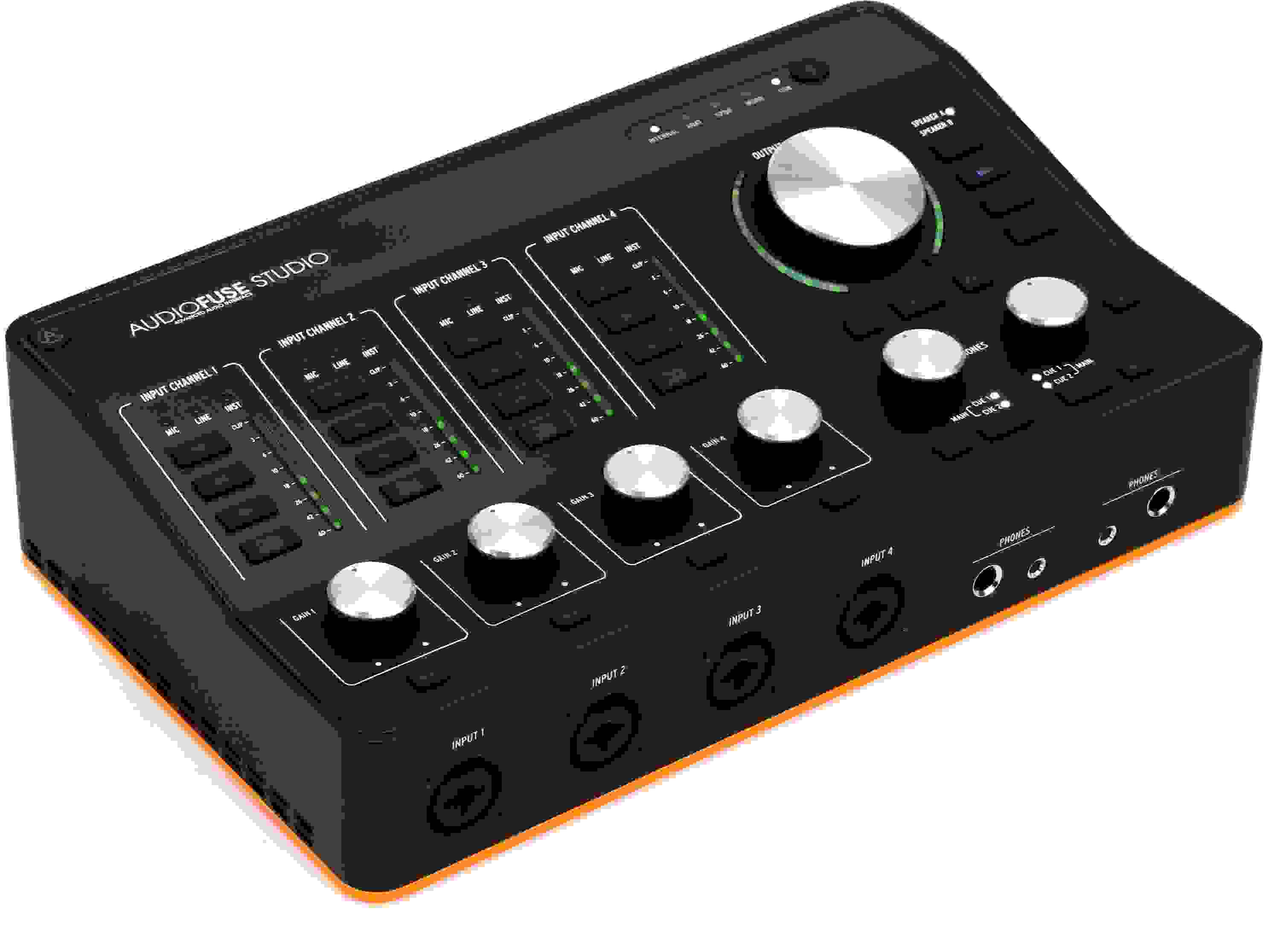
Item ID: AudioFuseStu
Arturia AudioFuse Studio USB Audio Interface
Reviews for

Arturia AudioFuse Studio USB Audio Interface Reviews

18-in/20-out USB-C Audio Interface with 4 Mic Preamps, 8 Line Inputs, 8-channel ADAT I/O, S/PDIF I/O, 2 Headphone Outputs, and Bluetooth Receiver - macOS/Windows

The surprisingly robust desktop-format Arturia AudioFuse Studio USB-C audio interface is equipped to be the centerpiece of your entire studio — that, and a powerful mobile interface for capturing live audio on the go. On deck are four high-spec Discrete Pro mic preamps with +71dB of clean gain to drive even your most power-hungry ribbon mics and studio dynamics with virtually zero added noise. A total of eight TRS line-ins and an additional eight channels of I/O over ADAT optical give you plenty of room for connectivity to mixers, summing boxes, and outboard pres. Factor in class-leading conversion and clocking with 129dBu of EIN and 119dB of dynamic range, and this potent interface is all you need to capture modern bands to string quartets at home and on location. Even so, the AudioFuse Studio's design remains future-forward at every turn. USB-C protocol yields a rock-solid connection and lightning-fast round-trip latency. And two independent headphone outs, along with two sets of speaker outs, make the AudioFuse Studio the perfect tool for collaborating and critical monitoring. There's even an onboard audio-grade Bluetooth receiver for streaming tracks directly into your session. It all ships with Arturia's Creative Suite software pack, which offers some significant sound-shaping and music-making options.

More Details
Price:$999 and 00 cents
Special Financing - Ends Aug 2, 2026. $28/month with 36 month financing*
Add to Cart
In Stock!

Only 6 left in stock! Order Soon!
Page 1 of 1
April 11, 2024

AWESOME INTERFACE

By Marvin from Chicago

This is more than just an adequate interface. It has more connectivity than most in its weight class. I was using an Apollo Twin, but I wanted more connectivity and something that wouldn't lose the pre-amp battle. Arturia has made a brute of an interface that can stand-up to any of the big name interfaces.

February 24, 2022

All you may need and a lot more

By Marcus from Houston
Music Background: Producer

This interface is amazing, it truly has power, versatility, and a great sound. Very solid and useful software and plugin bundle, It's very sturdy and well made too. The only thing I would change is the front XLR inputs, I'd rather prefer having them at the back of it.

February 19, 2022

My thoughts

By Klaciko from New Mexico
Music Background: Producers. Mixers. Beat maker.

The unit it's solid and good looking. Sounds pretty good, lots of gain for my dynamic mic. Love all the inputs for the price. The main volume nob feels good but it doesn't seen to response well. I have to crank it up to get a good volume and difficulty to find the sweet spot.my apollo twin silver nob was more responsive. I think it's a pretty good interface that will last for many years without needing to get another one

January 1, 2022

Gear Junkies Beware

By Gabriel

This is an "end game" interface. If you're a gear junkie who likes to always be planning on your next upgrade, prepare to be a little frustrated with this one. You're not gonna find better, at any price point, for along time!

This amount of connectivity coupled with top notch sound quality and ease of use is simply not present elsewhere. Not for double, triple or even quadruple the price. Once you buy this, that's just it for the foreseeable future. There is no upgrade path. Start upgrading the rest of your studio around it.

December 12, 2021

Awesome device for a guitarist!

By Lyle L. from Colorado
Music Background: Guitarist, Guitar Instructor & Gear Nerd

I have been using an Antelope Audio Zentour interface for 3 years. It sounded good but it's software is a joke. I spent more time trying to figure what went wrong than actually getting some recording done. I finally had enough and purchased the AudioFuse Studio. Sounds great! Easy to use. Actual physical controls and easy to use software. I hooked it up, got a great tone going and tracked some guitars in just a few minutes. Elegant design, great sounding mic preamps (with inserts!) and enough I/O to tackle anything I am going to run into. Expandable too. It also comes with a very nice software bundle. Highly recommend this device! Well done Arturia!

October 28, 2021

fantastic!

By Peter from Philadelphia, PA
Music Background: performing amateur musician

I needed a 4 mic pre USB interface, mostly for recording my classical guitar with 2 or 3 mics, and this Arturia is absolutely fantastic! Top shelf specs for the preamps and converters. And I particularly like the form factor with gain knob, commonly used switches, and meters for all 4 preamps on top of the unit. The knobs all feel super solid. I'm also thinking about using an external preamp and each of the 4 preamp channels has inserts allowing one to bypass the internal preamps and directly access the converters. I've made a couple of recordings and they all sound absolutely beautiful - I'm using Warm Audio mics with flat frequency response curves and my mixes have needed zero EQ adjustments. Brilliantly conceived and executed unit with 5 star rating from me.

September 12, 2021

An Interface to Grow Into

By JKRICHARD from Orlando, FL
Music Background: Multi-instrumentalist, audio production and sound design

Here is the one downside to this interface and pre: no DSP. That's it.
What you get: a huge amount of ins and outs, the ability to record Bluetooth, phono/rca, the ability to reamp, 4 inserts channels (or 2 stereo), midi and modular/rack connectivity, and easy expandability for more ins/outs. Want to A/B on two sets of monitors: no problem. A/B on two headsets? Talkback feature: no problem. USB connectivity - plenty. Works great with PC or Mac and Mac iOS: yes.
The 4 mic pres are silent, crazy quiet. Very similar to the hi-fi sound of Grace Designs pres. 73+ dB of quiet gain on tap with the hidden gain boost feature for mics.
If you want an interface that packs the most connections, and routing options - an interface that grows as your studio and equipment grows - this should be high on your list of choices for a dang good studio interface with quality mic pres.

Read More
August 26, 2021

All-In-One Solution

By Matt B. from Canal Fulton, OH
Music Background: Multi-instrumentalist, producer, mixer

Arturia knocked it out of the park with this interface. Things I love about this device: everything! Between the massive amount of I/O options, physical layout of the knobs and buttons, backlit buttons, onboard input level meters, intelligent control software, amount of gain per channel, USB hub, and ADAT expandability, I can't think of a scenario this interface can't handle with ease. The recording quality of this device is pristine, capturing every nuance of the source. The Audiofuse Studio is now the central hub that ties my entire studio together.

August 23, 2021

Excellent Interface

By Anthony B. from United States
Music Background: Music Production

I've had this unit for a few months and nothing but great quality audio. I appreciate its functionality and the fact that I can expand this unit at anytime. Excellent buy and great service from sweetwater.

March 27, 2021

Worth the price

By Brian S. from JAMAICA, NY

I was hesitant about spending so much for an audio interface for my bedroom studio especially since I don't use microphones. I took a shot on this after seeing all the reviews and the amount of features and I'm glad I did. First thing I noticed was the sound quality as soon as I turned it on. It was almost as if I had new speaker monitors. It's plug and play but you can go into the desktop app and change some settings. I love connecting my IPad using the Bluetooth for watching tutorials and having my session open on my monitor. You can set the Bluetooth for audio to play on channels 7 and 8 so it doesn't override everything which is does by default. The only disappointment is the audio quality of the Bluetooth is subpar so forget about using it with your DAW. I have two external HDs connected to the usb connectors so I don't have to constantly eject them from my computer. I can go on and on with everything you can do with this interface and how it condensed my setup I love this thing and you will too.

Read More
March 11, 2021

Great interface for my needs

By Niels J. from RESTON, VA

This interface offers great output quality, I have it directly connected to two pairs of studio monitors, and having the volume control, A/B switching, dim, mute, and mono right at my fingertips os great. I got rid of my monitor controller, because this box does it. Two sets of headphone outputs, each able to be driven by main mix, cue 1 or cue 2, are awesome as well, and I love having 1/8" and 1/4" outputs, easy switches on the front panel to pick the input, easy volume control, and a mono mode for both. Works to do small recording sessions. The talkback built into the unit also works well for this purpose, and the microphone is plenty sensitive for my needs.

The 4 microphone / instrument / line inputs are fairly quiet and high quality, about the best I have heard in a unit in this price range. Knobs for setting levels are sturdy, meters are easy to read, and the control buttons and indicators are all dimly lit when not engaged, and brightly when engaged, making the unit easy to use in a dark-ish environment. There are hardware inserts on all four preamps, awesome feature, it works well for me. Line, Instrument, and Mic input all work well. The meters are easy to read and large enough for these four inputs.

All connections are on the back, except for the four inputs to the preamps, and the headphone outs. I like this design since the cable mess I don't often change is in the back, but the inputs and output I frequently use are in sight on the front. Well thought out, and works well for me.

Four additional line inputs on the read is where I have synths hooked up; two of these also have RCA inputs (can be switched on or off) and they even have a phono pre-amp with correction curve, so it's easy to capture vinyl. it sounds pretty decent. Again, well thought out. Also on the back the two sets of speaker outputs, and two more outputs that can be used for re-amping. One nice touch: You can set these to be instrument level, so you can stick a guitar pedal in with no problem, or stick them into a guitar amp for re-amping. Nice feature, I never knew I wanted this but I love it!

There's dual ADAT/SMUX ports on the back, both in and out, and word clock on an RCA (can alternately be used as SPDIF). I got an RCA to BNC cable and hooked this up to an external A/D converter, got 8 extra pre-amps that way, and as expected it works and sounds excellent. Getting word clock sync and SMUX setup was easy, and there were no issues getting 8 additional channels in at 96K.

The software works well, easy to use and does most of what I want. Clear, concise, functional. There's even a button on the top left of the unit to bring up the software control panel on the computer and, on second press, make it go away. Very nice, easy, intuitive.

I've been using it for a few weeks now, and am overall happy with how it works.

A few small issues I have noticed that you may want to be aware of:

- There is a built-in bluetooth interface that lets you connect your phone or computer to do playback. The sound quality of the bluetooth playback is lacking in my opinion. I just elect to plug in rather than to use the bluetooth, as it is just not that wonderful.

- When recording 12 channels of 96K into ProTools for a few hours on end at a live show, the interface got very warm. No problems at all, but it does get very warm. Thank goodness there's no fan, so at least it stays quiet!

- In the interface software, there are no scales next to the meters except for the master, and there is no numeric peak indicator. It would be really helpful to have those so we can better judge about what input level we have coming in.

- Nearly all the indicators at the front of the physical box are white lights. I would have liked the Speaker A/B indicators to be different colors, and the same for the dim, mute, and mono indicators. It would make it more clear from a distance what is engaged.

- It would have been nice to have an insert switch on the 4 channels that have the insert. A click to take out the insert would be easier than unplugging a cable at the back.

- I wish that on the hardware, the main meter would not be around the knob, but would be straight, and would have a scale in dB letting me know where the output is. It would help me with monitoring.

- It would also have been nice to have input meters on the hardware for the other 4 analog inputs, and the 8 ADAT inputs, or at least to have signal and clip LEDs. It's all there in the software, but I would have loved to have had it on the hardware so I can see "at a glance" what's happening,

Overall it's a very nice unit and I am very happy with it. Would buy it again, and would recommend it to anyone with similar needs.

Read More
February 13, 2021

Great Feature Set, Execution Lacking

By JM from West Lafayette, IN

When considering an interface, this ticked all the boxes for me for the feature set I was looking for and had some cool bonuses like the Bluetooth audio in. Compact box, right price for feature set, but lost me on the audio quality and noise.

1.) I found the audio quality thin. When I brought it online from my previous gear I noticed an immediate loss in audio quality of 30% keeping all other gear the same (Speakers, sub, PC etc.) Lost the bass response and part of the midrange. Not the direction I was hoping for.
2.) I was dubious about the only monitor outputs being 1/4" Unbalanced and it turns out I was right. Not clean enough. (And yes, cables were good.)
3.) The Control Software is OK. Every time I powered it back up the USB inputs were re-arranged, but that's probably Windows playing with the mojo of things.

Tip: When I fired it up the first time connected to my PC/Win10 it locked up my mouse. You had to turn the monitor volume knob first to get the mouse to work. Fun! I resolved that by moving the Arturia to a different USB port on the same machine and for some reason that worked.

Some of those points are minor annoyances, but the thing that killed it for me was the audio being noisy and thin. I'd sacrifice several features on it if it meant the sound was better.

Read More
November 26, 2020

Comprehensive feature set

By Anthony C. from NY

I'm not a professional so I can't give a detailed review on the audio quality of the various inputs and outputs. The main difference from my last (and cheap) Behringer interface is that whatever I hook up to this sounds clean as hell and I can crank it up much higher. Not a particularly fair comparison since this costs five times the price. I'm not surprised it performs better, haha. Build quality and feel is quite good, no complaints. The meters and other lights are comprehensive and readable.

The main reason I am writing this review is the absolute avalanche of features this audio interface has. It has let me integrate all of the components of my (literal) bedroom "studio" in ways I have always wanted but thought impossible due to a lack of knowledge or assumption that I would have to buy expensive equipment a professional studio might have.

I have this interface connected to my Windows PC. Connected to the analog inputs is a microphone and a synthesizer. Connected to the SPDIF output is my RME DAC/AMP that I prefer for general listening. With a button press of the RME remote I can switch between regular computer audio or the Main interface mix, no swapping of headphones required.

The loopback function is also extremely useful. I use VCV Rack for modular synthesis and I can output VCV Rack to the loopback channel which has its own dedicated virtual input. I have my DAW listen and record off of this input. It makes recording VCV so easy while we wait for the VST version to release!

My favorite new thing I'm able to do though is with my iPad Pro. I have a lot of iPad music apps: synthesizers, drum machines, MIDI sequencers, FX processors, etc. I'd like to be able to use whatever apps I like regardless of whether they're on iOS or Windows. I've connected my iPad Pro to a MiniDSP USBStreamer B box which gives my iPad Pro 8 ADAT inputs and outputs. I've connected the USBStreamer to the ADAT input and outputs of the AudioFuse Studio.

This allows me to send 8 distinct tracks of audio from my iPad Pro to the DAW on my PC for easy recording. Additionally, I can send 8 distinct tracks of audio from my PC to the iPad. I mainly use this to send audio through FX apps that I like on the iPad, and then I can send the processed audio back to my PC for recording. It works really well and it was surprisingly easy to set up. The Control Center software makes it easy to monitor and troubleshoot things in case I get something wrong.

The Bluetooth is also pretty cool! I just use it to watch funny videos I get texted without having to take my headphones off or disturb people I live with though, haha. Latency is low enough when using the AAC codec from my iPhone to the AudioFuse Studio.

Overall the AudioFuse Studio is the nerve center of all of the random things I've accumulated over the years. It's really satisfying to be able to use whatever tools I want in nearly any combination I want. As a hobbyist this interface feels like it has a lot of headroom for me to grow into.

Read More
November 23, 2020

Versatile recording solution

By Steve P. from Minnesota
Music Background: Experienced guitarist and home studio enthusiast

Excellent product for all-around recording. This fills my need for a single device with greater than two channels, USB-compatible, running in Windows. Non-Thunderbolt choices are surprisingly limited. The AudioFuse Studio ticks all the boxes: four mic/line/inst connections on the front for easy access, a simple and intuitive layout, two independent headphone jacks (I like to use close-backed phones for recording to click tracks, and open-backed phones for mixing), and a full complement of I/O options. It comes with its own ASIO driver and control software and is easy to install. I've been using it in Pro Tools 2020 without a hitch, up to the full 192 kHz 24-bit resolution. An unexpected bonus is the built-in phono pre-amp, with gain adjustable in software. For old turntables with RCA connectors, this is plug-and-play and makes digitizing LPs incredibly simple. The software emulations are a further bonus. These include an 1176-style compressor, a tape delay, several vintage preamps, and a plate reverb. Using steel- and nylon-string acoustic guitars with a ribbon mic and a variety of small- and large-diaphragm condenser mics, I've been comparing the AudioFuse to my Lynx Hilo (used in combination with a Grace m101 preamp). Honestly, my ears cannot tell the difference. The only thing worth noting is that the AudioFuse preamps seem to have less oomph (gain) than standalone preamps like the Grace. But while I had to turn the gain to about 75% with the ribbon mic, I could hear absolutely no background noise. Really impressive for the price, and four channels to boot! Recording electric guitars through the Hi-Z inputs is a breeze, making it well-suited for working with modeling software like Amplitube. I've made some cool stereo recordings by plugging the outputs of a Strymon Volante pedal directly into the AudioFuse. This device has so many well-thought-out features I can't begin to describe them all. It has greatly simplified my workflow. It's solid, with a thick non-slip pad on the bottom, and it has freed up a lot of space on my desktop. Highly recommended.

Read More
October 11, 2020

Your miles may vary.

By Fred from Leimberger

I was, to say the least, beyond excited when I discovered this unit. It checked every box I wanted and Arturia has always been good to me. Also, the price tag was hard to beat. I was approved for the Sweetwater credit card(omg) so I was able to purchase this about 6 months ago.

Basically my needs were-- 4 preamps, 8 inputs, 4 send and return, and 2 headphone jacks. Totally the perfect unit!! It even had features that I didnt know would be as useful as they are.

**When I got it and plugged it in it did nothing when I turned it on. I turned if off and on a few times and
discovered that it would turn on sometimes, probably about 10-15% of the time.

**Once powered up, one of the preamp channels didnt work at all.

**When on, it gave off a strong burning component smell.

I only live a few hours from sweetwater so I drove it up there. I told the gentleman about the problems and he immediately had a new one sent up, no questions asked. I even tried to show him the issues with mine but he wouldnt even consider looking at it, getting me a new one was his only concern!! He let me test it and it was good to go. Sweetwater always has the best customer service no doubt. Unfortunately since its a bit a drive I never get to see the rockstar superhero Derek Kemp who is secretly a sales engineer by day.

Now that ive had some time to work with the unit, heres what I have to say.


**The headphone amps are too quiet even at bedroom volumes to hear over an amp. 80 ohm closed back.


**People talk about the temperature. Yeah, its warm. Its never gets hot though, and it has never smelled of high
temp. Unbelievably over time the unit doesnt get as warm as it used to. I know that sounds weird and maybe even
impossible, but Im 100% sure that it runs cooler now than when it was brand new.


**The 4 send/return loops are noisy/staticy sounding. I know they arent balanced, but 2 things. I had a mixer
placed in the same spot prior to this with 8 send/returns going to the same spot going to the same gear and it had
no noise at all. Plus there is no new gear or new possible interference along the loop. I made sure to change out
cables and gear and pathing and location because these loops are integral to my chain. No solution could be found.
And when you consider that the audio outputs goes through USB cable I cant even use a patchbay as a solution like
with traditional outboard gear.

**There is a handy button right on top of it that instantly opens up all of its settings and mixer etc. Its
actually way more useful for workflow than you might think. That button has stopped working, I guess its not a
huge problem, but it was part of how I learned to use the unit and my new workflow. But theres workarounds.

**Aside from those, the preamps sound great! The features are killer! The software it came with I actually use a
lot. Its simple to use and intuitive. It looks really cool lol.

Are the problems worth the tradeoff to have all of the other truly awesome Audiofuse features? ..No.. But, because of the affordable price I could see how some people might say yes. They say you get what you pay for lol. Alternatively, if you dont need the FX loops, this is definitely a great device to consider. Though i still fear a preamp might die or it will not turn on at some point like the 1st one did. But since its sweetwater, I know ill get at least 3 years out of it anyway.

I hate to rate anything 3 star, but i cant in good conscience give it a 3.5 star either. C-, but not a D+. We are in the digital age of music, so some things are gonna go wrong. Stuff happens. If it were my old mixer, I would just get a screwdriver and a soldering iron lol. Its still a new model, I would almost consider these prototypes imo. Digital only improves over time.

Read More
October 3, 2020

Excellent Desktop Ergonomics, Good Feature Set. Very happy to have it.

By Matthew F. from ATLANTA, GA
Music Background: Electronic + Electric Musician/Composer with some professional production experience.

This is an excellent home studio interface, with one caveat (in a moment). Having discrete monitor and headphone controls is really convenient. I'm happy with the build quality and the mic pre's seem fine to me. I've mostly tracked synthesizers and drum machines. It's really nice to have 8 balanced line inputs. One thing I appreciate is that the line inputs on the front bypass the mic pre's. It does a pretty good job of recognizing what I plugged in without much fiddling from me. Basically, I don't think about it too much and when I want to change a setting there is usually a knob or a button for it on the panel. Obviously it's easy to access an input when I just want to swap a guitar for a mic on the fly. I've been really impressed with the direct bass and guitar sound, fwiw.

I have two technical issues that maybe could have been better. First, it does use the USB-C form factor, but it's a USB 2.0 protocol. So, it doesn't really do anything with USB-C bandwidth. This is actually probably fine--USB 2.0 is still enough bandwidth for a lot more than 8 tracks--and it means you can plug in to basically any computer and it'll work. So maybe not a big deal, but I hoped higher bandwidth would improve a different problem I have...

...which is that this device uses generic audio drivers, which means ASIO on Windows. So I'm stuck at 48khz with a 512 sample buffer, or I get a lot of pops and clicks from skipped samples. Maybe your machine won't have the same problems--CoreAudio is definitely a better driver than ASIO--but it's a bummer to have nice a nice piece of hardware you can't use to it's capabilities because the software foundation is generic.

Read More
September 21, 2020

No Regrets

By Scott J. from Nashville
Music Background: Keyboards and recording. scottjoycepiano.com

Ted Ulrich's review sold me on the unit and his review is excellent and informative. I've had my unit for a week now and I love it. I originally had bought the Audient iD44 but it did not work well enough for me to even make a recording. Mine was either defective, or I had a conflict with my computer. So I returned it and spent quite a bit more on the Arturia. Thank you Delvin Wolf and Abigael Black for the smooth exchange.
I don't want to knock Audient too much but my unit was impossible to get working and the response from tech support was too slow for my taste. When I hooked up the Arturia it just worked.
I'm using mine to record a grand piano mostly. I wanted the ability to use 2 close mics and also use one or two room mics. I also needed the ability to record a singer and a keyboard at the same time. So far I have used 3 mics on the piano, and 4 and it sounds amazing.
The Audient does not have MIDI and the Arturia does. I had a work-a-round planned for the Audient, but now I don't need one. I had no issues with getting MIDI to work and I got to try the Analog Lab Lite software which is impressive.
The Arturia has Bluetooth receiving capability which I wasn't looking for but now I find I use a lot. When a friend sends me a mix to check out on my phone, I can use my studio monitors right away. Very convenient.
As far as I can tell, there is no on-board reverb as it says in the ad. Not an issue for me. Just FYI.
I was concerned about latency being a piano player, but it's not an issue. I use Studio One and there is a Zero Latency button that still works even though I'm not using a Presonus interface anymore. Pleasant surprise.
I have had the 4 mic input UA interface in mind for a long time but it's about twice as much. It requires thunderbolt though and I need a newer computer for that. From what I hear, their plugins are amazing but you end up paying a lot for them. The Arturia strikes me as the emphasis being on great tracking mostly. But then again, it comes with some truly great plugins for mixing too. Let's just say, I don't regret not getting the UA. The Arturia plugins seem to me to be of a higher quality than most. And it was easy to install them too.
My old interface was a discontinued Audiobox VSL22 with just two inputs. I've had it for years and it's done a great job for the price. And it came with Studio One! Now, years later, the only reason I didn't get a Presonus was because I needed the ability to choose which inputs need phantom power. The Arturia allows this.
For a guy with an older mac without thunderbolt, this is fantastic. I can save some money and put off buying a new computer a while longer, and record like I want to in the meantime.

Read More
May 30, 2020

Feature packed interface and studio hub.

By Ted U. from Virginia Beach, VA

For starters, this thing is built like a bridge. I should have known in advance, considering I own a Keylab 61 Mk II and a Beatstep Pro, and they're both solid metal, heavy and sturdy. Still I was pleasantly surprised by the weight of the box when I picked it up. The Audiofuse is definitely in keeping with the high build quality of Arturia's professional grade equipment. The gain and headphone volume pots have a weighted feel, with no rough spots or dragging. The monitor volume knob is rubber wrapped like all the others and has a hefty feel. While it has detents, it's high enough resolution that there's not a huge jump in volume with each 'click'.

One of my minor gripes about my Keylab is that all the buttons have a plastic feel and have a loud click. This is NOT the case on the Audiofuse Studio - the buttons have a softer feel and the click, while still audible, is far more subtle. The headphone outputs have no problem driving any of my cans, and the dual outputs are nice for recording my band. They're also completely independent and don't use any of the other output paths.

The preamps are excellent. Dead quiet and have the guts to bring my quietest mics into their sweet spot. Phantom power toggle per preamp is an excellent feature that sold me over some other interfaces - I mix several mics and only need +48V on certain channels, not half or all of them at once.

One place manufacturers and retailers are failing is referring to some of these devices as using a "USB-C protocol". USB-C is absolutely NOT a protocol, it's just the connector. USB-C can apply to any of several USB protocols (2.0, 3.0, 3.1) and in this case is 2.0, so it will work on most "standard" USB equipped machines. You don't need 3.0 or 3.1 capability, nor do you need a USB-C port on your computer as both USB-C and USB A cables are included. It's also worth saying that USB 2.0 does NOT handicap this interface. I get outstanding roundtrip times compared to my Line 6 Helix, and my computer isn't exactly new. The included USB cables are excellent, cloth jacketed and sturdy. Speaking of cables, the threaded collar on the power cable is a nice touch. I don't usually pull out power cables, but I know this one won't for sure.

I know some have said their two preamp Audiofuse interfaces get extremely hot during use, but the Audiofuse Studio does not. I checked mine after several hours with an infrared thermometer and the warmest metal part was 84 degrees, with 90 degrees directly at the metering LEDs, which is to be expected. The exhaust vents at the rear run 88-92 degrees. This thing isn't going to burn you or heat up your studio.

A couple of caveats that aren't apparent by the sales information: While the Bluetooth input is convenient, it overrides the #7 and #8 line level inputs, so keep in mind that you lose two of the inputs. It's more a convenience than anything else, I certainly wouldn't rely on Bluetooth to record something if I could absolutely avoid it. Also, while this more a benefit for me, the USB hubs power down with the unit, so if you shut it off, everything connected to the onboard ports shuts down as well. This is fine for me, as I can use it as a master switch for my desktop gear, but others might find it a problem.

Overall I'm EXTREMELY happy with the Audiofuse Studio, and will certainly augment it with the Audiofuse 8Pre when the time comes.

Read More
of

Have Questions About the AudioFuse Studio USB Audio Interface?

Or call us at (800) 222-4700

Questions about the Arturia AudioFuse Studio USB Audio Interface?

Sweetwater's Sales Engineers are regarded as the most experienced and knowledgeable professionals in the music industry, with extensive music backgrounds and intense training on the latest products and technologies. They are available to offer you personalized product advice any time you need it.

Type your question below or call us at (800) 222-4700
Thank You!