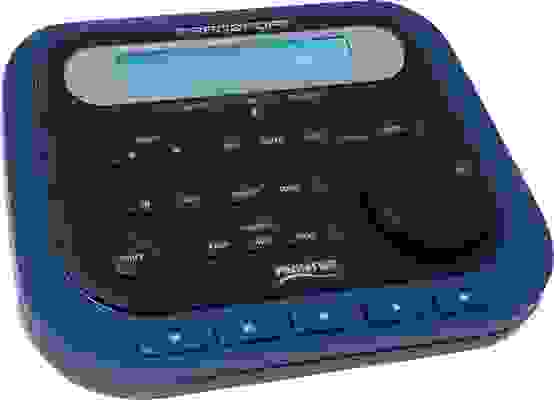

This Wireless DAW Remote Will Change Your Studio Life!
The Frontier Design Group TranzPort remote DAW transport controller solves many problems that occur when tracking alone in your studio. If you've ever struggled to run your DAW recording session from behind a drum kit or from a vocal booth, you'll appreciate the control you get from TranzPort. This wireless controller features all the transport controls you need, plus easy compatibility with most DAW programs. Its backlit LCD display shows important information, including timecode position, track names and numbers, volume levels, pan settings, and more. You also get dedicated buttons for several important functions, so you're in control no matter where you are in your studio — thanks to the TranzPort!
Frontier Design Group TranzPort at a Glance:- Wireless remote control frees you from sitting at your computer
- Complete transport controls plus bi-directional reception
- Compatible with many DAW programs right out of the box
- Wireless radio frequency transmission works around corners, through walls
- Small, light, runs on AA batteries
Wireless remote control frees you from sitting at your computer
Frontier Design Group's new TranzPort represents a revolutionary way to interact with your Windows or Mac (now including Intel Macs) digital audio workstation (DAW). Instead of being stuck in front of your computer to compose, record, and produce music/audio, TranzPort gives you the freedom to control DAW functions from anywhere in your studio.
Complete transport controls plus bi-directional reception
The TranzPort gives you total control over the transport functions of your DAW. Buttons and controls include REW, FWD, STOP, PLAY, RECORD, CHAN LEFT/RIGHT, RECORD-ARM, MUTE, SOLO, UNDO, IN, OUT, PUNCH, LOOP, SHIFT, PREV, ADD, NEXT, Battery, Backlight, and a Data Wheel. TranzPort is bi-directional, which means you can get feedback from your DAW on signal levels, time code position, and track names. Other indicators include RECORD-ARM, MUTE, SOLO, ANY-SOLO, PUNCH, LOOP, RECORD, and LINK STATUS.
- Adjust monitor mix settings from inside an isolation booth, or easily record instruments that are physically incompatible with your work space (piano, drums, etc.)
- Get creative in an environment away from the computer (living room, lounge, etc.) without having to run back and forth to the workstation
- Control your recording while physically removing yourself from unwanted computer noise and monitor hum
- Add a set of basic DAW controls to a second location in a studio (producer's desk, separate room, etc.)
- Remotely control your computer from onstage in live performance without messy cable runs
- And much more!
Compatible with many DAW programs right out of the box
TranzPort is easy to set up and use. Right out of the box, it's compatible with popular DAW software such as Pro Tools, SONAR, Logic, Cubase, Digital Performer and others. You can arm tracks, use transport controls, set markers, control pans, punch in/out, start loops, and more from TranzPort's simple and intuitive interface.
Wireless radio transmission works around corners, through walls
Unlike infrared remotes, you don't need line-of-sight between the TranzPort and your computer. TranzPort uses high frequency radio waves (RF) to send and receive control data, and uses advanced coding and frequency-hopping techniques to operate without causing interference, even in the presence of other wireless devices.
Small, light, runs on AA batteries
The compact, lightweight TranzPort runs on standard AA batteries, is mountable to a mic stand, and even has a footswitch input. As a very affordable alternative to keyboard/mouse DAW control, TranzPort offers control tools that will speed up your workflow. TranzPort is compatible with Windows 2000/XP and Mac OS X (10.2.8 and above), and requires only one USB port for the small Tranzceiver receiver. TranzPort is the remote DAW control solution for your studio!
- Wireless DAW control: operate your computer-based digital audio workstation from anywhere in your studio
- Compatible with Mac and Windows
- Supports Pro Tools, Logic, Cubase, Digital Performer, Sonar and other DAW software applications
- Two-way interface: get time code position, track name/number, track volume, pan settings and more via backlit LCD display and LED indicators
- Uses high-frequency RF technology: no wires or line-of-sight required, and no added interference
- Dedicated buttons for often-used functions, including transport controls, marker/locate buttons, track control (level, pan, solo, mute, record arm) and more
- New version 1.3 driver supports iTunes operation
- Operates on AA batteries
- Small, lightweight design (mountable to a mic stand)
- Footswitch input