Sweetwater®

Free Shipping with no minimum purchase. Learn more »
(800) 222-4700
  • Español: (800) 222-4701
Cart

MOTU Track16

Item ID: Track16

16-in/14-out Hybrid USB 2.0 and FireWire 400 Compact Desktop Recording Interface with Onboard DSP, Pre-DAW Latency-free Effects and Processors, and Comprehensive Hands-on Controls

Yes, It's In Stock!

This item is available for immediate delivery. You'll enjoy the fastest delivery time in the industry with our centrally-located warehouse and latest shipping cut-off times.

Get More Value From Sweetwater

or make 3 easy payments

From Our Research Team:

An Interface as Flexible as Your Recording Needs!

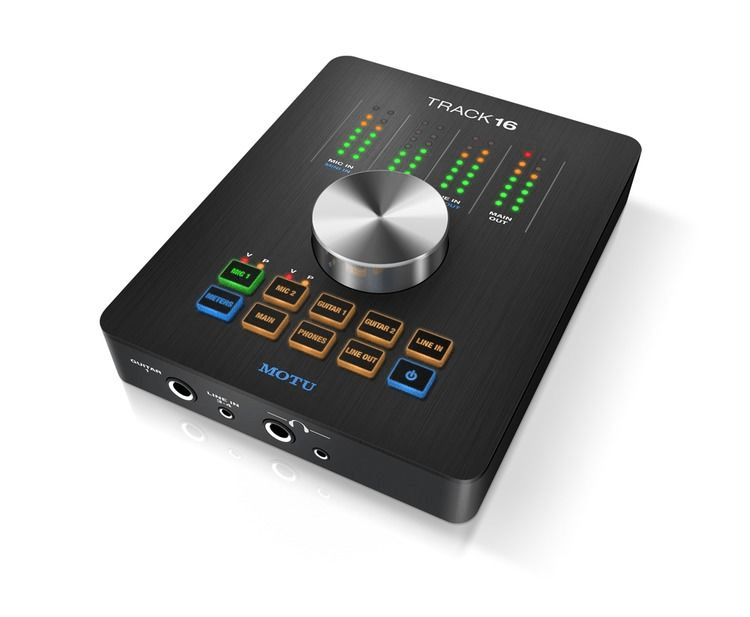
MOTU's Track16 desktop recording interface gives you the quality, versatility, and expandability you need to build a reliable recording rig that can grow and adapt to your needs. Intended to fit into any small to midsize recording rig, MOTU designed the Track16 to keep your invaluable desk space clear, while giving you access to a full set of hands-on controls. Need to tweak mic input 1? With the push of a button, the Track16's large central button lets you grab the level you need. The same thing goes for every other input or output. And when you add in onboard effects and DSP mixing, you'll be absolutely astonished by what you can do with a MOTU Track16 desktop recording interface.


MOTU Track16 Desktop Recording Interface at a Glance:
  • Flexible form factor fits any size or style of studio
  • Loaded with the versatile I/O and control options you need
  • CueMix FX lets you mix and add effects with zero latency
  • Control CueMix with your iPad

Flexible form factor fits any size or style of studio
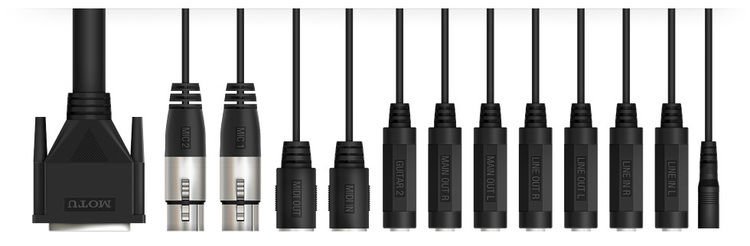
MOTU knows that your studio is entirely what you make of it. That's why they designed their versatile Track16 recording interface to allow you to configure your system around an ever-changing layout. If you're working alone or with a collaborator, then the Track16's onboard analog I/O is more than enough. A breakout cable (included) lets you keep your desktop clear and your cables organized - a real bonus in any modest sized project studio. Of course, if you find yourself suddenly needing to track a full band, then the Track16's optical expansion ports let you instantly add up to eight additional channels of outboard gear. And when it's time to hit the road, just detach the breakout cable and go. Your laptop's FireWire port is all you need to power your Track16, giving you unfettered access to its amazing sound quality wherever your music takes you.

Loaded with the versatile I/O and control options you need
It's really quite impressive how much useful I/O MOTU managed to pack into their Track16 desktop recording interface. For instance, you can track vocals via one of the Track16's dual microphone preamplifiers, mic up a guitar cab with the other, capture that same guitar direct, run bass direct as well, and even record a stereo feed from a keyboard or drum machine - all at the same time! And that's just with the onboard I/O. And you still have eight additional channels of ADAT optical I/O left for expansion. And the best part is that you can instantly grab hold of any input or output level with a single push of a button via the Track16's simple top-panel controls, which totally streamlines your workflow.

CueMix FX lets you mix and add effects with zero latency
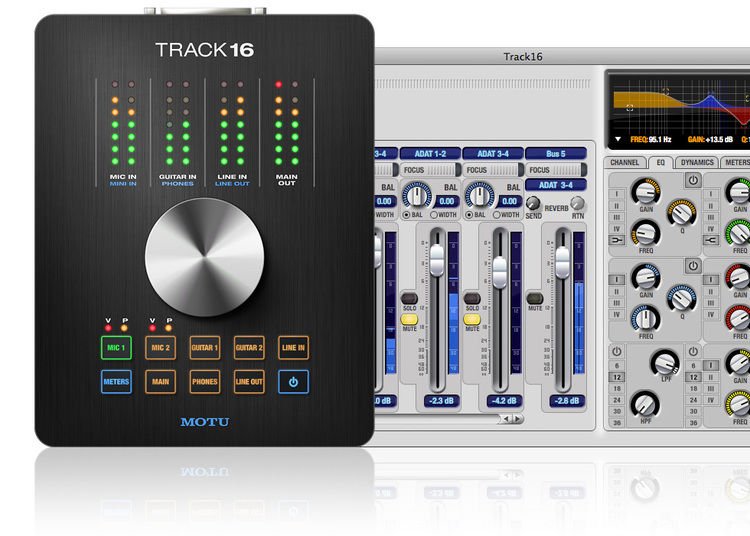
Another huge part of what the Track16 offers you is neatly tucked out of sight, hidden within the inner workings of this impressive desktop recording interface, namely, MOTU's advanced CueMix FX DSP mixing and processing system. If you've ever had to fight the effects of excessive latency as you tried to record, then you know what inspired MOTU to create this powerful system of onboard processing and signal routing. The way it works is simple. Using a straightforward software application, you can create up to eight totally independent monitor and routing mixes and add effects and processing to your inputs such as equalization, reverb, compression and more - all before your incoming signal hits your computer! That means with a MOTU Track16 and CueMix FX, you'll get the low-latency performance you need, no matter which DAW you prefer.

Control CueMix with your iPad
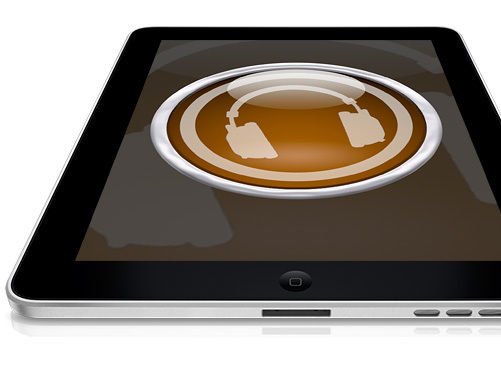
MOTU's CueMix FX software, the mixing software that drives the powerful routing of the Track 16, can be controlled from your iPad. MOTU created CueMix templates for the TouchOSC controller app, giving you complete control over your Track 16's mixing and effects processing over a Wi-Fi network. This means that when you're recording in your studio, you don't need to keep going back to your computer to adjust gain levels, change monitoring effects, or virtually anything else you rely on CueMix for.
MOTU Track16 Desktop Recording Interface Features:
  • This personal desktop 16-in/14-out desktop recording interface gives you all of the I/O and advanced mixing options you need to make professional-quality recordings
  • Slim desktop form factor keeps your work surface clear and your controls handy
  • Hybrid high-speed USB 2.0 and FireWire 400 connectivity
  • FireWire 400 supplies bus power (AC power supply provided for USB 2.0 operation)
  • Supports up to full 24-bit/192kHz HD audio
  • All analog I/O connects via a single DB-25 breakout cable for maximum versatility
  • 2 x MOTU microphone preamplifiers provide you with low-noise, high-headroom performance
  • Each mic pre features switchable +48V phantom power and a switchable -20dB pad
  • 2 x dedicated instrument inputs allow you to record guitar and bass direct
  • 4 x line-level inputs (in 2 x stereo pairs) are perfect for keyboards, drum machines, and outboard gear
  • Top-panel controls provide one-touch control over all input and output levels
  • CueMix FX lets you assign a separate pre-computer input mix to each output pair including the main outputs, the line outputs, the headphone outputs, 4 x optical pairs, and the return bus
  • CueMix FX also lets you apply effects and processing to your input channels including Classic Reverb, a 7-band British style parametric EQ, a conventional compressor, and the Leveler (an accurate model of the legendary LA-2A optical compressor)
  • Precision Digital Trim technology on all inputs provides adjustments in approximately 1/4dB increments, which you can store and recall later
  • 8-bus mixer also functions in standalone mode
  • Time code support directly resolves to or generates time code via any quarter-inch input or output, without the need for an extra synchronizer
  • Direct Digital Synthesis DSP-driven phase lock engine and internal clock source produces imperceptibly low jitter characteristics (below the noise floor), even when the Track16 is resolved to an external clock source via SMPTE time code
  • DC-coupled TRS outputs can be used with MOTU's Volta (sold separately) to manipulate and sequence voltage-controlled modular synthesizers from a host DAW
  • Mac and PC compatible on both 32-bit and 64-bit platforms

MOTU's Track16 hybrid recording interface lets you get more from your gear, without giving up more desktop space!
Specification Detail
Computer Connection Type USB 2.0/FireWire 400
Form Factor Desktop
Simultaneous I/O 16 x 14
A/D Resolution 24-bit/192kHz
Built In DSP/FX Yes (CueMix FX)
Number of Audio Inputs 8
Audio Inputs Types 2 x XLR, 2 x TS, 2 x stereo line
Number of Audio Outputs 8
Audio Output Types 2 x main, 2 x line, 2 x headphone
Number of Digital Inputs 8
Digital Input Types 1 x optical (ADAT/TOSlink/SMUX)
Number of Digital Outputs 8
Digital Output Types 1 x optical (ADAT/TOSlink/SMUX)
Number of Preamps 2
Phantom Power Yes
MIDI I/O In and Out
Clock I/O No Clock I/O (sync support for SMPTE via analog audio)
Bus Powered Yes (FireWire), external power supply also included for standalone use
Rack Units Not rackmountable
Depth 8.375"
Width 5"
Height 1.125"
Manufacturer Part Number 8440

Track16 Image Gallery

Can We Help?

Sweetwater's friendly and knowledgeable Sales Engineers are regarded as the most experienced and educated professionals in the music industry, with extensive music backgrounds and intense training on the latest products and technologies. As your personal contact here at Sweetwater, they are available to provide personalized advice any time you need it.
Call toll-free (800) 222-4700 or E-mail us

Recommended Accessories

Sweetwater ALWAYS exceeds my expectation in sales, customer service and knowledge on the gear being sold to me. Sweetwater is my #1 choice to buy equipment from the first time I ordered. I find of great value the fact that I don't feel like one more customer, rather THE customer.


Hector, Kissimmee, FL

Reviews

based on 6 reviews

Its a great productf

by Walter lilli Charles from British virgin Island
February 26, 2013
Music Background: Pro musician/ producer
I love the track 16, its a graet product. Also the fact that i could switch beteen monitors with the touch of a button. Its. The way foward into the future with that technology. Just love it.....

Track 16 Review

by Bill W. from Moorpark, CA
January 28, 2013
Music Background: Pro Guitarist, Teacher
For years I've used Apogee interfaces, most recently the Duet 2. As time went on, I started realizing Apogee has a sheen to its sound. An added color. Almost like smoothed over edges. Now this is a pl... read more [+]easant quality but I found I didn't want that in my interface. I wanted my interface to be clear and pristine, though not brittle. I tried the Forte which was nice but definitely had a notable top end brilliance. The Track 16 is fast, clear, natural and for my needs much more practical and flexible than the other 2 interfaces. I've had it now for almost a month and I'm still digging it. MOTU is sneakily good. close [-]

Track 16 Sounds Amazing

by Victor Tarassov from Princeton
August 3, 2012
Music Background: Pro Musician, Live Sound, Recording Engineer
Just received my MOTU Track 16 and it sounds amazing. Had a little hiccup in that I did not do a fresh restart and power up after installing all the drivers and software that came with MOTU. There ... read more [+]was a bit of noise that I was hearing when I used the Mac Book Pro. That has gone completely away after doing a restart and powering up the MOTU Track 16. I have let a few friends hear it and they actually thought it sounder better than the others out there that look a little like the same. One even compared the sound to the Ensemble. I am able to use the Firewire on both my Mac Book Pro and Mac Pro running Pro Tools 9.0.6 with no issues. I am very happy with the MOTU Track 16 it sounds great and is working rock solid. I like how the Cue Mix software works and can see using this live as well. The DSP works great and "0" LATENCY with reverb and eq on. The Mic pres sounded good I used them with a DPA 4099G mic, Shure KSM 141 and CAD Triton Tube. all sounded good and warm with my use which is a Flamenco Guitar. The Led's are bright and easy to see even not close to Track 16. Sweetwater is great the EZ pay make the purchase much easier if your on a budget. The support is great and thanks Mark Magdich x1265 If you need a small unit that has the ability to be expandable like with MOTU 8 Mic Pre (light pipe) and need more than 2 channels this is worth a close look. The folks at MOTU make rock solid drivers, software and hardware. This unit Rocks Thanks MOTU and Sweetwater. close [-]

Sounds Beautiful

by Gadjho. from
February 10, 2013
Music Background:
Love it !!! Love it!!!!! Great features. I had a tascam 1082 and Cubase SX 1.15 for years and now change to Cubase 7 and the track 16. It now sound as though I've been missing out on something. I am ... read more [+]still trying to get use to not having a jog wheel like on the 1082 but I am getting it slowly.
I might be missing something cause I am having a challenge getting sound on the line out. But any how I still love the track 16..... close [-]

inSync Review

by: Mitch Gallagher
A lot of different audio interfaces make their way through my studio, and they all have... read more »
Read more reviews

Also popular

See Also: FireWire Interfaces , MOTU , MOTU USB Audio Interfaces , MOTU FireWire Audio Interfaces

MOTU Track16

Today's Payment: $193.00
Includes $10 processing fee
Payment 2: $183.00
In approx. 30 days
Payment 3: $183.00
In approx. 60 days

Buy Today, Make

Sweetwater's Flexible Payment Plan is a convenient, interest-free way to buy gear now and stretch your purchase across three budget-friendly payments. Simply choose the "3 Easy Payments" option in your cart, and we'll divide your purchase amount into three convenient payments, billed to your current MasterCard, Visa, Discover, or American Express card. There is a $10 processing fee for using this service, and your billing address must be in the United States to be eligible. It's just another way we make shopping at Sweetwater easy and convenient!

Get your MOTU Track16 now and spread out the payments!


This program is subject to credit approval. We will pull a copy of your credit report to approve your application.

Sweetwater Sound Inc.
5501 U.S. Hwy 30 W
Fort Wayne, IN 46818
Get Directions »

Toll Free (800) 222-4700
Español (800) 222-4701
Local (260) 432-8176
Fax (260) 432-1758
E-mail us

Phone & Retail Store Hours:
9–9 Monday–Thursday
9–8 Friday
9–7 Saturday
(All hours listed are Eastern Time.)

© 2013 Sweetwater Sound Inc. All rights reserved. Please read our Terms of Use and Privacy Policy. Links | Press Releases