PreSonus FaderPort ReviewsSweetwater Advice
Nick Schenkel
Upon installing the FaderPort in my project studio, my workflow was simplified and improved drastically. The intuitive, hands-on approach that it affords allows me to focus on making music and working creatively. At this price, the FaderPort is a no-brainer of a bargain, and should be included in every home or portable studio.
Marcos Sanchez
The PreSonus FaderPort is an affordable and powerful solution to having a tangible control surface for mixing. The controls map out easily with your native transport controls, and include all the features you would need from a larger scale control surface, in a space smaller than a piece of paper.
Customer Reviewsfrom Coldspring, TX October 22, 2012Music Background: Hobbyiost Muscian Great tool for my studio!I have a midi keyboard/controller which works fine but the Faderport puts the controls I need into a much easier format. I use Presonus Studio One 2 and Ableton Live 8 and the Faderport works well with both. I play and record guitar and keyboard, so I connected a footpedal to the Faderport to enable record. It just makes everthing easier and more convenient. Once again, Thanks Presonus and Sweetwater.from michigan ,usa June 20, 2012Music Background: pro musican well worth the buythe greatest thing since the invention of ice cubes,well worth the buy,looked a long time for a good fader port,this thing does every thing, no mouse needed,my wrist thanks you. from Clinton Corners, NY April 30, 2012Music Background: Pro Musician, and Recording Engineer A Great Interface at any priceThe Faderport has been one on the neatest and most useful tools I have bought for my studio. Granted I have lots of equipment, both hardware and software, but the functions that this little thing performs are just what I need. It is solid, well built, and works perfectly. I needed to download an up to date driver from the Presonus website because the motorized fader did not work inititially, but it works now! I have Pro Tools 10 and Windows 7 64 bit. I have a fairly active studio, and do film scoring and record small groups so I needed something that allowed gave an alternative to using a mouse. I usually have up to 16 tracks to deal with, and even with one fader, the speed at which I am able to use the controls on the Faderport more than pays for the modest price I paid for from Sweetwater. Thanks guys. And thanks to Paul, my sales engineer.from Princeton March 26, 2012Music Background: Recoding Engineer and Live Sound No More MouseFor me this was the ticket. I use Pro Tools 9, Logic Pro and Studio One 2. I found that it works great and frees up my hands to no longer depend on the (MOUSE) I like the price of the Fader Port and simplicity of use with the three above mentioned DAW's. The 100mm fader works great for adumation and just works.from morganton,nc March 8, 2012Music Background: recording engineer,hobbist,pro musician the best with s1v2let me tell ya i use the faderport with studio one v2 and it does everything i no longer need a mouse! buy it you wont regret it!from Auburn Me February 8, 2012Music Background: Musician FaderportThis thing does just want you would expect.I find myself hardly ever having to use my keyboard anymore.This has been the coolest piece of gear that I have purchased.from Va/WV USA January 22, 2012Music Background: Recording Engineer, Student, Semi-Pro Musician Great product for on the go and compact studios, a necessityFinally you can write automation and have transport controls at the tip of your fingers, not your mouse. The touch sensitive fader give you that hands on feel that you've been looking for without breaking the bank. I used it recently in audio post production in a featured film and it dramatically increased my workflow and creativity within the project, something I would have never been able to do with my mouse alone. A valuable tool and a great buy that pays for itself in no time.from NYC January 4, 2012Music Background: Producer Works great.Works exactly as I expected. I think my unit came with the newer firmware so I had to downgrade to get the fader to work. Presonus should announce this info instead of saying not to upgrade if the unit is working. But I'm very happy with the unit. Fader feels as good as any pro unit. The pan pot is pretty flakey (in Pro Tools) but I got the unit to automate volume and it does that perfectly.from Deltona, Florida December 13, 2011Music Background: Recording Engineer awesomevery great, I think everyone would need to have, if recording.from Washington DC area USA November 10, 2011Music Background: Professional recording artist, Professional Studio owner, author, educator GREAT RELIEF & GODSEND FOR DAW USERSNo matter how much I love digital devices run with mouses..The mouse is too ergonomically inferior and too slow for professional use compared to console and hardware physical buttons and faders...Furthermore... Mouses are also inferior in that they fix your hand into one static position and right there, you are going against ergonomics and towards RSi injuries...due to blood flow reduction and tendon wear and nerve irritation. The FaderPort increases workflow speed dramatically and relaxes your hand as well. Concentration is much easier and eyestrain is much less.... You do more work, have way more fun, and get less tired. The DAW revolution is very cool but a mouse is quite a primitive interface compared to analog technology. A full regression in ergonomics. For DAW control it is a Stone age gadget masquerading as high tech..The mouse was never intended for audio technology- it is an old computer holdover that got picked up in spite its inappropriate nature for audio use and it never really worked in that capacity .. but we put up with the caveman mouse technology because of the benefits of DAW technology. Well..no need to put up with the mouse anymore for much of the work. Just use the mouse for what it does more or less OK, and use the FaderPort for the essence of audio DAW work. As you know, my perspective is full time professional, real world music making and production. It may not apply to most readers who can afford to be casual and take a long time to edit audio. In that case the FaderPort may not be a Godsend... The FaderPort is most assuredly a killer Godsend to the professional user. from Adirondacks NY June 29, 2011Music Background: Studio Owner, Musician Fantastic ToolI bought this for an easy tool with my "idea" studio. I didn't want to commit toa full board considering this is a portable notebook and it is basically for writing new material. Well, this is an excellent tool to keep creativity up when writing and not have to fool around with the computer keyboard! I love this little Fader!from SC, USA May 17, 2011Music Background: Recording and LIve Engineer, Musician, Hobbyist LOVE IT!!!I have used Faderport on my last project and it was amazing!!! It has alot of features in a compact size. The great thing about this is I can be in the other room and record from it without my computer.I would recommend it to everyone. from Midwest City, Oklahoma January 14, 2010Music Background: Recording Engineer, Musician Presonus FaderPort=AMAZINGThe Presonus FaderPort is an amazing product, the motorized fader blows my mind. Easy to setup (Cubase LE4). Works perfect, looks great.from Orlando, Florida September 6, 2007Music Background: Recording Engineer, Live Sound Engineer A ton of feature in a compact footprint!Do yourself a favor and get the FaderPort!!! I just can't go back to mixing with a mouse. It greatly improves work flow with buttons for mix, project and transport windows. The motorized touch-sensitive fader works like a dream, this makes editing track automation a joke! You really don't need a bunch of motorized faders at the same time when working on a DAW, 99.9% of the time you will be working on one track at a time (although... yes.... I know... having a bunch of flying faders looks really cool, but its just not that practical). PreSonus has impressed me once again with the FaderPort a solidly built unit that has become an essential part of any project that I work with. After you use it you will wonder how could you possibly work without one!from Philadelphia PA May 24, 2007Music Background: Home Studio, Guitarist for Plasma Prophets & Spankin Stanley Transport control at your fingertipsInstallation was easy. I am using this with a Nuendo system and it works flawlessly. Mixing read / write per channel operation is covered. Transport control works nice. Lights on the buttons are color coded for operation once communication is established.from Long Beach, CA May 18, 2007Music Background: composer Excellent product, highly recommended1. This is an excellent product. The principal selling point for me was the following from PreSonus' website: "FaderPort utilizes the same ultra high-quality Alps fader that is used in professional control surfaces and digital mixing consoles costing 200 times the price including DigiDesign's D-Command. The fader in the FaderPort utilizes a dual servo motorized drive belt system for fast-acting, accurate, and smooth operation. The FaderPort's 100mm long throw fader delivers 1024-step resolution for wrting ultra-fine and accurate fades and adjustments." I can confirm that the fader is very high quality and performs as promised. I only need, and would rather have, one very high quality fader than multiple lesser quality faders.2. The quality of the product is otherwise very high. It is all metal except for the buttons, which are high quality, durable plastic. 3. I use this device with Cubase, and the controls are evidently specifically designed for use with this program. 4. The buttons that appear white in the photograph are lit with different colors from beneath (green, yellow, red) which is very helpful in a darker studio environment. 5. I cannot recommend this product highly enough. from New Orleans May 10, 2007Music Background: Pro Musician Super cool.I bought the faderPort and my friend bought the Alphatrack. We both like the Faderport way better. It's way easier to use, the fader feels better, and it follows my mouse clicks. My buddy is sending back his Alphatrack to get the faderport.from IL April 20, 2013Music Background: Recording engineer, Student Great!!!!!!!!No more mouse :) plus its recognized on all my software!!!!!!great buyfrom Fort Lauderdale, FL January 19, 2013Music Background: Pro Musician, live and studio work, songwriter PreSonus FaderportLove the feel of the fader; gives me more control of automation when I'm mixing. Great piece, great price!from Colorado Springs, CO USA February 3, 2012Music Background: X-pro turned Hobbyist FaderPortFirst thing I had to try was the automated fader. Although it may not be terribly needed, it sure is fun to watch! On a more serious note, this has come in really handy for recording in other rooms a distance away from my main system. With a long USB cable, you can record, play and such without having a second set of hands. As such, I am very happy with this device!from Corona, CA February 1, 2012Music Background: Student Life Saver!This a great tool to have at your finger tips. It makes automation a breeze! The only issue is the redo button will cause protools to glitch and slow the tempo of your working project in which case you will have to restart the program. Other than that, it's awesome!from Rockwood, TN January 30, 2012Music Background: Musician, Recording Engineer Time Saver!Super easy to get up and running with Cubase. I rarely use the Mute, Solo, or Record buttons, as there seems to be a bit of a lag with them, in Cubase and Logic at least. Not a big deal to me; I tend to use my keyboard for functions like those and transport controls. The fader responds just fine, as do the rest of the controls on the FaderPort.Basically, it does what I need it to do. Even the most basic DAW-based studio needs at least one motorized fader to create lively, dynamic mixes without slaving away with a clumsy mouse to draw automation points. I'd recommend this one. from Phoenix December 29, 2011 The missing linkI never thought the GUI sliders on my DAW or the concentration it took to keep the mouse on them, or my subconscious desire to have a track at a particular level was marring my mixes. Since I've got my FaderPort, I've realized those prejudices really were messing with my mixes. Switch to the track (easy), find the slider with your eyes closed and mix it right. You'll be amazed. Points off for the difficulty of installation, but once it's in it's great. Follow the instructions on sweetcare TO THE LETTER.from Pittsburgh, PA USA December 28, 2011Music Background: Hobbyist Works fantastic with Studio One v2This is a excellent compliment for the Studio One v2 software. If you need a compact controller, I'd recommend it.Improves workflow with Studio One. I'm glad I bought it. I also own Sonar X1, but could not get all of the features to work out of the box (probably programming with ACT would do the trick). from United States November 21, 2011Music Background: Recording Engineer Presonus FaderPortNo this isn't a 16 or 24 channel controller but team this up with key commands and you will just about disconnect your mouse and put it away. The FaderPort makes working in your daw's mixer a breeze! Correcting automation is now a snap. You can now think like an engineerwithout the hassle of moving around with a mouse. from Warren Michigan (USA) November 20, 2011Music Background: Pro musician, engineer Presonus Fader PortJust recently purchased the Presonus Fader Port to run my Protools digi 002 system. Man I am impressed. It has made my sessions run much smoother and faster, allowing me to be more creative in my recording process. Thanks Paul Allen for your assistance at Sweetwater. I placed the order and it was there the next day. Paul you have always been a life saver helping me make wise decisions with the equipment I purchase. If you haven't tried sweetwater you just need to!from Silverdale, WA March 11, 2009Music Background: Recording Engineer, Musician Perfect For Abelton LiveIt took years for them to update so live would work but now that it is done this thing screams. I was looking at the project mix i/o but it takes up too much space this does all the same stuff in a smaller area.from Largo Florida January 28, 2008Music Background: sound engineer, musician Presonus Faderport reviewRead up on this item an decided to give it a try. This being my first presonus component. The drivers that come with it just do not work on some daw platforms. Mine being cubase studio 4.1. Just had some very weird reactions. At any rate the unit is very sturdy and the slider is smooth and all buttons solidly built. Contacted presonus about the problem, after a little prying I got them to send me a v1.2 beta driver for my cubase system. Everything works as it should after the update. I'm told when cubase did thier update, they changed some coding that presonus had to then rewrite the drivers to correct. At any rate, after that rocky start, this has to be the best thing other than growing another hand! It's very intuitive to use (and I'm left handed) the touch sensitive slider saves tons of mousework on volume control and the other controls are very usefull to speed up the workload. Highly recommend this item, but make shure you don't get frustrated out of the box until you get the correct updated driver.from April 3, 2013 Love it, but doesn’t work with USB3.0!!!Its a great tool for the price. But unfurtunately it does not work with USB 3.0 yet. So if you’re on a newer computer that doesn’t have 2.0 ports this will be hit and miss. I’ve been told they’re working on a patch to get it to work but no expected date. Could be a month, could be a year. Who knows. Good unit otherwise though.from December 24, 2012 Pretty Bitchin!Sweet and worth the money. It communicates well with PT 10 and Abelton Live 8. Having some troubles with Logic 9 pro but i think that has to do mainly with the connectivity. I recommend this :)from Portland, OR November 26, 2012Music Background: Producer/Engineer/Musician Happy with this:)This little thing is pretty sweet. Especially since I don't have any other controller, this little guy is great as an auto locator for my DAW (Studio One3) and keeps me from having to scroll all over the screen for various necessary functions. The nice part about the FaderPort is it's able to hook up with other controllers so even if you have another surface to mix with you can still use the FaderPort right next to your keyboard for fast marker location and punches, plus it has a punch foot switch for recording alone.Bad thing is that it's got a wall wart, pretty big, so it doesn't fit well in a power strip or rack conditioner. There are ways around this i.e. mini extension or the bottom plug on a wall plate. The pan control also skips a bit when you are trying to automate by hand. The fader is super nice though. Very precise. from Scottsdale, AZ, USA November 23, 2012Music Background: Hobbyist PreSonus FaderPortI didn't know if I needed this piece of equipment because my keyboard controller has transport controls, and of course a mouse and shortcuts can do anything the FaderPort can. But my Axiom 49 is always off to the side, and not taking the time to make keyboard shortcuts consistant across a number of software programs makes simple functions confusing and irritating. Laziness aside, the PreSonus FaderPort is amazingly comfortable for the common moves of transport control and bringing up various monitor views etc. I still rely on the mouse and keyboard shortcuts for a few functions, but after a month with the FaderPort, I can't imagine not having my left hand resting on it, ready to perform the most basic functions of recording and mixing music.from United States November 20, 2012Music Background: Pro Musician, Recording Hobbyist, Engineer Logic 8 - Logic 9 - Firmware stuffThis was my experience with it... My mac is a little older so there may have been other issues. I recently upgraded to Logic 9 and the thing works like a charm...-With Logic 8 and OSX Lion, you need firmware version 1.3.3 for the motor to work... This version of firmware is buggy, but the motor works... -With Logic 9 and OSX Lion, you need version 1.3.8 for the motor to work. It looks like this version is pretty solid. The buttons are noisy and have a strong tactile feel to them. I wish they weren't so noisy, but maybe they're designed to last forever... I kind of wish the fader was on the other side... I keep this to the left of my keyboard, so I can mouse with my right hand, faderport with my left. Usually when you push buttons, you do it with your first two fingers. Well, that leaves your ring and pinky finger dangling over the fader. When you switch channels, your hand can get in the way of the fader moving. Maybe the mechanical engineer who designed it was a lefty... :) Negatives aside, this thing is really cool. Gives your DAW a desk feel for cheap! I'd recommend it! from United States July 18, 2012Music Background: Drummer, Mixer Works Like a CharmI used it with Reaper 4.x and will be using with Protools as well.Writing automation is very nice with this little baby. Nice feeling fader, however if I rest my thumb to the right of the fader and a just a bit of pressure to the surface it wants to tip over. The pan pot isn't wonderful, but can be used. Overall I'm very happy with it. from June 5, 2012 PreSonus FaderPortAfter overcoming the the specifics of intergrating the FaderPort with my DAW, the unit works perfect with my overall system. It provides a quick way of streamlining my workflow.from Rochester NY April 18, 2012Music Background: Recording Engineer/Live Engineer Good for the money, limited in Pro ToolsI bought this to do fader automation in Pro Tools 10. It is very easy to set up and works well for what I want to do with it. The only issue really is that Pro Tools is so limited in its control protocols. This unit shows up as a midi device, and the fader and pan knobs work fine, all the mute/solo/Rec and automation modes work fine. Window buttons work. Transport works.The "shift" functions do NOT work, or they only sort of work in Pro Tools. Also certain buttons do not light up correctly, for instance the automation mode buttons. If you hit "touch" it will put PT into touch mode and will work fine but the button does not light up as it should. Again I should emphasize that this is really a problem with Pro Tools and not a problem with the Faderport itself. I imagine it works flawlessly with other DAWs. Anyway for the price and 95% functionality it is still a great buy. from chattanooga, tn February 27, 2012Music Background: recording engineer, mandolinist Great Product!Overall a great product, had some firmware issues but it was quickly resolved with a firmware downgrade. Occasionally the fader won't function but usually a restart of the program or power cycling will fix any issues that arise.from Chicago, IL December 8, 2011 Very useful!This controller is great and easy to setup. It does everything you need to keep your hands off the keyboard and improves workflow. I was just disappointed that the buttons weren't softer and less noisy when pressed.from Boston, MA June 16, 2009Music Background: post production Presonus FaderportI'm running the faderport on windows media center, service pack 2 (for some reason it is not compatible with service pack 3).All of the features work very well except for the pan control. It is either very jumpy or very precise, and sometimes jumps between being both. The only other thing I see wrong with the faderport is that the fader scrapes against the sides (very slightly) when reading automation. This doesn't seem to have any negative effects besides being slightly annoying. Other than that it works flawlessly, and responds instantaneously, which is the most important factor. Buy from Sweetwater, they have the lowest price online (including new models on ebay) by far. from D/FW TX September 15, 2008Music Background: Metal Handy little unit!This is a very handy little unit. I purchased it mainly for the transport section to do on the fly quick punches with ProTools. It is spot on for that. Buttons are a little small but work great (they do light up, which is very nice). The pan and fader are a little sloppy, but once they locked into the track they work fine.When you switch from track to track, you would think the fader would move to match it's on screen location. If you move the fader or pan when on the selected track, it will move the on screen to the location of the FaderPort. The rest of the buttons MUTE, SOLO, RECORD, READ, WRITE, TOUCH, OFF, LOOP, ect. work perfectly with ProTools. The only other button I wish it had was Pre roll on and off would have been great. All in all it’s a good little unit with a very small foot print. from Pasadena,CA USA October 27, 2006Music Background: TV Composer/Programmer Ingenious Fader Device at great price pointHaving run out of space in my studio and tiring of doing fader moves with my mouse I luckily ran into the Presonus Faderport. It has all the basic features I need to do quick automation moves in Protools when setting up test mixes to show my television clients. It's also nice that I can also use it with Cubase or Nuendo on the same computer. The single fader has a very smooth throw and the unit looks great. The price is also reasonable.from Orlando, FL July 3, 2012Music Background: Engineer, Producer Very SolidVery solid, low latency... I can't say much more than already has been said. When you're in record mode, and the lights are "blinking" on the faderport, if you listen carefully, you can hear it.from Brasil September 3, 2012Music Background: Audio producer Works,but many problems to configWorks well and helps a lot at work automation. The problem is the setup. Does not come with 64 bit driver for Winodws 7. After downloading the driver from the Presonus site, the firmware is updated and a bug happens: the motor fader stops running. Only after finding another firmware in another section of the Presonus site, the motor fader started run again. Another problem is that there was a conflict with my sound card Lynx AES16e. After installing the Faderport, audio straight from Windows only works if there is no open application. It did not happen before. Another problem is that if I open Cubase, close and open the Pro Tools, I have to disconnect and reconnect the USB cable from the Faderport, otherwise Pro Tools does not recognize the Faderport.from January 6, 2011 Pro Tools users bewarenot every function works for pro tools. namely, the Prev and NEXT buttons that are supposed to let you jump through your markers. there's also a USER button that lets you assign a specific, user selectable function. not w/PT though! there's also an OUTPUT button that does absolutely nothing, nor is it even acknowledged in the manual. i don't understand how Presonus could create a product that isn't fully compatible with the industry-standard Pro Tools. to me, that's like designing a mic cable that would work with every mic except an SM57. other than these issues, it's great though ;-)from Houston, TX May 22, 2011Music Background: Radio Producer Good but flawedGood idea and design. Very convenient for those running Logic. The buttons are a bit loud for my taste, though, and the fader itself feels cheaply made. Prepare to have midi conflicts if you have a midi keyboard connected. I also hear that the motor burning out isn't really uncommon. My fader stopped working after the 10th use.from Yorba Linda, Ca. April 2, 2012Music Background: Recording engineer Not for me...First off, I have to say that Sweetwater is the best. Always there to help. Thanks Mike S.Now for the review, when I unpacked everything and started to run the setup for this device, the instructions and driver software didn't even come close to matching. I can't begin to tell you how many issues I had just to get the driver to load. I tried to call Presonus tech support, but they never returned my call. I spoke to sweetwater tech support and got answers almost immediately (Gotta love 'em). Now for the configuration of the Faderport in Sonar X1 producer Expanded. Again, the instructions should never have been shipped with this unit. You would have better luck just winging it! In the manual it stated that certain functions would not work in Sonar, that's fair....it said the same thing about other DAW's as well. The motorized fader was supposed to work, which when plugged in with the adapter sometimes worked and sometimes not, even after downgrading the firmware as was suggested. When loading a project the faderport would go nuts, just bouncing the fader around randomly. After about 3-5 minutes the project would finally come up, and sometimes it would cause Sonar to crash. Definitely not something I would recommend to anyone using Sonar X1. inSync Review
Marcos Sanchez
5-04-2009
I've wanted a control surface for my Pro Tools system for quite a few years now, but could never afford a full 8-fader bankable control surface like the Command 8 or a Digi 002/003 Factory system. However, my prayers have finally been answered! The Presonus FaderPort is an affordable solution to having a tangible control surface to get out of the box during mixing.
The Presonus FaderPort has only one actual 100mm fader, with a 1024-step resolution for accurate and detailed fades. It can be assigned to any channel on the fly, windowed in Pro Tools through your selection view. The FaderPort, while being fully integratable with Pro Tools, has universal commands on the surface which will allow you to have a tactile and tangible feel to your control surface. The controls map out easily with your native transport controls, and include commands to change the fader on the fly without having to touch your mouse, a pan knob, solo, record, and mute buttons, as well as common window selectors and all the features you would need from a larger scale control surface, in a space smaller than a piece of paper. For someone like me who has a small project studio setup, this is perfect, as it ensures you have the experience of having a control surface, without having to buy new furniture for your existing setup. The FaderPort even includes an ALPS high quality fader, which is the same fader used in Digidesign's D-Command control surface, meaning you can get the tactile feel of a D-Command for a significantly lower price. Ultimately, the FaderPort is easy to use, fully featured and works perfectly with quite a few software applications and configurations. Whether you're a mobile engineer looking for tactile mixing on the road, or a project studio with limited space, or even a professional studio looking for a more compact design for an existing DAW setup, everyone can benefit from the Presonus FaderPort.
Evan Gilmore
1-29-2008
Having used the mouse and keyboard to mix for as long as I can remember, I began to feel that it was time to take the next step to a control surface. However, I didn't feel quite ready to jump into a larger scale $1000+ unit. I just needed something to make my mixing process flow more naturally. After researching my options, I finally decided on the single channel Faderport from PreSonus.
I was immediately impressed with the no-nonsense design of the unit. It has all the key transport and edit controls you would most frequently use on any other control surface, all laid out in a compact, yet logical design. Despite its small size, the unit has an extremely sturdy feel, which makes you comfortable integrating it into your studio setup, or taking it on location if you need to. The small footprint of the Faderport, in addition to its durability and quality design, were all big factors in my choosing this control surface. I have several different software titles I use for recording on my DAW, including ProTools, Sonar, and Nuendo, so naturally I was curious about compatibility. The Faderport works flawlessly with all of these different programs, with minimal or no driver or support software necessary. Overall, it's a time-saving breeze to set up - just plug it in and start mixing!
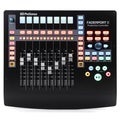
PreSonus FaderPort1-channel USB MIDI Fader with Transport Controls and Pan, Mute, Solo, and Record Enable |