
When the first affordable, true stereo, 16-bit sampler arrived in the late 1980s, it had a distinctive, bright red logo on the faceplate: Akai. That sampler was the S1000, and it was a design that pretty much set the standard for all other digital samplers that were to follow. I personally owned one and it was not only a superb sampler, but it was also remarkably easy to work with. Within an hour of taking it out of the box, I was sampling.
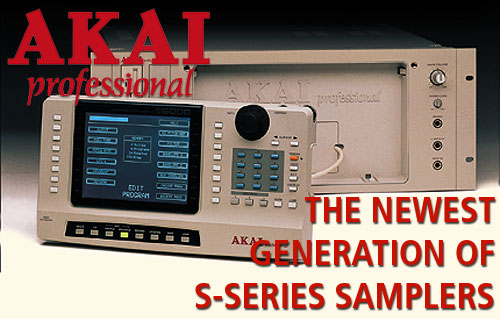
But even for a company as innovative as Akai Professional, the new S5000 (just $1999 list) and S6000 (just $2999 list) professional samplers are truly radical advances. Naturally they have more power, greater speed and a user interface that’s surprisingly easy to work with, particularly in this age of convoluted, multi-level menus. What’s more, they have the open, natural sound that all the Akai S-Series samplers have been famous for. Plus these machines come with a shockingly low sticker price that will have you reaching for your credit card without the usual chest pain and shortness of breath. And, oh yeah, before I go any further, these are the best-looking samplers Akai (or maybe anyone else) has ever put together - either module will look incredible in your rack (not that you’d personally be swayed by such things, right?).
The significance of Akai’s newest user interface is evident as soon as you plug a unit in and turn on the power. Akai engineers actually take pride in the fact that they don't think in straight lines. With a clean sheet of paper, they sat down to create a new streamlined interface. Obviously, the more complex the system, the tougher it is to design a system to manage it. So Akai developed the idea of using a big, luxurious, 320 x 240 graphic display with all the common user-required data (such as number of items loaded and available memory) shown in the center of the screen. Then they put a double row of one-touch function keys down either side of the display next to the on-screen parameter boxes and included a large data wheel for adjustment. The result is a “Touch and Tweak” system that virtually eliminates the cursor crawl through multiple function levels with its capacity for confusion and error. Extensive use of graphics, icons, pop-up windows, progress displays and drop-down menus provide a computer-like familiarity. For more intricate operations, the engineers added a “Window” function to allow power users deep level access.
An efficient file-based disk operating system allows you to create all the folders and subfolders you could ever want. A complex library of sounds can then be stored in a filing system that’s optimized to your personal needs, and the inclusion of a PS2 port for ASCII keyboard attachment makes it easy to name sounds (you can hear me shouting “yahoo!” if you listen carefully). If you don't like manual naming, there’s an "auto name" function that intelligently allocates names for programs, samples and recordings (double “yahoo!”).
The S5000 and S6000 both use standard DOS and .WAV files as their native disk and sample format. Recognizing that .WAV is fast becoming the worldwide standard for audio interchange, the adoption of these formats makes a great deal of sense and allows .WAV files to be loaded directly for instant playback from any PC formatted disks attached to the samplers. In addition, sound files downloaded from the Internet can be easily loaded and played back. Other advantages are that off-the-shelf disk utilities and commercially available .WAV and shareware sample-editors can be used without any special transfer or conversion routines. However, Akai hasn’t forgotten their existing customers: The new samplers will read all S1000 and S3000 sound libraries, making the decision to upgrade your sampler even simpler.
The S5000 and S6000 can record to RAM or directly to hard disk, and playback from either is transparent. The result: Seamless playback of multiple “virtual” samples direct from hard disk (the number being dependent on size and speed of drive) without the need to load into memory. The Virtual Sampling function also allows you to assign disk recordings to keygroups, so long recordings can be triggered directly from disk within the context of a program. Not only does this enable disk recordings to be processed via the filters, LFOs, envelopes, etc., but a program containing virtual samples appears in a Multi just like any normal program where it may be mixed, tuned, and sent to the effects, elegantly integrating traditional sampling and disk recording. Flexible recording options let you sample sounds via the analog ins, digitally using the onboard I/Os, or even via an optional ADAT interface.
The hardware specs for the two machines are very impressive and include 64 and/or 128 voice polyphony (depending upon the specific configuration - more on that in a few minutes), multi-channel effects (standard on some configurations of the S6000 and upgradable on the S5000), stereo digital I/O and the capacity to handle up to 16 individual analog outputs which can also be configured as stereo pairs. Two MIDI In/Out/Thru ports provide 32-channel multitimbral operation, and the two SCSI ports mean added flexibility in a SCSI chain. The Wordclock connector allows the new samplers to be integrated into an all-digital environment, and an optional ADAT interface provides stereo digital inputs and sixteen digital outputs for direct connection to any of the latest generation of digital mixers.
Let’s talk memory: 8MB of RAM is standard, and each unit is expandable to a maximum of 256MB via 4 SIMM expansion slots which gives you (where’s my calculator) over 50 minutes of mono sampling at 44.1kHz. The Flash ROM software operating system allows future upgrades to be downloaded from Akai's Web site and saved to floppy disk.
Are you a do-it-yourselfer? Not afraid  of programming? Good, because there are 26 different filter types available including 2- and 4-pole resonant lowpass, bandpass and highpass plus notch, peak dual notch, dual peak and many more. All of these can be controlled using Akai's Assignable Program Modulation (APM) allowing you to patch up to 14 controllers to 17 destinations turning the sampler into an extremely powerful synthesizer. The Edit Sample pages features a large waveform display which shows both an overview of the entire sound together with a zoom function for more detailed editing. Looping is straightforward with the Auto Find function or Loop Start/Loop End for user definable setting. There’s also a Loop Lock facility, backwards/forwards looping and Loop Crossfade which offers a selection of curves. Meanwhile, Timestretch uses the same algorithms imported from Akai's highly acclaimed DD1500 Digital Audio Workstation and offers stereo, phase coherent timestretch processing, while a series of presets optimized for various types of sound eliminate the need to adjust complicated parameters. Other DSP uses of Timestretch include Pitch Shift calibrated in semitones (useful for retuning samples through key changes) and BPM Match for matching tempos to prerecorded tracks or samples.
 Akai's Multi Mode makes setting your sampler for multitimbral operation simple, providing 32 Parts which can each be assigned a different Program and MIDI channel. Every Part also has its own Level, Pan, Tuning, Transposition, Output Routing and Effects Send (when fitted with EB20), and up to a staggering 128 Multis can be loaded at any one time. While Multi Mode allows you to edit superficial attributes such as Part level and out routing, Edit Program allows you to further manipulate sounds with extensive filter options such as 2 x multi-wave LFOs, 1 x multi-stage and 2 x ADSR envelope generators. To simplify things even further, the Quickload function enables programs to be located and loaded directly into Parts, making complex multitimbral set-ups quick and easy to achieve.
The new, optional EB20 SampleVerb II multieffects processor ($399 list) provides two independent channels of multieffects plus two additional channels of reverb only effects. The two multi-channels offer up to six simultaneous effects each, including reverb, echo/delay, distortion, EQ, ring modulation, and a choice of modulation effects such as chorus, phasing, flanging, pitch shifting and rotary speaker emulation. All effects are extensively editable. In Multi Mode, the EB20 is configured as four separate processors with effects sends from each multitimbral channel, but it can also be used as a stand alone dual channel FX processor for other sound sources attached to the sampler.
So do you choose an S5000 or an S6000? Both share many of the same features as already outlined above. Both feature 18-bit A/D converters with 64 x oversampling and 20-bit D/A converters with 128 x oversampling on all outputs. Unique to the S6000 is the very seductive removable front panel (which you can set on your lap, your mixer, a dinner plate, etc.) and an expansion slot for a removable 3.5" drive. It also has User Keys to program often used routines. But here’s where we get into the “nitty-gritty” as they say: The S5000 comes standard with 64-voices and 8 outputs. The S5000 Studio is fitted with the VOX64 64-voice expander and IB-S508P 8-Output expansion board. Meanwhile, the S6000 Studio comes with the VOX64 and SampleVerb II installed, while the standard S6000 does not.
Having a hard time deciding? That’s understandable. Fortunately all it takes to clear up any confusion is a single call to your friendly, knowledgeable Sweetwater Sales Engineer. They’ll take the time to sort out all the features and options and get you a super low Sweetwater price on the Akai sampler that’s perfect for your needs!
- Jim Miller