
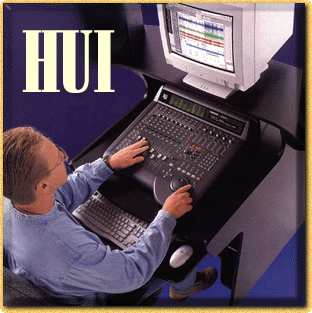
Back when Pro Tools 4.0 was still in alpha form, industry giants Digidesign and Mackie Designs (you may have heard of them) formed a joint project to combine Pro Tools' enhanced capabilities with Mackie's mixing console expertise. The HUI (Human User Interface — pronounced "Hewey") is the result. Digidesign's new 4.1 release of Pro Tools represents a quantum leap forward in workstation software. Among its many new features is the ability to bidirectionally interface with many more types of external hardware… hardware such as Mackie's HUI. This complete hardware workstation console has the user-friendly features and ergonomics that Mackie is renowned for, including instantly touch-updatable 100mm motorized faders, transport controls, DAE Plug-ins control, keyboard shortcuts, window buttons — even built-in Mackie quality mic preamps! What used to take multiple mouse moves and clicks can now be done at the push of a single button. Instead of individually adjusting "faders" on-screen (which can be too slow for live recording applications), Pro Tools 4.1 users can now enjoy hands-on tracking and mixing with touch-updatable motorized faders. With full automation control and recall capabilities, HUI is anything but a conventional fader pack. For serious professionals who work day in and day out with Pro Tools, HUI can significantly boost productivity through direct hands-on control. The Human User Interface is organized into seven parts (which you can probably make out from the picture). In the upper-left corner is an assign section where internal mix bus and physical hardware I/O assignments are made. The main part of HUI is composed of eight assignable channel strips with "big console"-grade, 100mm motorized faders and Mackie's innovative new V-Pot rotary controls. In the upper-right corner of the interface is a vacuum fluorescent alphanumeric display for controlling the parameters of DAE-compatible Plug-ins. Next, below the DSP section is a switch matrix for assigning channel status and/or global session attributes. The lower right-hand section, with keypad and jog wheel, dedicated keys, and even extra cursor controls, is dedicated to transport/locate functions.
The lower left contains a keyboard shortcut section bank and selector buttons to switch between various Pro Tools screens. And shoehorned in the middle of all this is a complete analog control room section with three This is all pretty cool, but those obsessive Mackie engineers couldn't stop. If you had a couple of studio-grade microphone preamps, they reasoned, you'd have it all and might not even need a Mackie analog mixer. So, being the fanatical tech types they are, they went ahead and added two of the company's renowned high-headroom low noise preamps with balanced XLR inputs. Beginning to see why HUI blows a mere fader pack into the weeds? Finally, what the heck is a V-Pot? Well, even the megabuck automated consoles never fully solved the problem of controlling and recalling a rotary control value via automation. Until now, that is. A V-Pot consists of a free-rotating encoder with eleven LED segments in the surrounding collar (yeah, it goes to 11!) It's damped, so you fine tune with it just like you would adjust a standard rotary pan or EQ pot. The exact V-Pot value is precisely displayed on-screen or via HUI's Display screen. The V-Pot's LED pattern coarsely reflects parameter values, varying according to the parameters it's displaying. For example, a volume value can wrap clockwise from the 8 O'clock position, whereas a narrow parametric EQ value would start at 12 O'clock and wrap equally. Depending on DAE implementation, a value can also be shown as a single, movable point. A dedicated LED at the bottom of each V-Pot shows activity or function, such as automation or assignment status. If you make your living using Pro Tools, Mackie's HUI interface can dramatically add to your productivity. Once you've used it for even a short time, you'll wonder how you ever got along with just a mouse. So call us right now to find out more about HUI. Your Sales Engineer will be glad to give you our special Sweetwater pricing, making this fantastic product an even better value! Master Index | Sweet Notes Index | Home | Back Page | Next Page |
 sets of speaker/headphone controls and built-in talkback mic. Trim controls for the two integrated mic preamplifiers and talkback mic are on the back.